2026.11.0 : Introducing Search All Fields, Formulas Across Linked Records & More
Search All Fields
Search in Grid and Gallery views now looks in every field at once, and the command palette finds records across the open project. Search matches what cells show, such as formatted numbers, dates and user names. A search index keeps results fast on large tables.

Formulas Across Linked Records
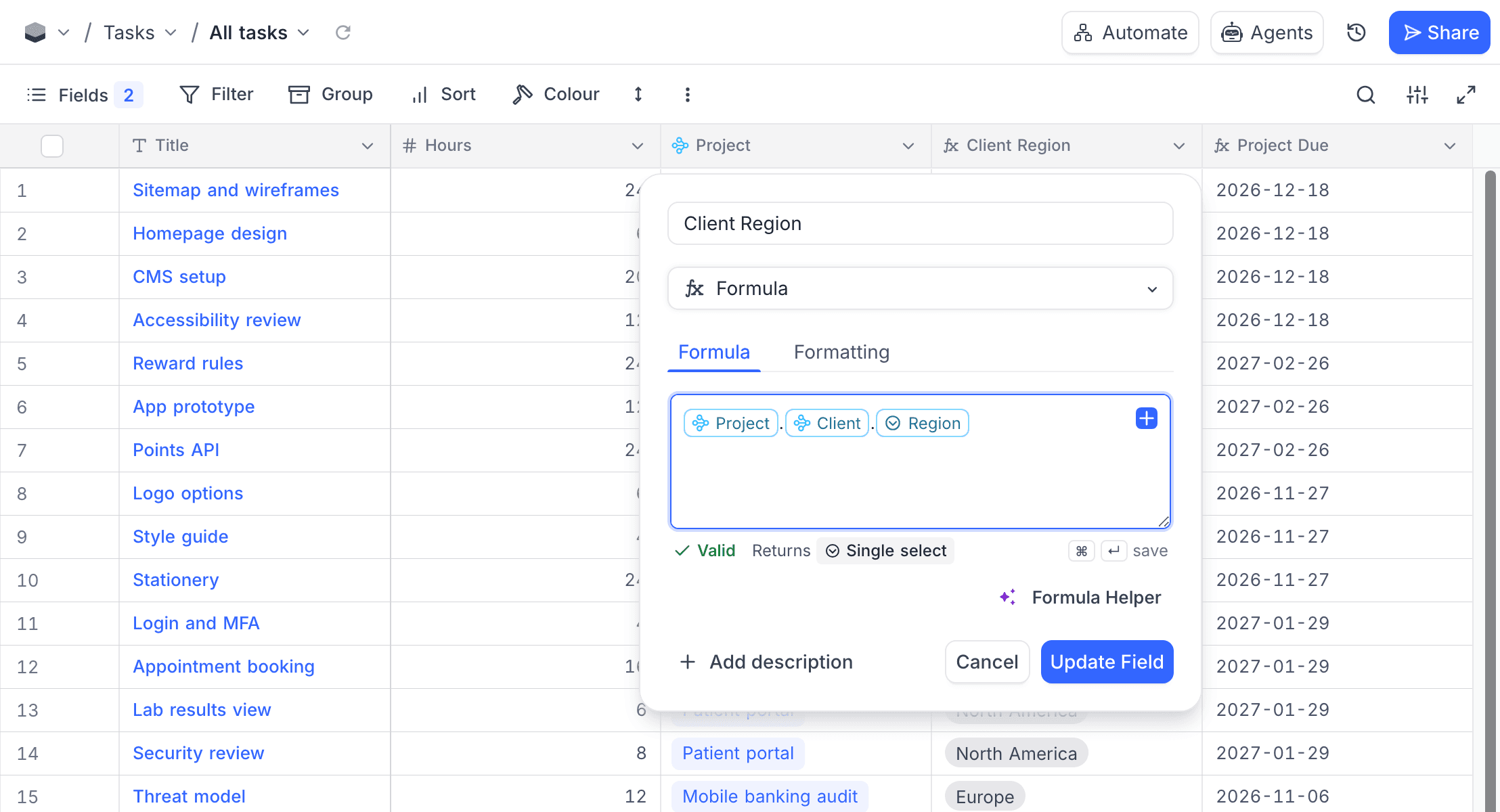
A formula can now read a field of a linked record, such as {Project}.{Client}.{Region}, up to four links away. When a link returns many records, combine the values with SUM, AVG, MIN, MAX or a count, such as {Tasks}.{Hours}.SUM().
Learn more about referencing linked records →
Rollup Formulas
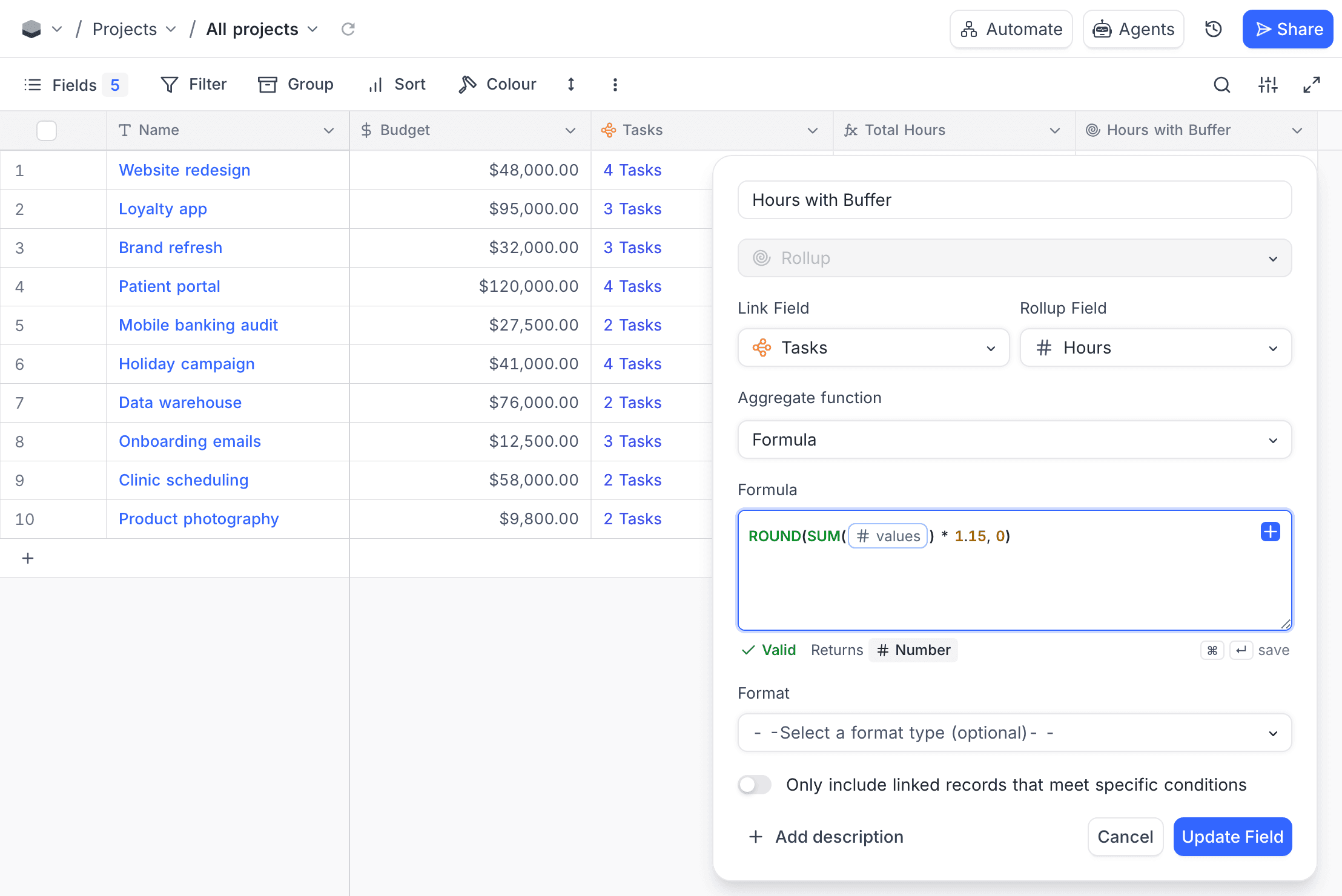
A Rollup field can now aggregate with a formula. Choose Formula as the aggregate function and write an expression over values, such as ROUND(SUM(values) * 1.15, 0) or ARRAYJOIN(ARRAYUNIQUE(values), ", ").
Learn more about rollup formulas →
New Workflow Triggers
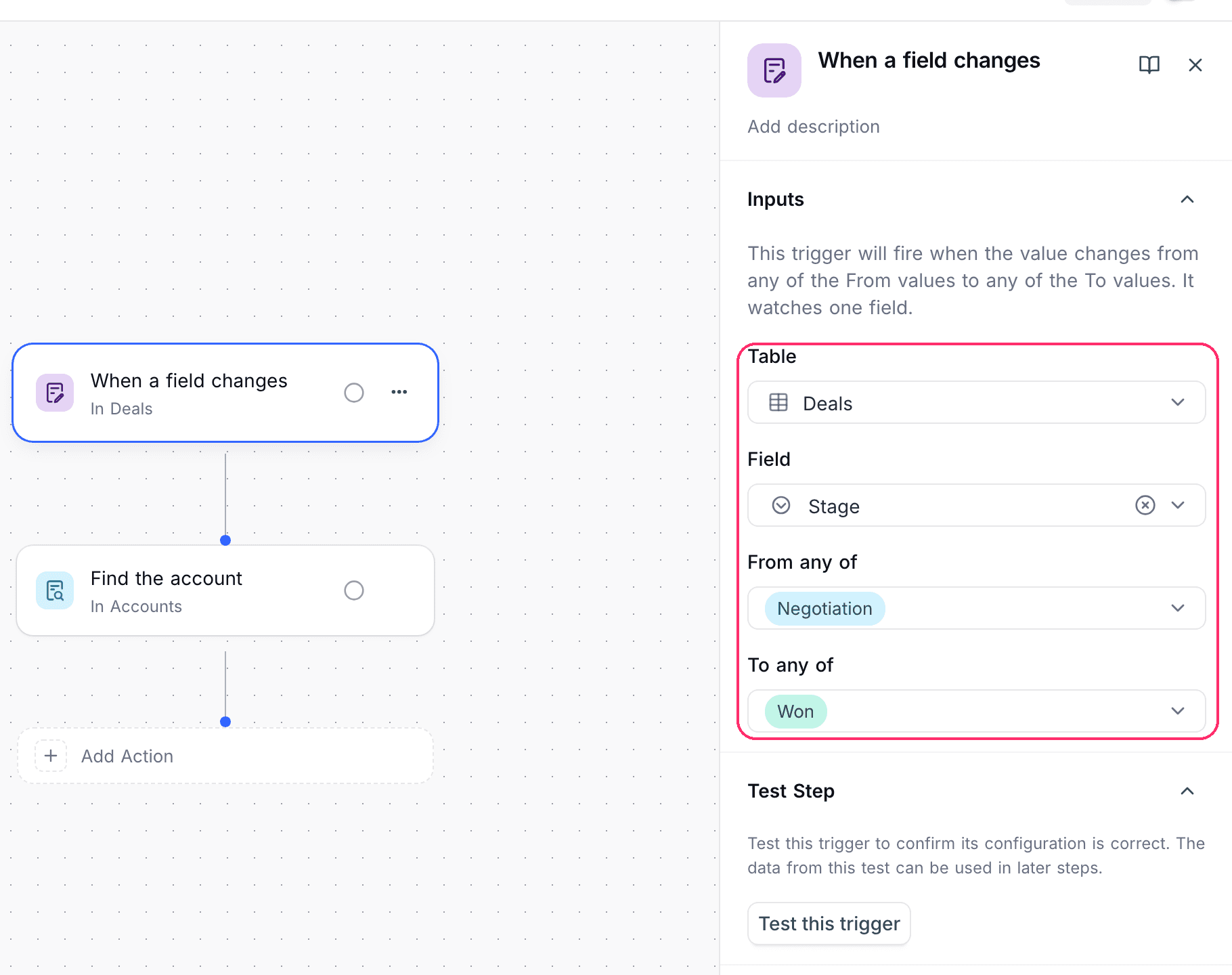
When a field changes runs a workflow only when a field changes from one value you choose to another, for example when a deal's Stage changes from Negotiation to Won. When record created or updated covers both events in one trigger. When another workflow completes starts a workflow when another one succeeds, fails or is cancelled.
Learn more about trigger nodes →
Kanban Stack Summaries
Each Kanban stack can show a total in its footer, such as the sum of Budget, and colour it by rules you set. Boards can also stack by a User field or a link to one record, so each person or each client gets a stack.
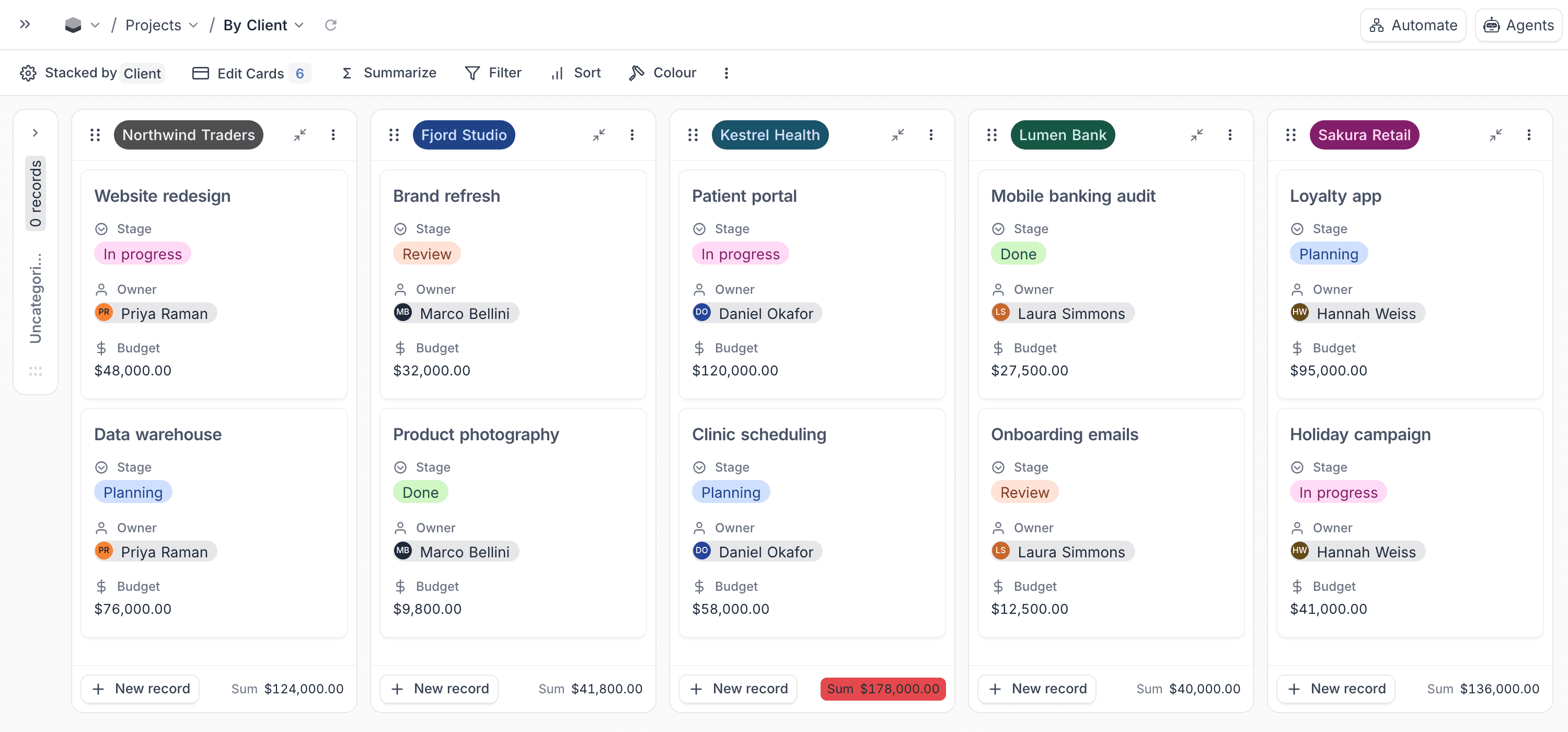
Learn more about stack summaries →
Group Records in Gallery View
Gallery views can now group cards by up to five fields, like Grid views. Each group shows its value and record count, and holds its own cards.
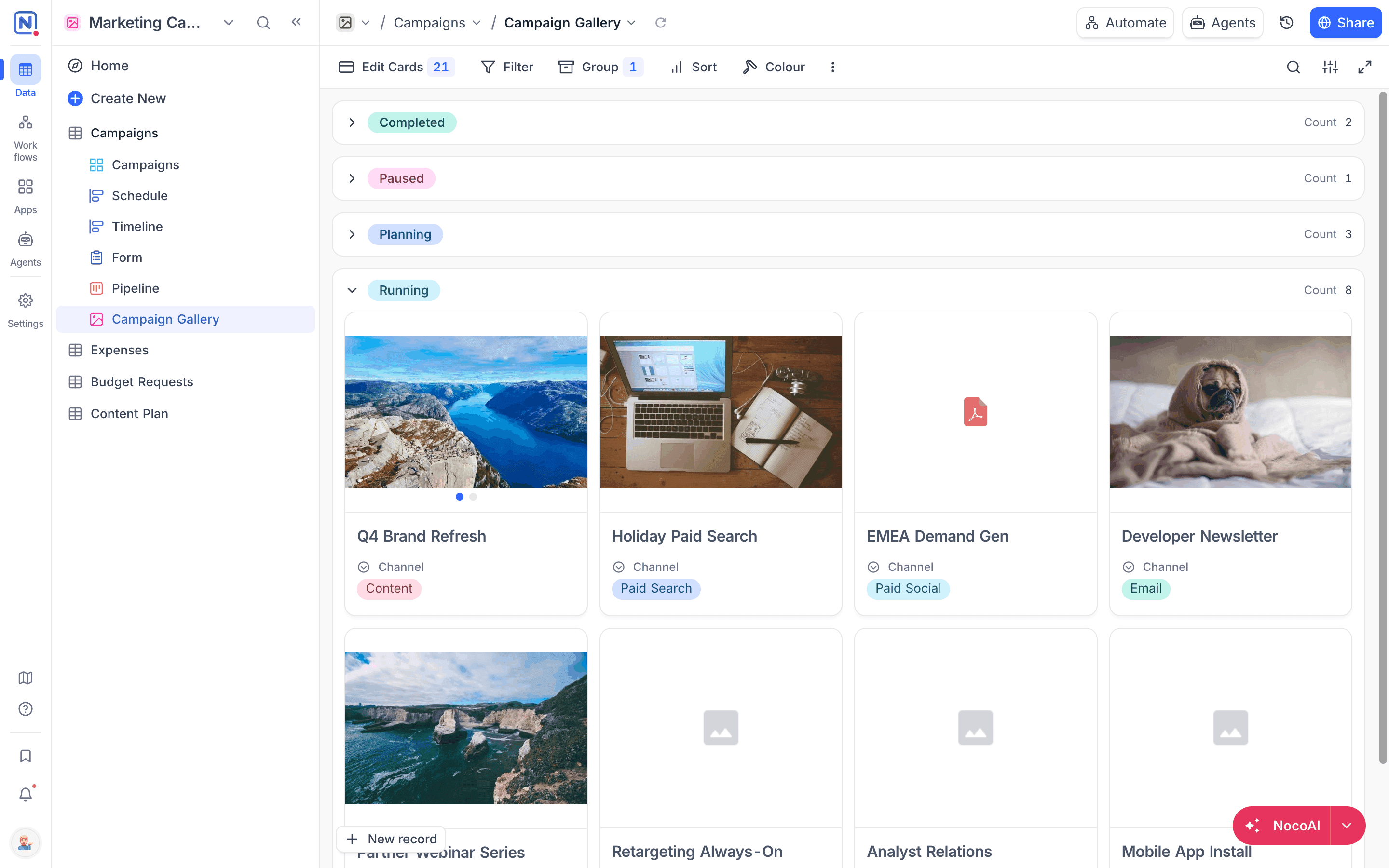
Learn more about grouping records →
Several Date Ranges in a Calendar
A Calendar view can now show more than one date range, such as a drafting period and a publish date. Each range has its own label and color, and a record shows once for each range it has dates in. A view can hold up to 20 ranges.
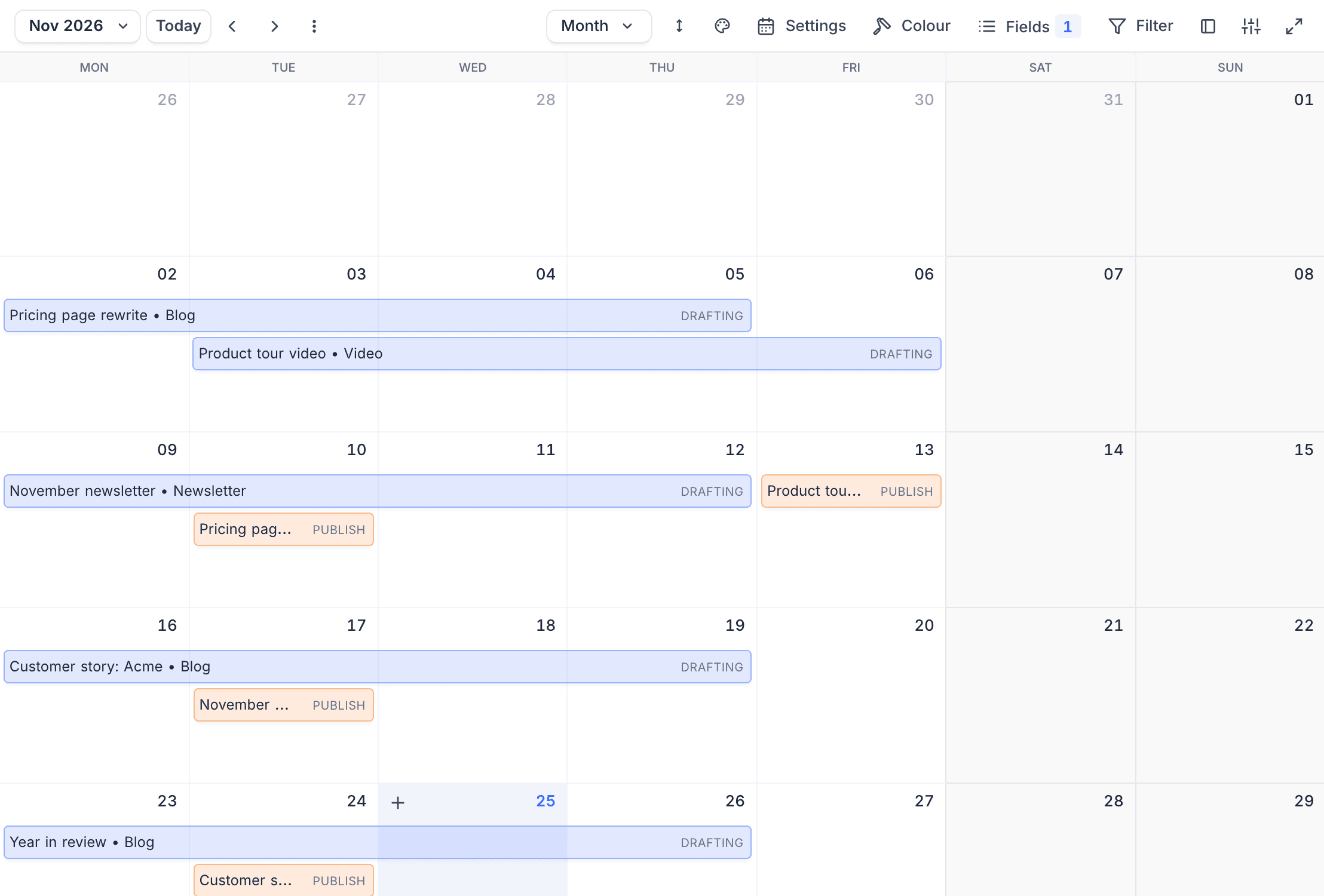
Learn more about several date ranges →
Print Views
Grid views can now be printed on paper or to a PDF. Choose the paper size, layout, font size and the range of records, and the print follows the fields, filters, sorts and grouping of the view.
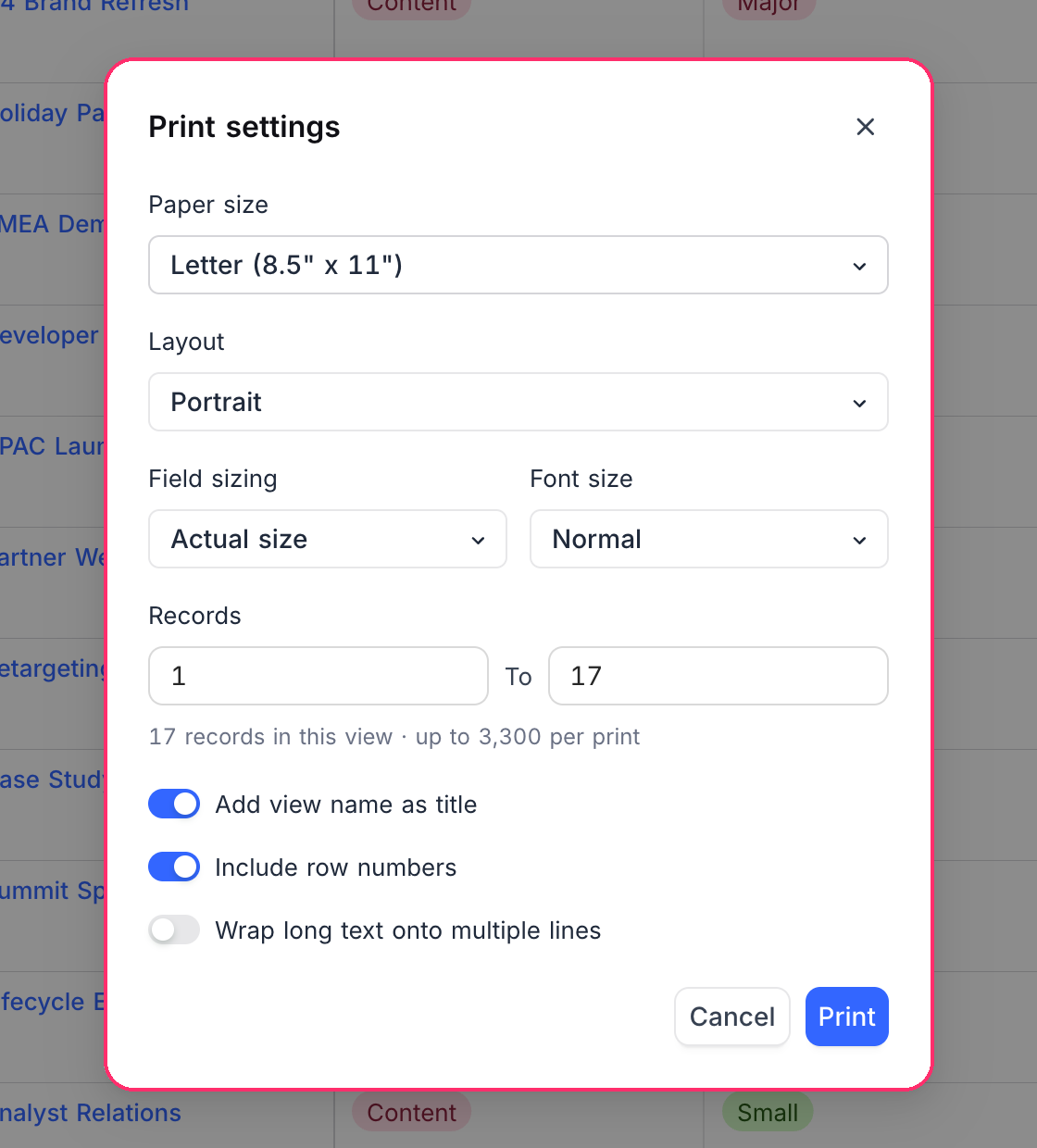
Learn more about printing a view →
Comment Threads
Reply to a record comment to keep the answer next to it. React with an emoji and pin the comment that matters. Comments posted since your last visit are marked as new, and Summarize sums up a long thread.
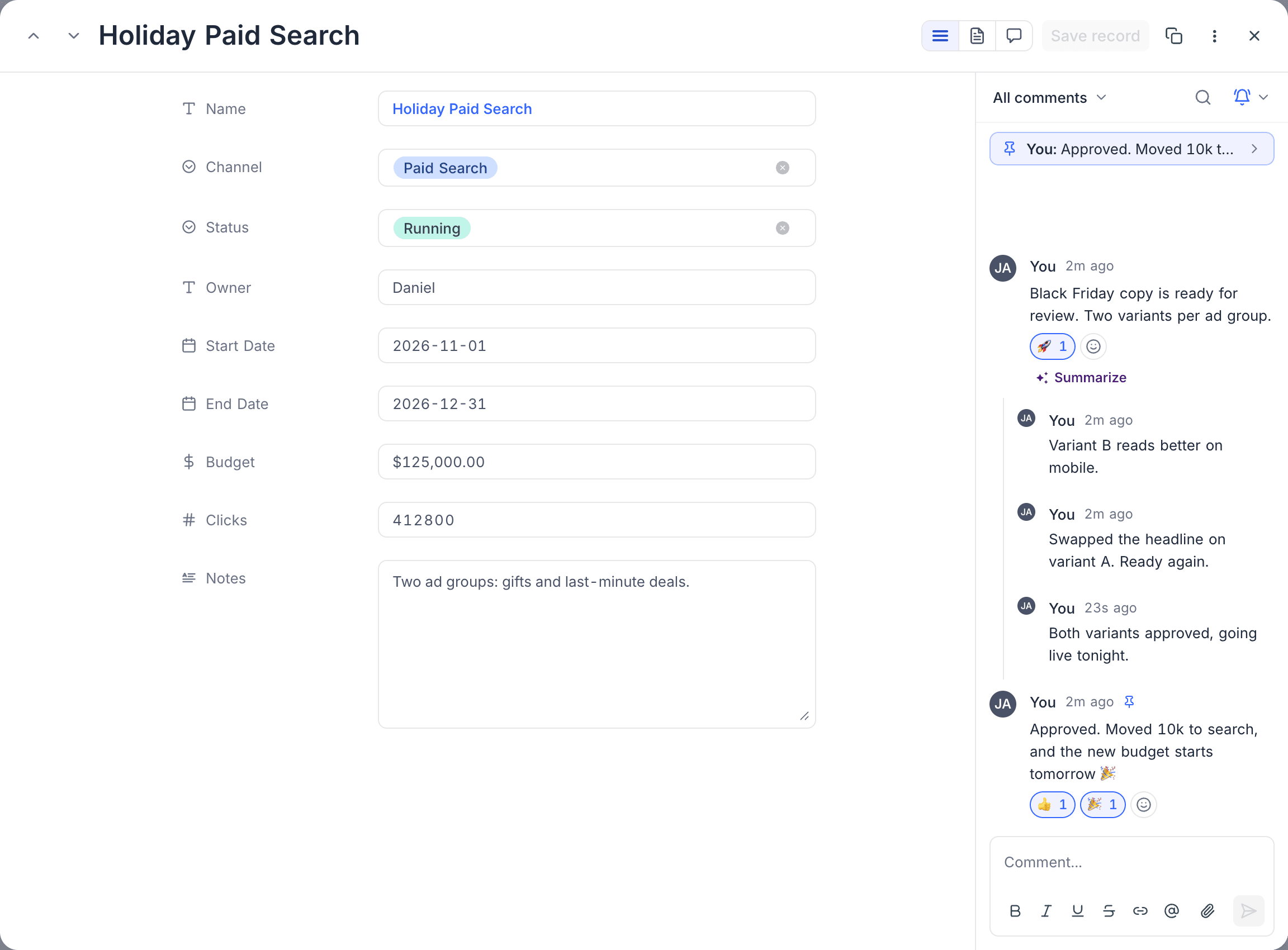
Learn more about record comments →
Ask for Data in the Command Palette
Type a request in plain words in the command palette, such as status is running or sum of amount. It shows how it read the request and the result before anything runs, and it can filter, sort, group, answer questions and update records.
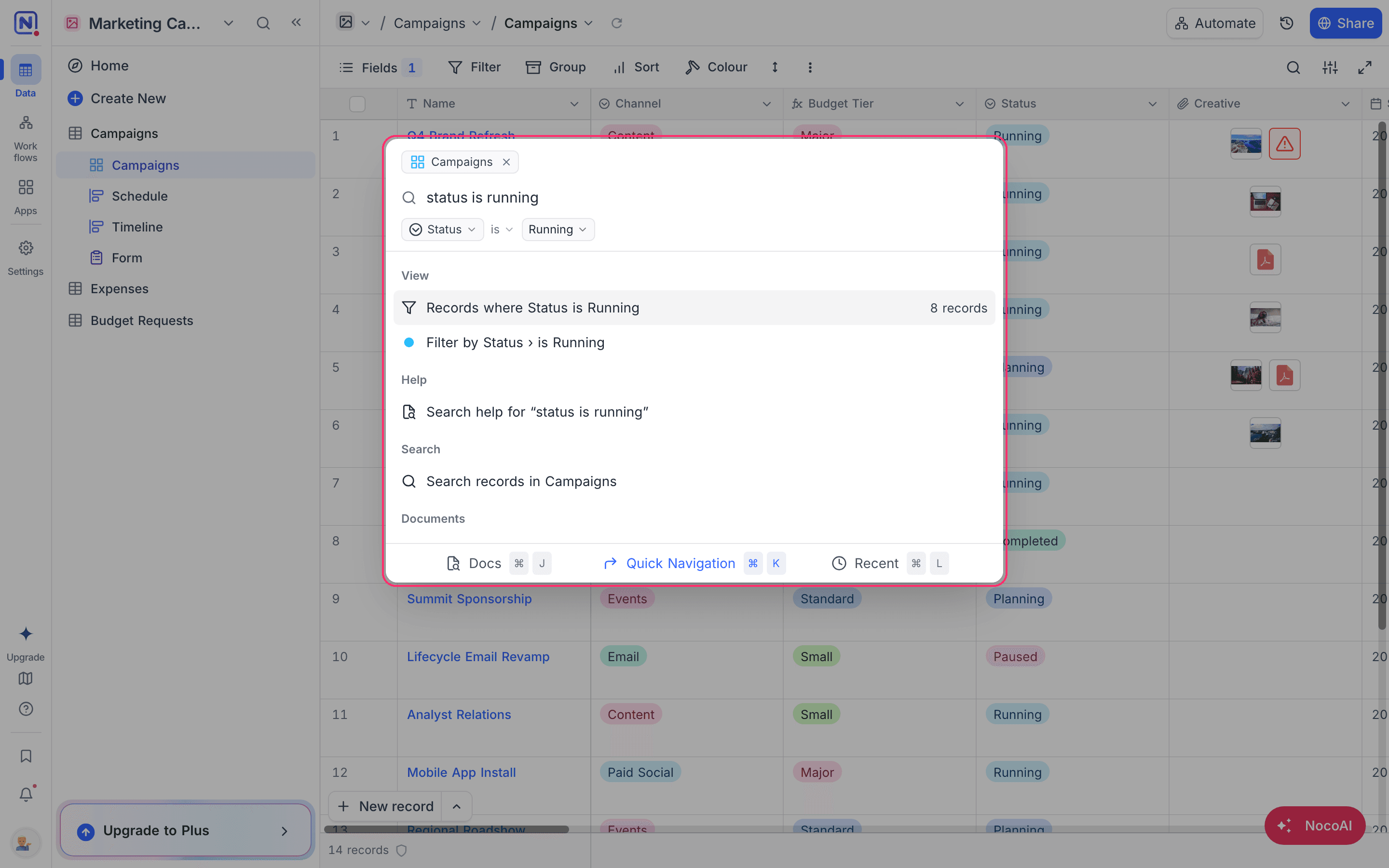
Learn more about asking for data in words →
Enterprise Vaults
Integration credentials can now come from your own secrets manager: HashiCorp Vault, AWS Secrets Manager, Azure Key Vault, Google Secret Manager or CyberArk Conjur. NocoDB stores a reference and fetches the secret when it needs it.
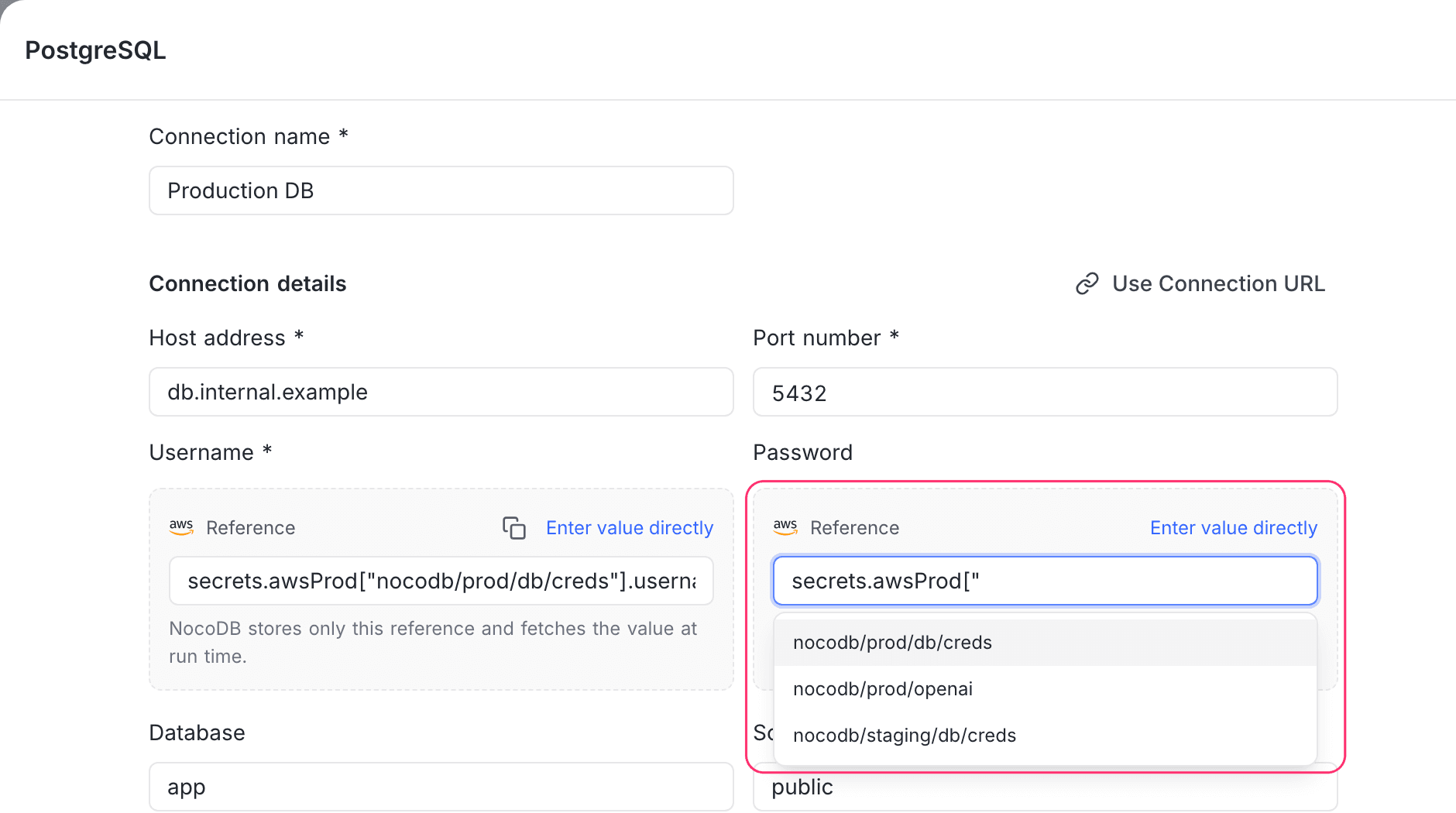
Learn more about Enterprise Vaults →
Improvements
- A link as the display value - A link to a single record can be the display value of a table, so records show the linked record's name. Learn more
- Open linked records in a table - View all in table opens the related table filtered to the records linked to the current one. Learn more
- Open records from a Lookup - Click a record in a Lookup of a link field to open it, the same as in the link field. Learn more
- Notify people added to a User field - A User field can notify people, in NocoDB and by email, when they are added to a record. Learn more
- Scan codes into forms - Form fields can be filled by scanning a QR code or a barcode with the camera. Learn more
- Edit rich text as Markdown - The expanded rich text editor can switch to the Markdown source. Learn more
- Lookups next to their link - Lookup and Rollup fields added from a link field's menu go right after that field.
- Tables and images in rich text - Rich text fields can hold tables, and images in them can be resized. Learn more
- Fit a column to its content - Double-click the edge of a column header to fit the column to its content. Double-click the edge of the row number header to fit every column.
- Preferences - Theme, language and the first day of the week now have one page in your account. Date pickers can start the week on Sunday. Learn more
- Field types in your language - Field type names follow the language you use NocoDB in.
- External databases - On read-only sources and synced fields, select options can be recolored and reordered, and Decimal and Percent fields can change precision. SQL views show their fields in Manage fields, read-only.
- Script API - Scripts can write any number of records at once, add or remove single links, upsert, count, and filter with API v3 filters. Learn more
- Repeat a step a number of times - The Iterate step can loop a set number of times, up to 4,000, as well as over a list. Learn more
- Editors can run workflows - Editors can open workflows, follow live updates, and run workflows that have a manual trigger. They see only the runs they started.
- Who started a run - Run history records who started a manual run or a retry.
- Automate a table - Automate in the table toolbar lists the workflows and scripts that use the table, and starts a new workflow from a table trigger. Learn more
- No workflow loops - A workflow no longer starts again from its own changes, and run history shows these runs as Not run with the reason.
- WORKDAY formulas -
WORKDAYandWORKDAY_DIFFadd and count working days, with optional holidays. Learn more - Formula syntax -
=works as equality, andIFwith no else value returns blank. - More formula functions - New functions include
TEXTSPLIT,SUBSTITUTE,IS_SAME,DATETIME_PARSE,FROMNOW,TODAYandARRAYCOUNT, which counts the options in a Multi select or the users in a User field. Learn more - Calendar date filters - Is within can match this, last or next calendar week, month or year, or a date range you pick.
- Expand all groups - Expand all and Collapse all reach every group level, and Expand subgroups opens one branch. Learn more
- Records without dates in Timeline - A side panel lists the records that have no bar because a date is missing. Learn more
- List View - Freeze the first column, and show summaries for each group with a grand total. Learn more
- Search inside documents - The command palette finds documents by title and by content. Learn more
- Restore deleted documents - Deleted documents and their sub-pages go to Project Trash, where you can restore them. Learn more
- Duplicate with sub-pages - Duplicating a document also copies its sub-pages. Learn more
- Search comments - Search a record's comments, and type
:to insert an emoji. Learn more - Who can download data - A table permission limits CSV, Excel and JSON download to chosen roles, users or teams. Learn more
- CSV import in classic apps - Table pages can let people import records from a CSV file. Learn more
- Preview utilization - A classic app link picker shows how busy each person is now and after you link them. Learn more
- Utilization for shared tasks - Timeline utilization accepts a many-to-many link as the assignee, and groups can split multiple values. Learn more
- Safer saves - Save asks before it overwrites a field that someone else changed while you were editing.
- Offline edits - Grid edits made while offline are saved when the connection returns.
- Faster record edits - Saving a record that has many links and lookups now reads far less table metadata. In our tests on a table with 5 links and 25 lookups, a save took up to 60% less time. Self-hosted setups that keep their cache in Redis gain the most.
- Email a copy to the submitter - Forms that require sign-in can email respondents a copy of their response.
- Bulk actions from the cell menu - Right-click a cell of selected records to update or delete them all.
- Undo a delete - Deleting records from the grid shows a toast with Undo.
- Open in a new tab - Middle-click opens tables, views and other navigation items in a new tab.
- HubSpot access tokens - A HubSpot connection can use a private app access token. Learn more
- Opt-in MCP tools - AI apps connected by sign-in can turn on
deleteBase,executeWorkflowandtestHookone at a time. Learn more - Password changes - Changing your password signs out your other sessions, and Also disconnect apps also revokes connected apps and tokens. Learn more
- Accessibility - Screen readers name icon buttons, field inputs, dialogs and rating stars.
What's Fixed
- Airtable import - Imports from Airtable shared links work again after Airtable changed its share page. Two imports running at the same time no longer share a session. Learn more
- Security - Hidden tables stay hidden in imports and comments, locked views can no longer be changed through group-by or filter side paths, private integrations work only for their owner, and SSO sign-in links can be used only in the browser that started the sign-in. Classic app users get only their app's teams from the API.
- Shared views - Grid and gallery views shared by link show their groups again when the view groups records by a hidden field.
- Grouped grids - Insert above and Insert below keep the new record in its group, and scrolling inside a large group is smooth.
- Find in long text -
Cmd+Fin an expanded long text field searches only the text in the editor. - Workflows - List records filters match link and lookup variables. Learn more
- Links - Links that point to a parent column other than the primary key show their records.
- External sources - Every table shows after a sync, drag-to-reorder works in NocoDB tables found by a sync, and numeric columns with no scale show two decimal places.
- Imports - A CSV exported from NocoDB imports again, with attachment cells left empty because exported links expire. Long table names in imports and duplicates are shortened to fit the database.
- Phones - Pinch-zoom works in the grid and in the expanded record.
- API - The v3 API returns minimum and maximum date rollups on SQL Server and Oracle.
- Dashboards - Bar and line charts work on every table, and pivot widgets on Oracle group by text formulas.
- Redo - Redo works in documents and in rich text fields.
- Many-to-many tables - External database join tables with extra columns, such as
created_at, become many-to-many links on sync. - Long field names - Long non-Latin field and SQL view names fit the PostgreSQL and Oracle limits, and a second similar name gets a suffix.
Self-Hosting Notes
- Search indexes - NocoDB starts building a search index for each table as soon as the plan is active, and keeps it up to date as records change. Indexes are stored in the built-in PostgreSQL database and need the
pg_trgmandbtree_ginextensions. Tables in external data sources are not indexed. Tables over 5 million cells (records × fields) are skipped unlessNC_SEARCH_INDEX_AUTO_MAX_CELLSis raised (0removes the limit). - Turning search off - Indexing uses extra disk space and runs in the background while the first indexes are built. For large databases or servers low on disk,
NC_GLOBAL_SEARCH=offstops search and indexing.NC_GLOBAL_SEARCH=indexkeeps the indexes up to date but hides search from users. Turned back on, existing indexes catch up from where they stopped instead of rebuilding. - Azure Blob Storage - Attachments can be stored in Azure Blob Storage.
- Query timeout - Data reads on PostgreSQL stop after 30 seconds.
NC_DATA_QUERY_TIMEOUT_MSchanges the limit. Learn more - Helm chart - The chart supports a Gateway API HTTPRoute in place of an Ingress.
- Private network databases - When a database host on a private network is blocked, the error names
NC_ALLOW_LOCAL_EXTERNAL_DBS, the variable that allows it. Learn more - SQLite metadata database - Project invites, member changes and trash actions respond at once when NocoDB keeps its metadata in SQLite.
- Attachments from your network -
NC_ALLOW_LOCAL_ATTACHMENTSallows attachment URLs on private networks, such as a NAS, while cloud metadata addresses stay blocked. - S3-compatible storage - Files with spaces or special characters in their names download from Linode, OVHcloud, Scaleway, UpCloud and Vultr storage.
- Readiness check -
GET /api/v1/health/readyreturns 503 when the metadata database or Redis is down, so it can serve as a readiness probe.
For the fixes released in 2026.10.2, see the 2026.10.2 changelog.
Availability
| Feature | Community Edition | Cloud Free Plan | Paid Plans In Cloud/On-Prem |
|---|---|---|---|
| Search All Fields | ✅ | ✅ | ✅ |
| Formulas Across Linked Records | ✅ | ✅ | ✅ |
| Rollup Formulas | ✅ | ✅ | ✅ |
| New Workflow Triggers | ✅ | ✅ | ✅ |
| Kanban Stack Summaries | ✅ | ✅ | ✅ |
| Group Records in Gallery View | ✅ | ✅ | ✅ |
| Several Date Ranges in a Calendar | – | – | ✅ |
| Print Views | ✅ | ✅ | ✅ |
| Comment Threads | – | ✅ | ✅ |
| Ask for Data in the Command Palette | – | ✅ | ✅ |
| Enterprise Vaults | – | – | ✅ |
When another workflow completes requires a paid plan on self-hosted NocoDB. Enterprise Vaults is an add-on to the Enterprise plan on NocoDB Cloud or a Self-hosted Enterprise license. Replies to comments work on every plan. Reactions, pins and unread comments need NocoDB Cloud or a self-hosted license, and Summarize needs the Plus plan and above on NocoDB Cloud. Search All Fields searches tables of up to 10,000 records on the Cloud Free plan and on unlicensed self-hosted NocoDB. Record search in the command palette needs the Plus plan and above, or a self-hosted license. Public document links now need a paid plan on NocoDB Cloud. User field notifications need the Plus plan and above on NocoDB Cloud, or a self-hosted Business license. Several date ranges in a calendar need the Plus plan and above on NocoDB Cloud, or a self-hosted Business license.