AppsBeta
Copy a prompt, paste it into NocoAI in any base, and replace the words in [brackets] with your own.
- Build an app where [the support team] can triage [tickets] and reply to [customers]
- Build an app for [event check-in] that lists [today's attendees] and marks them as [checked in]
- Add a page to this app that shows [overdue invoices] for [the finance team]
- Make the [booking] page public so [customers] can use it without signing in
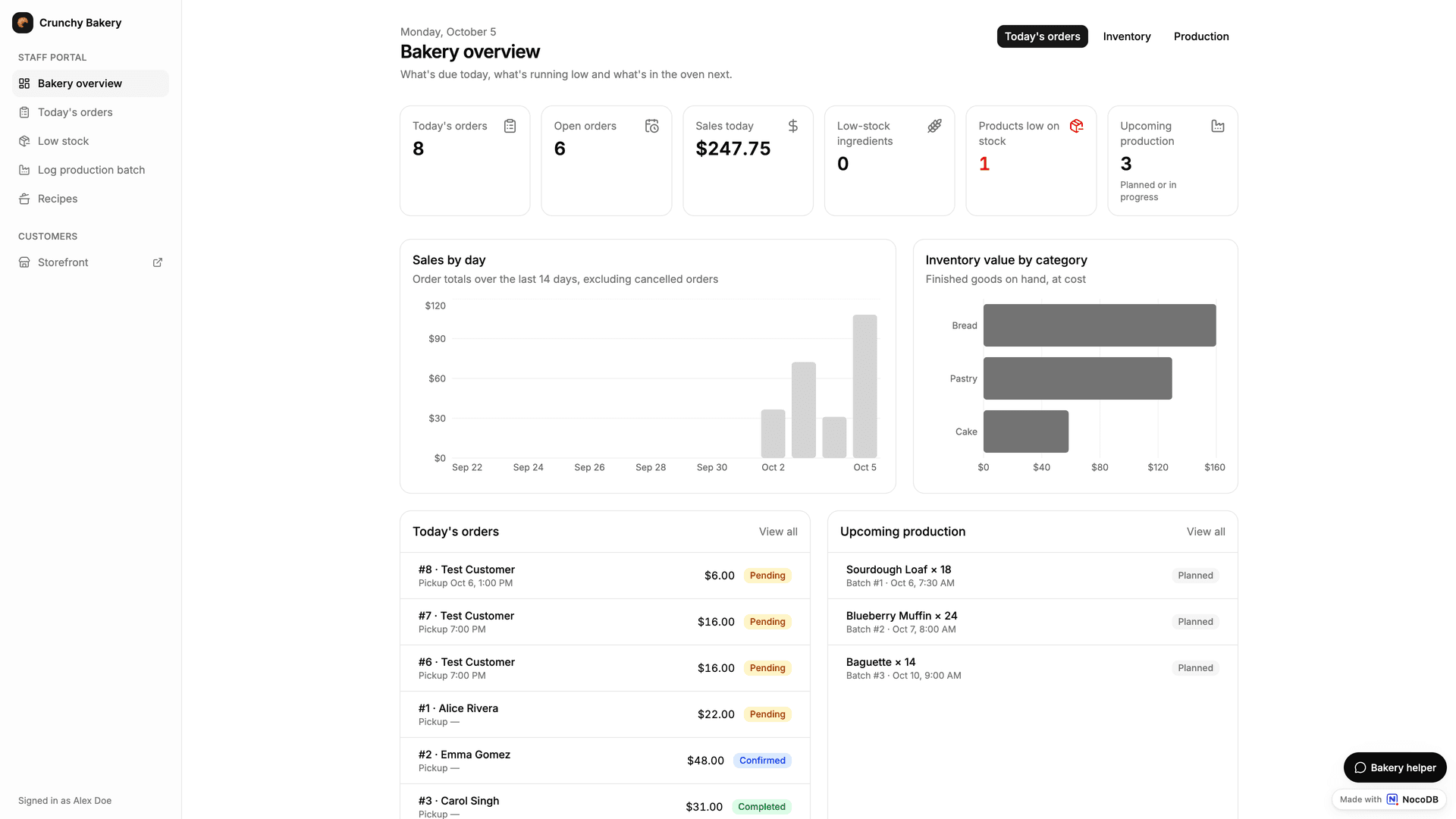
NocoDB Apps is an AI app builder for creating enterprise-grade work apps. You describe the app in a chat, and NocoAI builds it on the data you already have. NocoAI writes the pages, the actions and the access rules, and adds tables when the app needs them. You test the app in a live preview. Then you deploy it to its own web address for your team and the people you invite.
This is vibe coding for the apps that a business runs on. From the first build, the app has a real database, teams and permissions, an API and an MCP server. You do not build a backend, and you do not add security later.
Why build work apps with NocoDB
| What a work app needs | What NocoDB Apps gives you |
|---|---|
| Real data, not a demo database | Apps run on NocoDB tables, your own Postgres or MySQL database, or data that syncs from tools such as GitHub and HubSpot. There is no record limit. See Data for apps. |
| A data model that fits the app | NocoAI designs the tables and fields too. Build with AI creates the base and the app from one description. |
| Control of who does what | Teams, a list of the actions that each team can run, record rules for each team, and public pages that you choose. See Secure vibe coding. |
| Safe changes | A live preview, a review before risky deploys, environments for tests, and a version history with one-click restore. |
| Access for programs and AI agents | Each app has its own REST API and MCP server. |
| Costs that you can plan | Actions that only read or change the data of the base do not count as action runs. See Availability. |
An app is not limited to the layouts of an interface. NocoAI writes the app code, so each app can have its own screens, navigation and logic. For example:
- An internal tool for the operations team, on the company Postgres database.
- A client portal that shows each customer only their own records.
- A booking app for a clinic, with a public page where patients book a visit.
- A check-in app for an event team, used on phones at the door.
How apps are structured
| Concept | Description |
|---|---|
| App | A custom web app on the data of one base. Each base has at most one app. The app uses the name of the base. |
| AI app builder | The page where you build the app with AI: a live preview of the app and the NocoAI chat. See AI app builder. |
| Action | An operation that the app can run, for example "create a booking" or "send a reminder". Actions are the only way that the app reads or changes data and calls other services. NocoAI creates the actions. |
| Team | A group of people in the app. Each team has a list of the actions its members can run. Every app starts with the Admin and Members teams. See Members and teams. |
| Deploy | Deploying saves the current build as a numbered version and makes it live at the app address. See Deploy an app. |
| App URL | The web address where people use the app. See App URL. |
| Public pages | Pages that anyone can open without signing in. See Public access. |
Who can do what
| Action | Who and how |
|---|---|
| Build | Base Owner and Creator roles build, change and deploy the app. |
| Use | Base members open the app from the App tile in the mini sidebar, or at its address. You can also add people to the app only. They get no other access to the base. Their team controls which actions they can run. |
| Visit | Anyone can open the pages that the app makes public. |
| Connect a program | Programs and AI agents call the app actions through the app API and MCP server, with a token. |
Get started
- Create an app in a base, or create a base and an app together with AI.
- Describe the app to NocoAI in the AI app builder.
- Deploy the app to its address.
- Give people access in Members and teams.
New to building apps with AI? Read Vibe coding with NocoDB Apps.
Availability
Apps are available on the paid plans of NocoDB Cloud: Plus, Business, Scale and Enterprise. Apps for self-hosted NocoDB are in private beta. To get early access, talk to sales.
Some capabilities need a higher plan:
| Capability | Plan |
|---|---|
| Apps, the app API and MCP server, actions that use external data (SQL, HTTP and Redis connections) | Plus and above |
| Environments, per-user connections, record-level security for app teams | Scale and above |
| Clean URL | Enterprise |
Each plan includes these action runs for each billing cycle:
| Plan | Action runs per billing cycle |
|---|---|
| Plus | 30,000 |
| Business | 120,000 |
| Scale | 240,000 |
| Enterprise | 600,000 |
Only these runs count: actions that use external data, actions called with an API token, and actions that run custom code. Actions that only read or change the data of the base do not count.
Related
Last updated on