2026.04.0 : Our Biggest Release Ever
Three new views. Four new field types. A built-in doc editor. Enterprise musts like SCIM, RLS, and Team Hierarchies. And enough under the hood to rethink what's possible this quarter. This one's big, grab a coffee ☕
Quick Overview
| Feature | Description |
|---|---|
| Three New Views | • List View: Browse data as nested hierarchies • Timeline View: Plan & track work on a time axis • Map View: Visualise locations with interactive pins |
| New Field Types | • UUID: Auto-generated unique identifiers • Colour: Hex colour values with visual swatches • Auto Number: Sequential auto-incrementing counters • Link to Another Record: See linked record names, not just counts |
| Smarter Filters | • Pinned Filters: Pin frequently used filters to toolbar • Toggle Filters: Enable/disable filters without deleting • AI-Powered Filters: Create filters using plain language |
| Meet NocoDocs | Write, collaborate & publish docs right next to your data |
| Date Dependencies | Move one date, every downstream deadline shifts automatically |
| Record Templates | Reusable blueprints with pre-filled fields and linked records |
| Form Scheduling | Auto-open and close forms on a set date |
| Multi-Field De-Duplication | Match on multiple fields to catch true duplicates |
| Conditional Button Fields | Show or disable buttons based on record conditions |
| Conditional Cell Colouring | Highlight cells by rules you define |
| Org Management | Centralised control over workspaces, members & governance |
| Teams Hierarchy | Nested teams up to 4 levels with inherited permissions |
| SCIM Provisioning | Sync user groups from your identity provider |
| Record-Level Security (RLS) | Control which rows each user or team can see |
| Fine-Grained API Tokens | Scoped permissions, base-level access & expiration |
| API v3 Expansions | New endpoints for comments, forms, webhooks, docs & dashboards |
| Workflow Nodes | GitHub, Google Calendar, Twilio, HubSpot, HTTP & Email |
New Views
List View
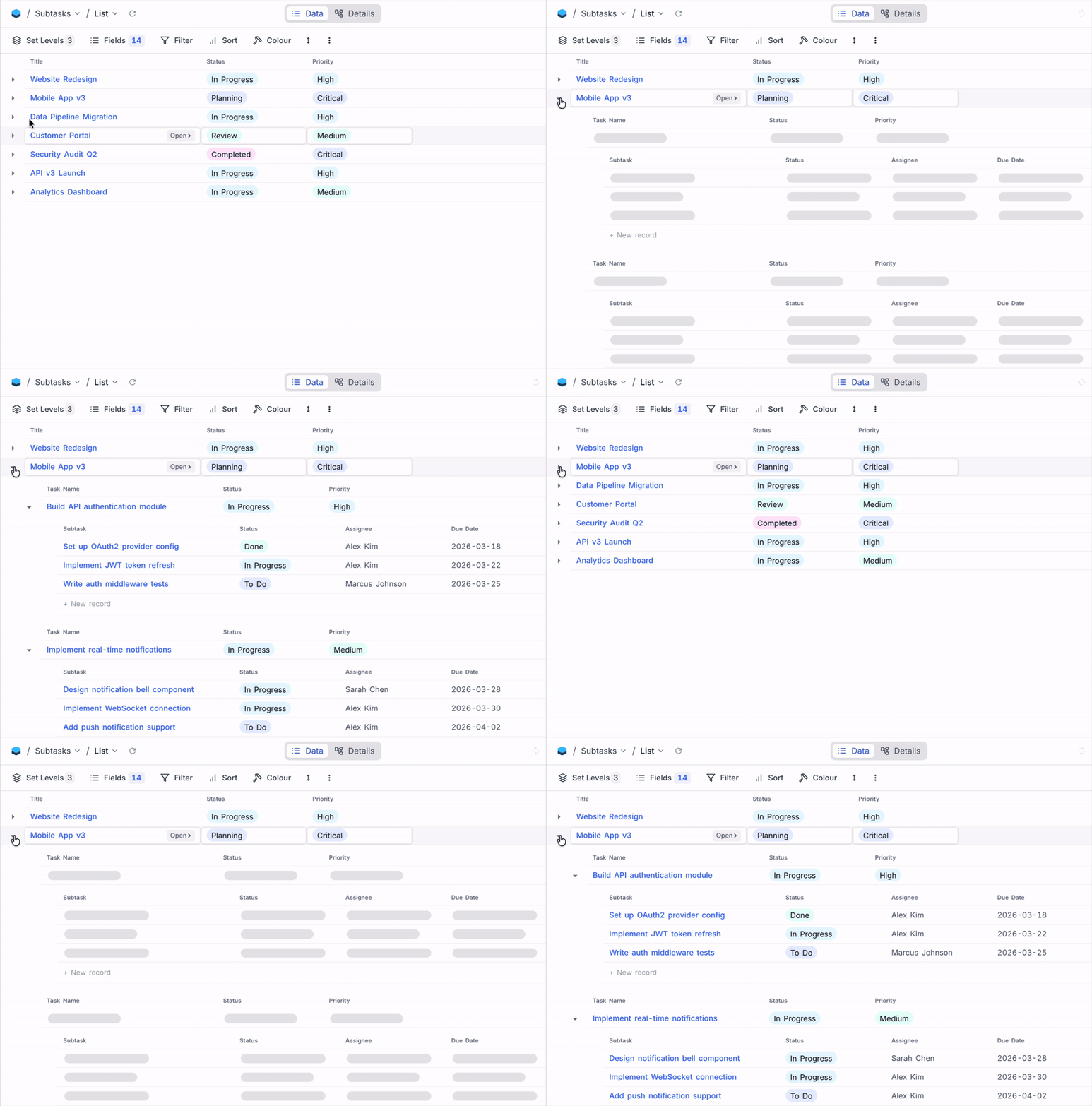
List View works like Grid View but is built for showing linked records as a nested, collapsible hierarchy, up to 3 levels deep. Click a project to reveal its tasks, expand a task to see its subtasks, all inline. Perfect for project plans, org charts, or any parent-child data. Sort, filter, and colour-code records at every level, all without leaving the view.
Timeline View
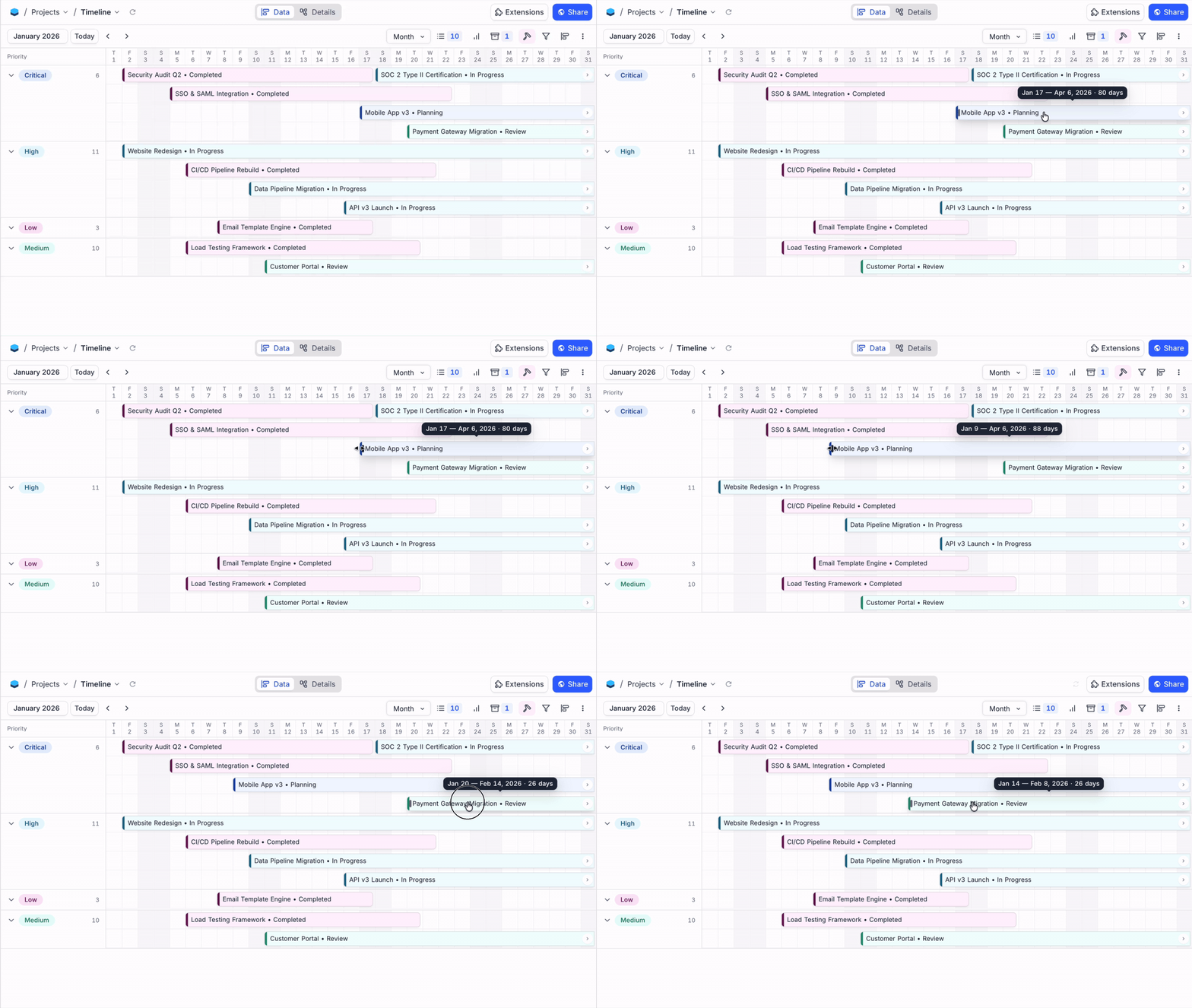
Timeline View visualises any date-based data as draggable bars on a time axis. Whether you're planning a product launch, scheduling content across channels, managing construction phases, or coordinating team shifts, Timeline View gives you the full picture of what's happening and when.
Reschedule by dragging, adjust duration by resizing, or click empty space to create records inline. Zoom between Day, Week, and Month. Group by team or status, colour-code by priority, and bars automatically stack into non-overlapping lanes so nothing gets hidden.
Map View
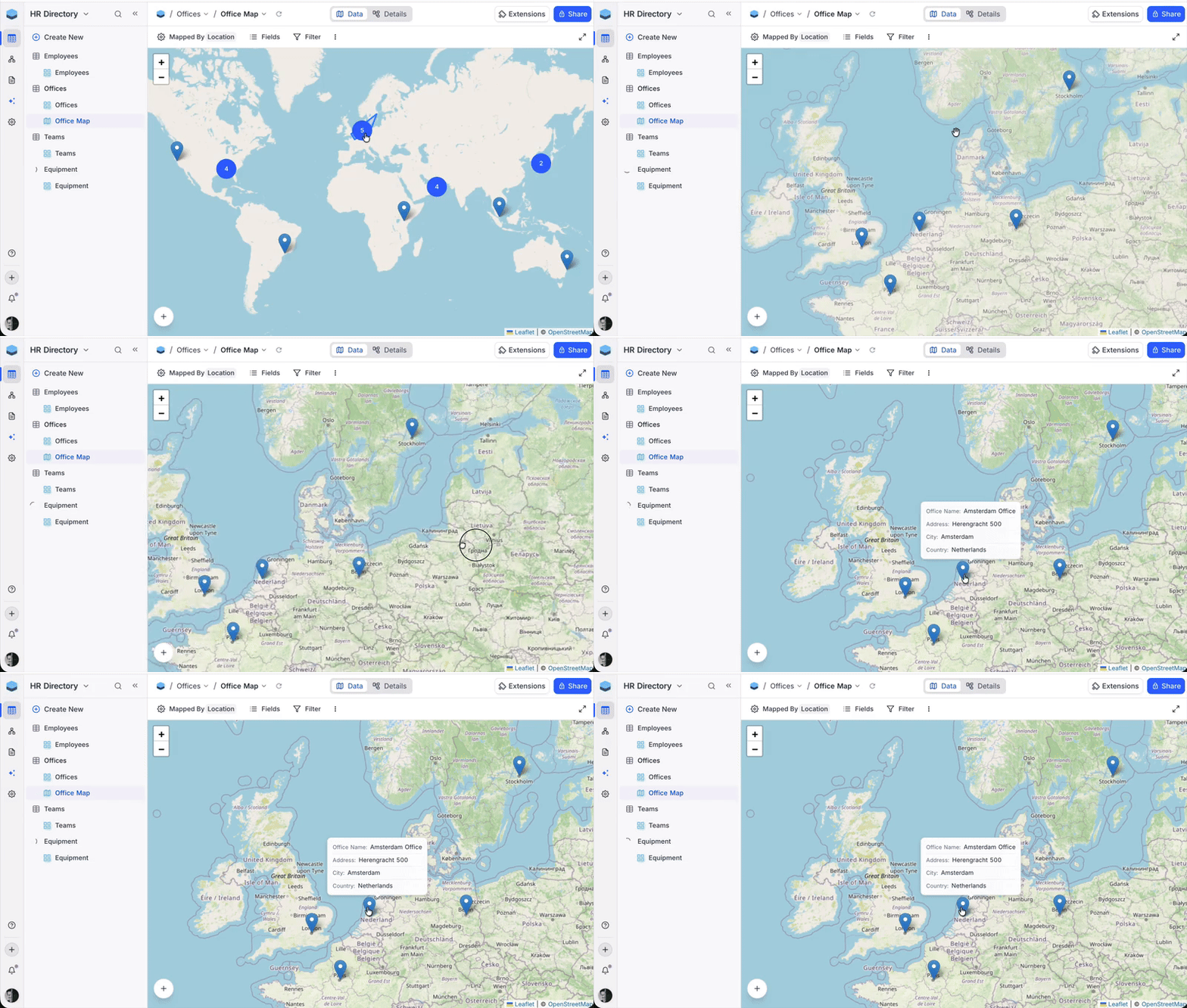
Map View places your records as pins on an interactive map using a GeoData field. Whether you're tracking office locations, plotting customer addresses, managing field service teams, or visualising retail store networks, Map View turns coordinates into context.
Click any pin to view record details, and use filters to narrow down what's on the map.
New Fields
UUID
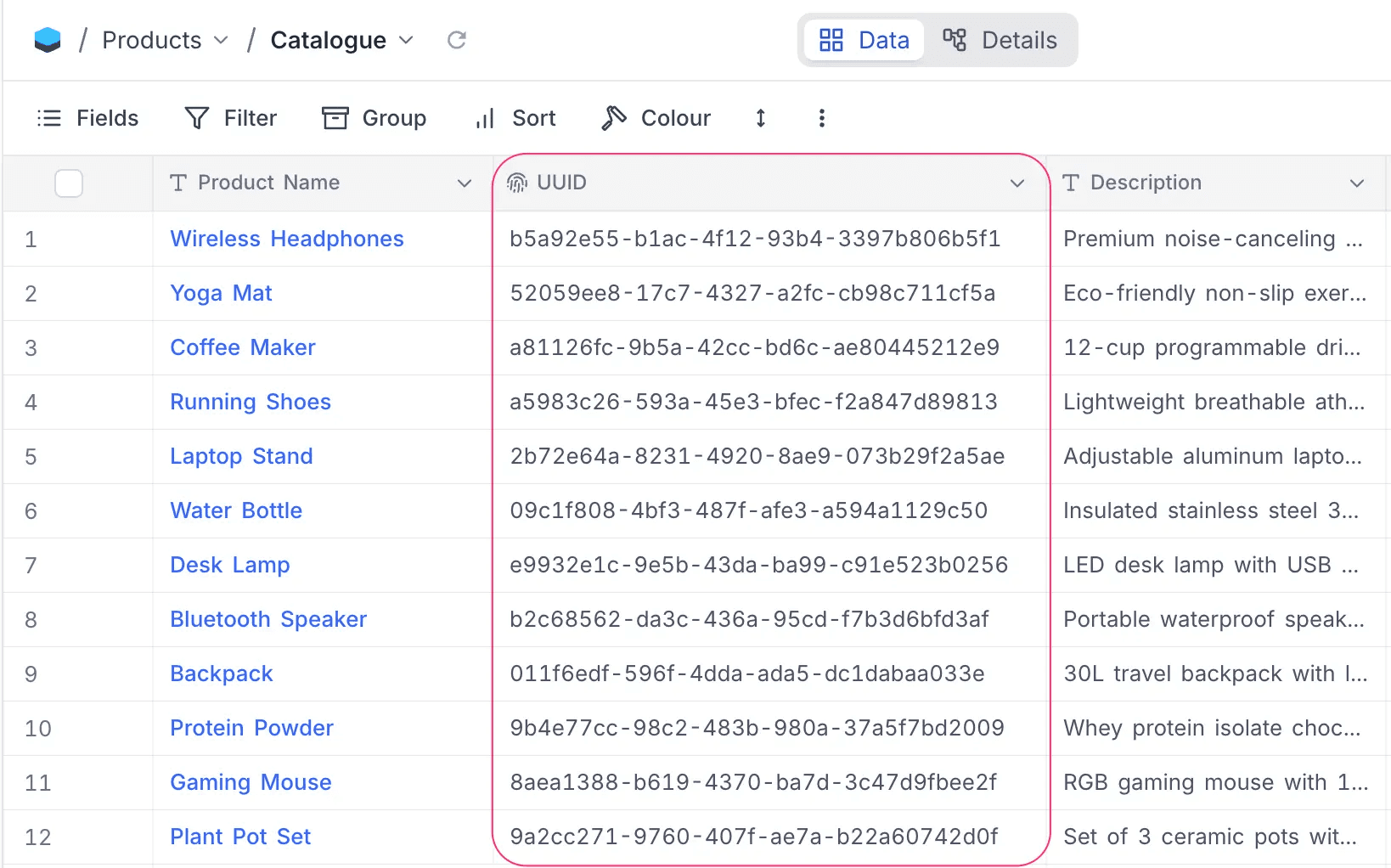
UUID automatically assigns a universally unique identifier to every record, a 36-character string like 31c46437-0bb9-4072-bf7a-40cd7aebcae3. Whether you're syncing records with external systems, building API integrations, or need a stable reference that never changes even if the record title does, UUID gives you a reliable, permanent key.
Auto-generated, read-only, and guaranteed unique at the database level.
Colour
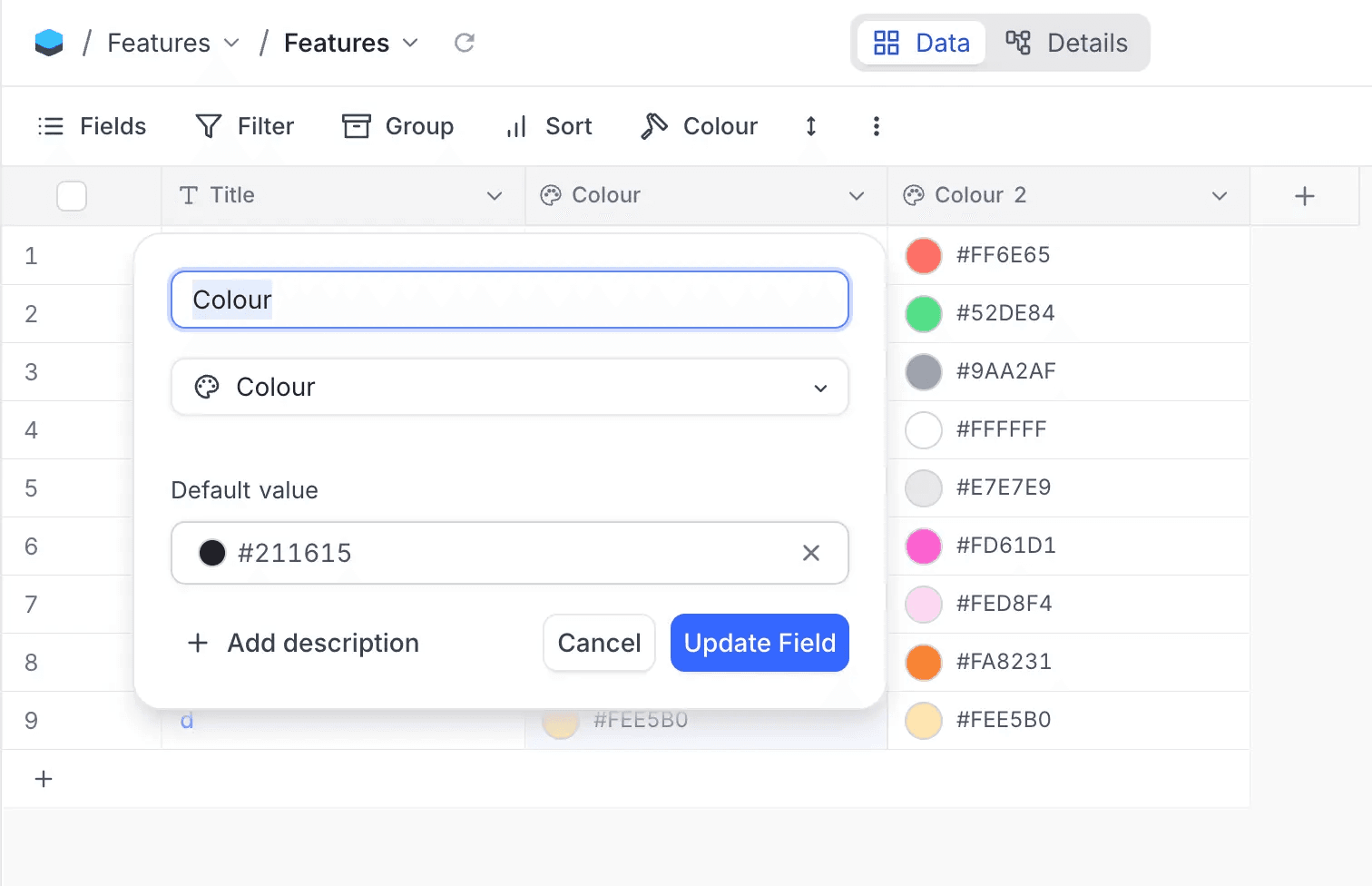
Colour is a field type that stores and displays hexadecimal colour values with a visual swatch. Whether you're managing design systems, tracking brand guidelines, cataloguing product variants, or tagging records with visual status indicators, Colour makes colour a first-class data point.
Includes a colour picker with a default palette, full colour wheel, and hex input.
Auto Number
Auto Number automatically assigns a sequential, incrementing number to each record. Whether you need invoice numbers, ticket IDs, order references, or serial codes, Auto Number gives you a clean counter with no manual entry, no gaps, and no duplicates.
Link to Another Record
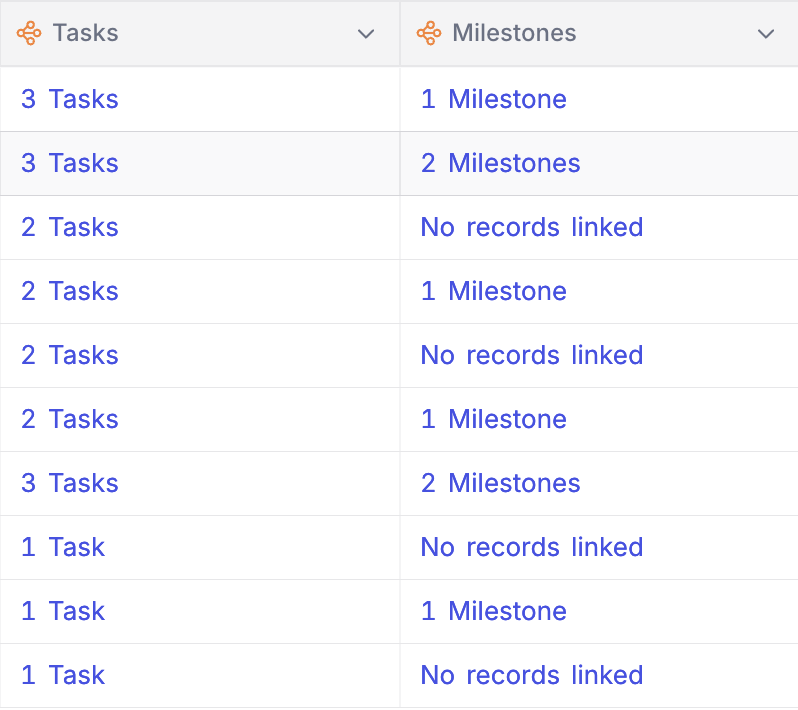
Link to Another Record (LTAR V2) is a complete rebuild of how records link across tables. Whether you're connecting deals to contacts in a CRM, linking tasks to projects in a tracker, or mapping students to courses in an LMS, linked fields now show the actual record names as display-value pills instead of just a count like "3 Tasks".
Before:
After:
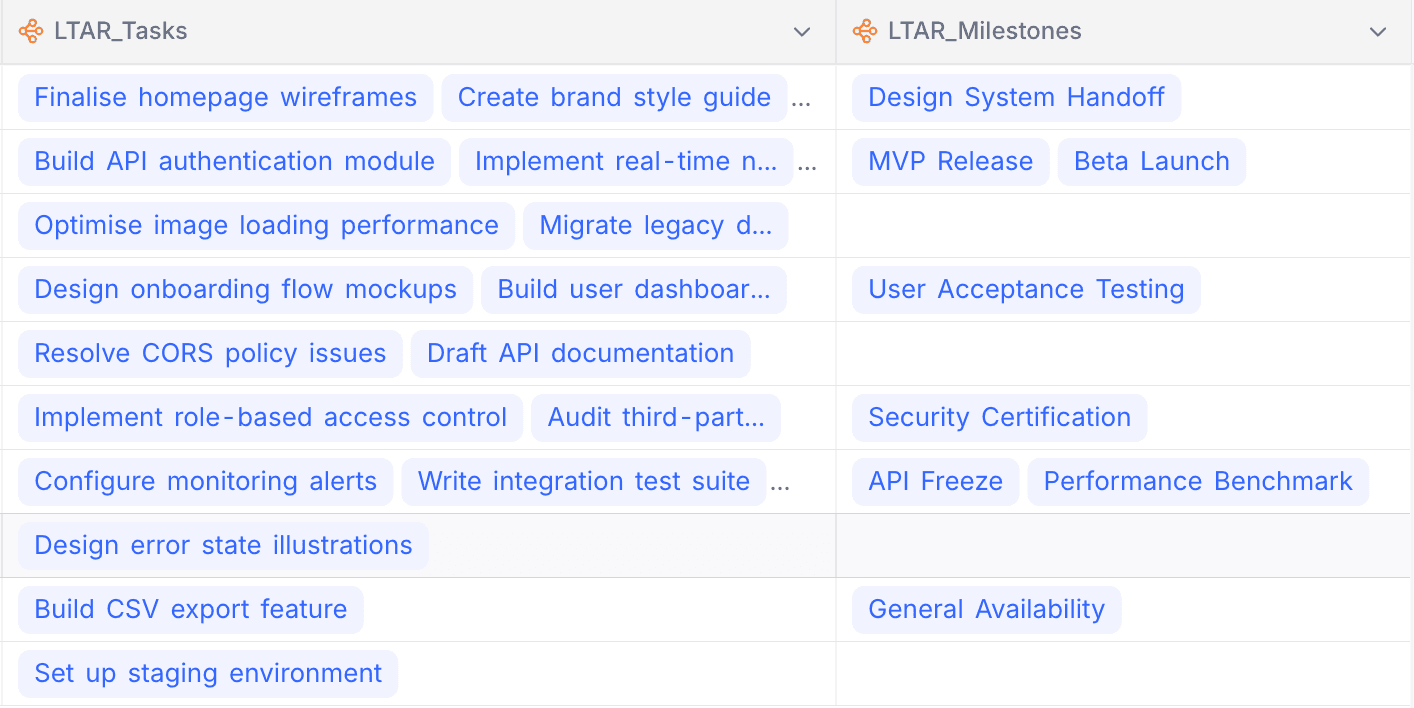
All relation types now use a consistent junction-table architecture, making linking behaviour uniform and predictable. This lays the foundation for spreadsheet-like capabilities on linked fields such as copy-paste, import-export, and more. All new link fields use LTAR V2 by default. Existing link fields continue to work as-is and can be upgraded in-place whenever you're ready.
Filters Got More Powerful
Finding the right slice of data should take seconds, not clicks. Filters get three major upgrades in this release.
Pinned Filters
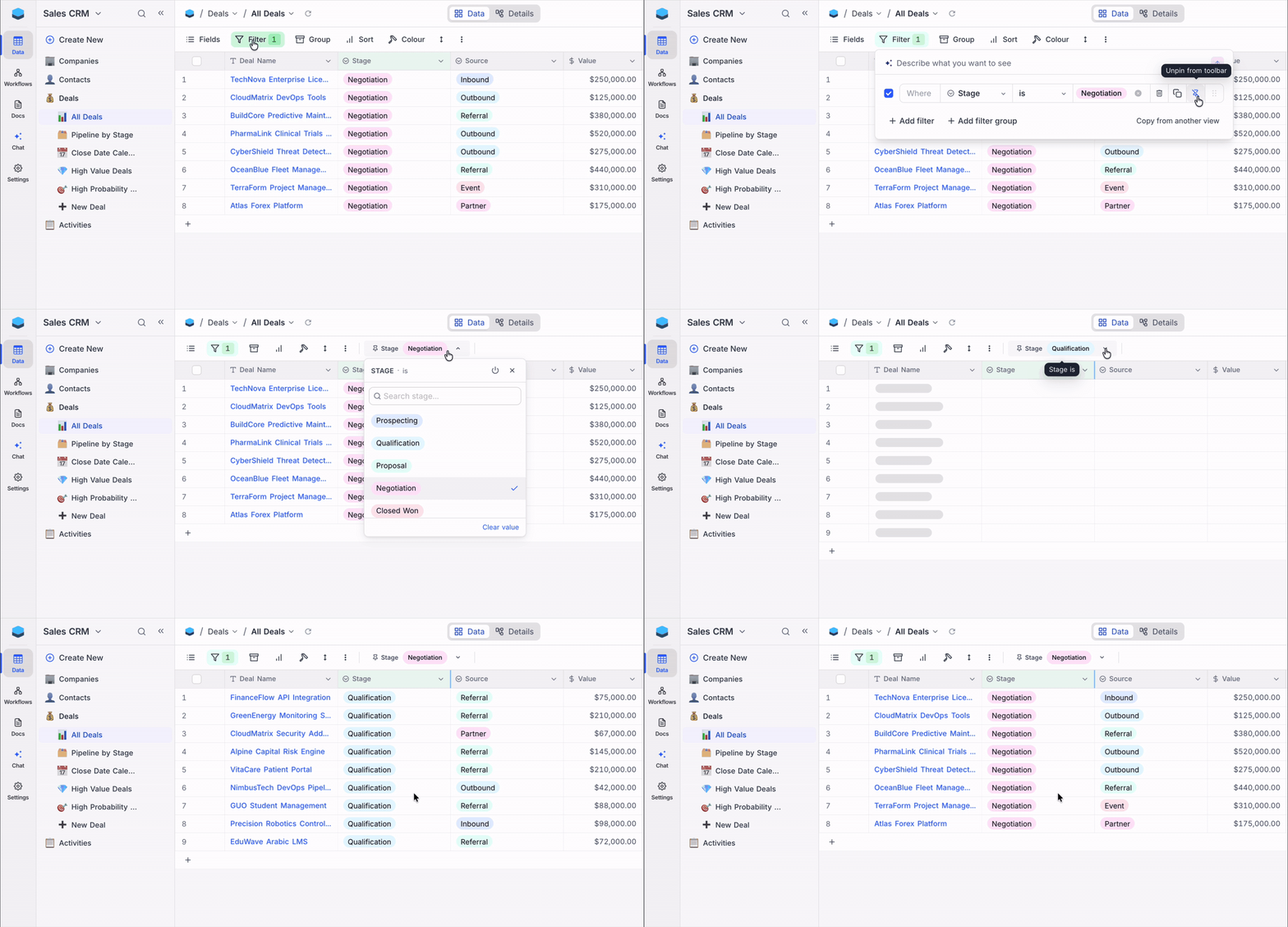
Pinned Filters let you pin up to 3 frequently used filters directly to the toolbar as compact, interactive pills. Whether your sales team needs to switch between regions or your support team toggles between priority levels, pinned filters give you one-click filtering without opening the filter panel.
Supported field types: SingleSelect, MultiSelect, User, CreatedBy, LastModifiedBy.
Toggle Filters
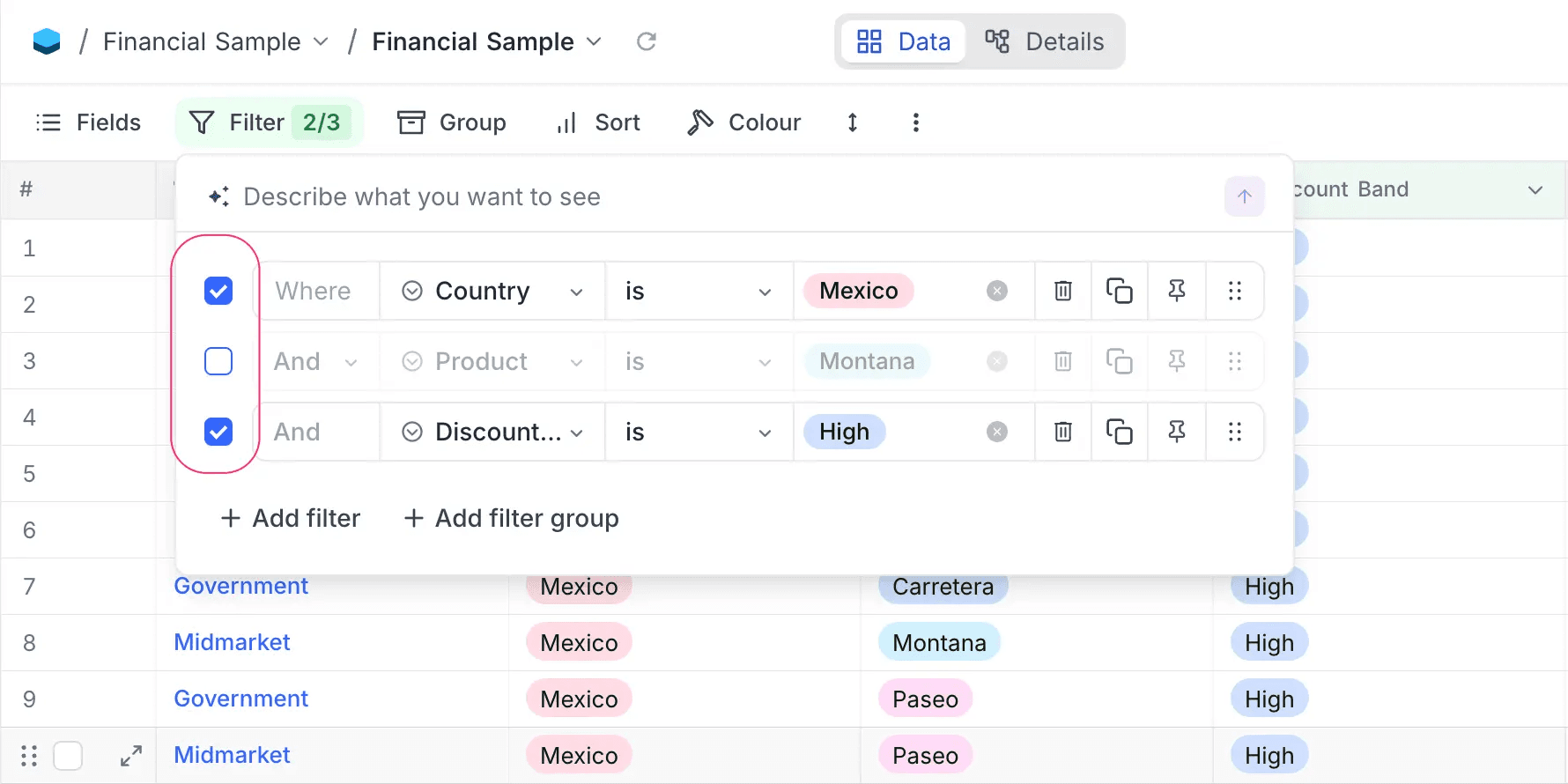
Toggle Filters add a checkbox to every filter row that lets you enable or disable it instantly. Whether you've built a complex filter set for your weekly review but need to see the full picture temporarily, or want to test how individual filters affect your data, toggle them off without losing the configuration.
The toolbar badge shows the count as "enabled/total" (e.g., 2/5) when some filters are disabled.
AI Filters
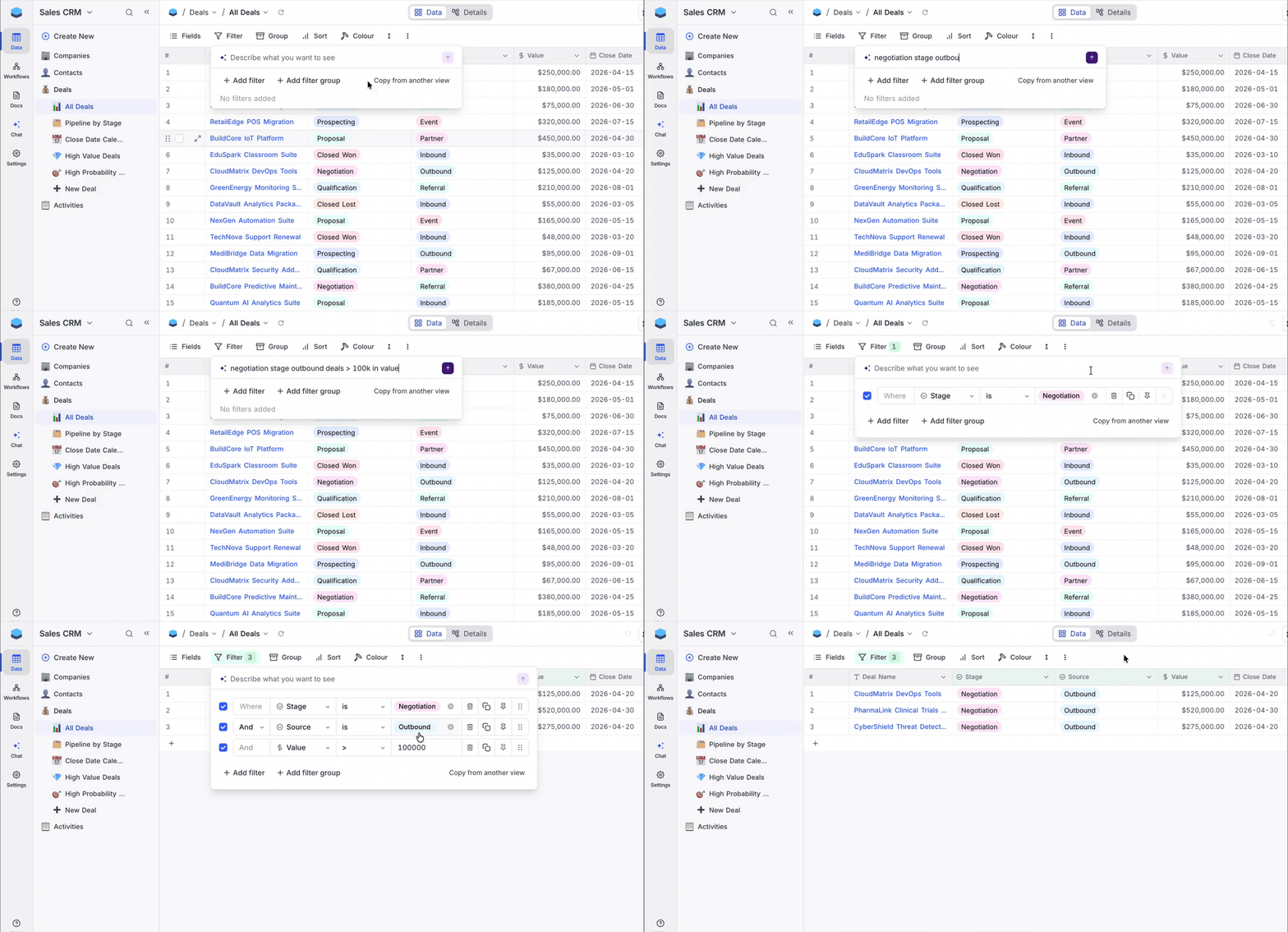
AI Filters let you describe the filter you need in plain English instead of building it manually. Whether you're looking for "high priority tasks due this week" or "deals over $50K in negotiation", NocoDB creates the filter for you.
Add it alongside your existing filters, replace them entirely, or clear everything and start fresh.
Supercharged Views
Conditional Cell Colouring
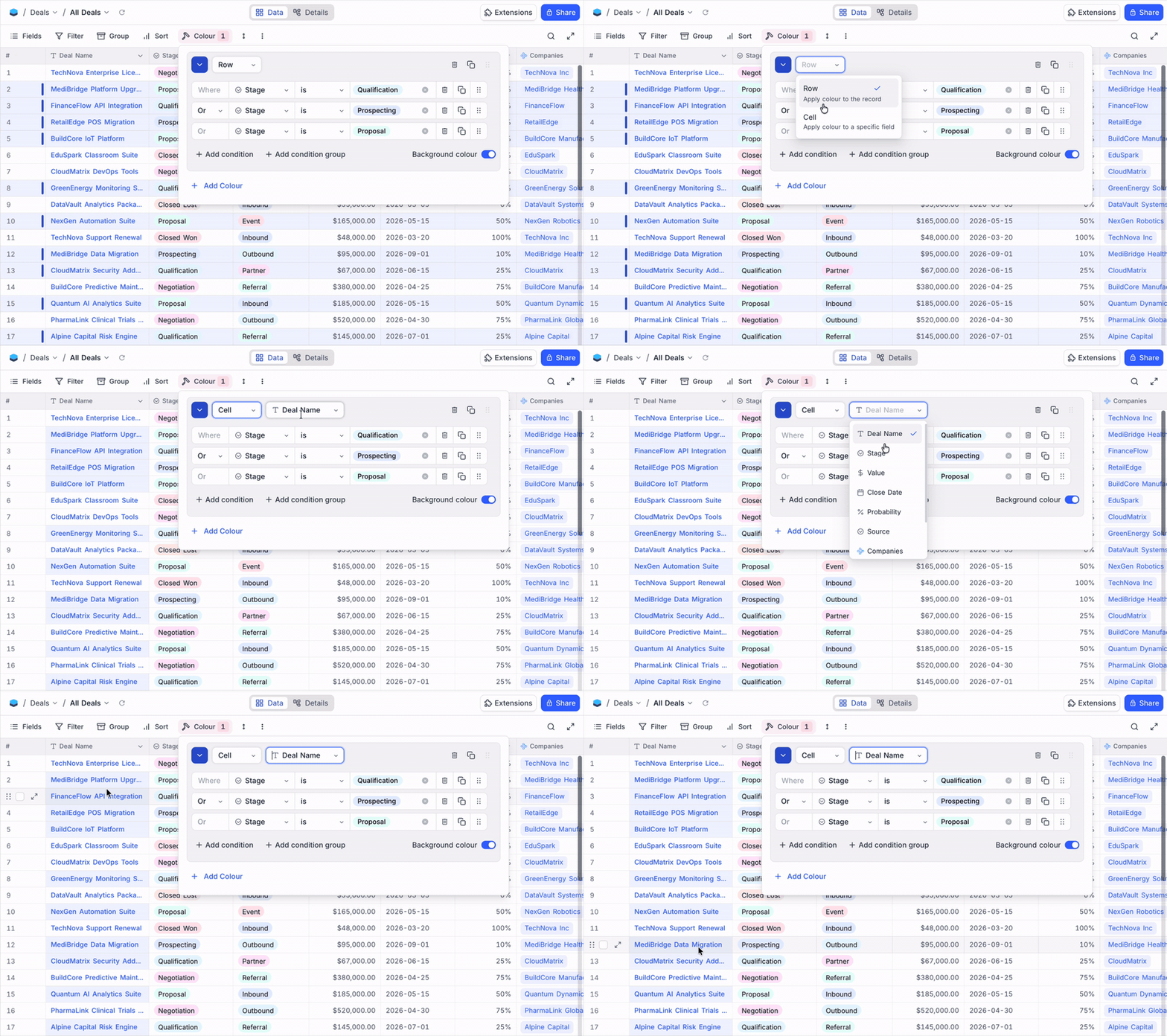
Conditional Cell Colouring lets you apply colour rules to individual fields in your grid. Whether you need to highlight overdue dates in red, flag high-value deals in green, or mark incomplete fields with a left-border accent, cell colouring makes important signals stand out in dense grids.
Conditions use the same filter builder you already know, and cell colour takes precedence over row colour for targeted fields.
Conditional Button Fields
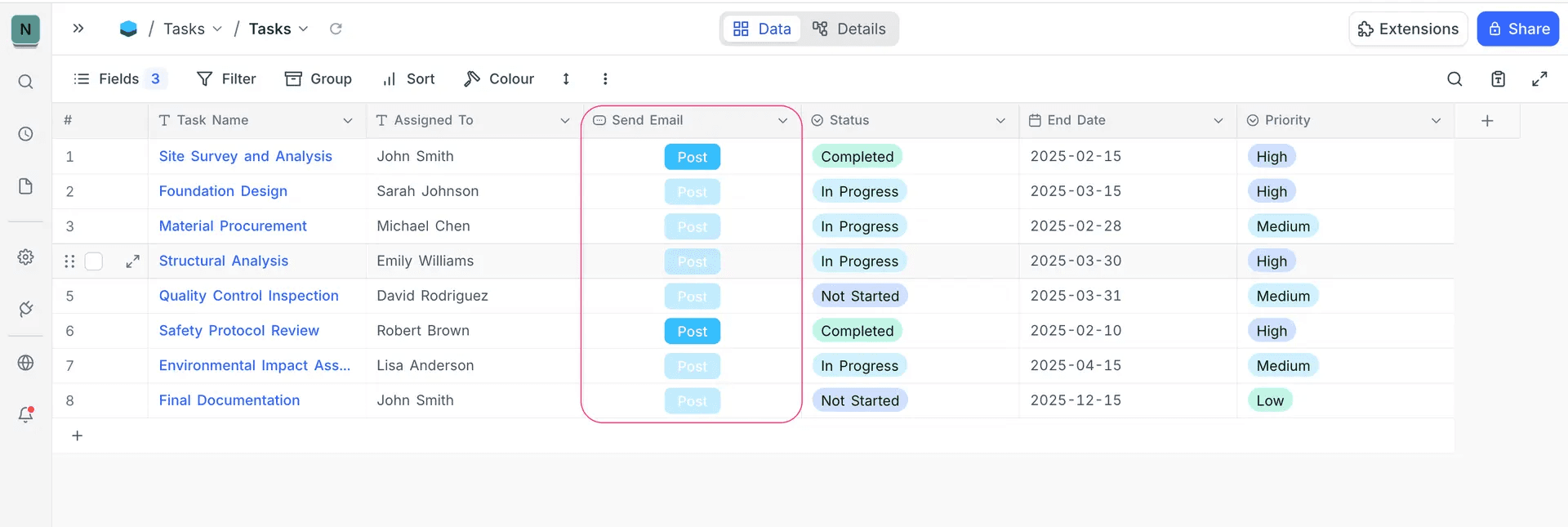
Conditional Button Fields let you define filter-based rules that control when a button is active on a record. Whether it's a "Send Invoice" button that should only work after a deal is won, or a "Publish" button that shouldn't fire until a draft is reviewed, conditional buttons prevent premature actions.
When conditions aren't met, the button appears disabled with a clear tooltip. Works with all button types and supports AND/OR filter groups for complex logic.
Date Dependencies
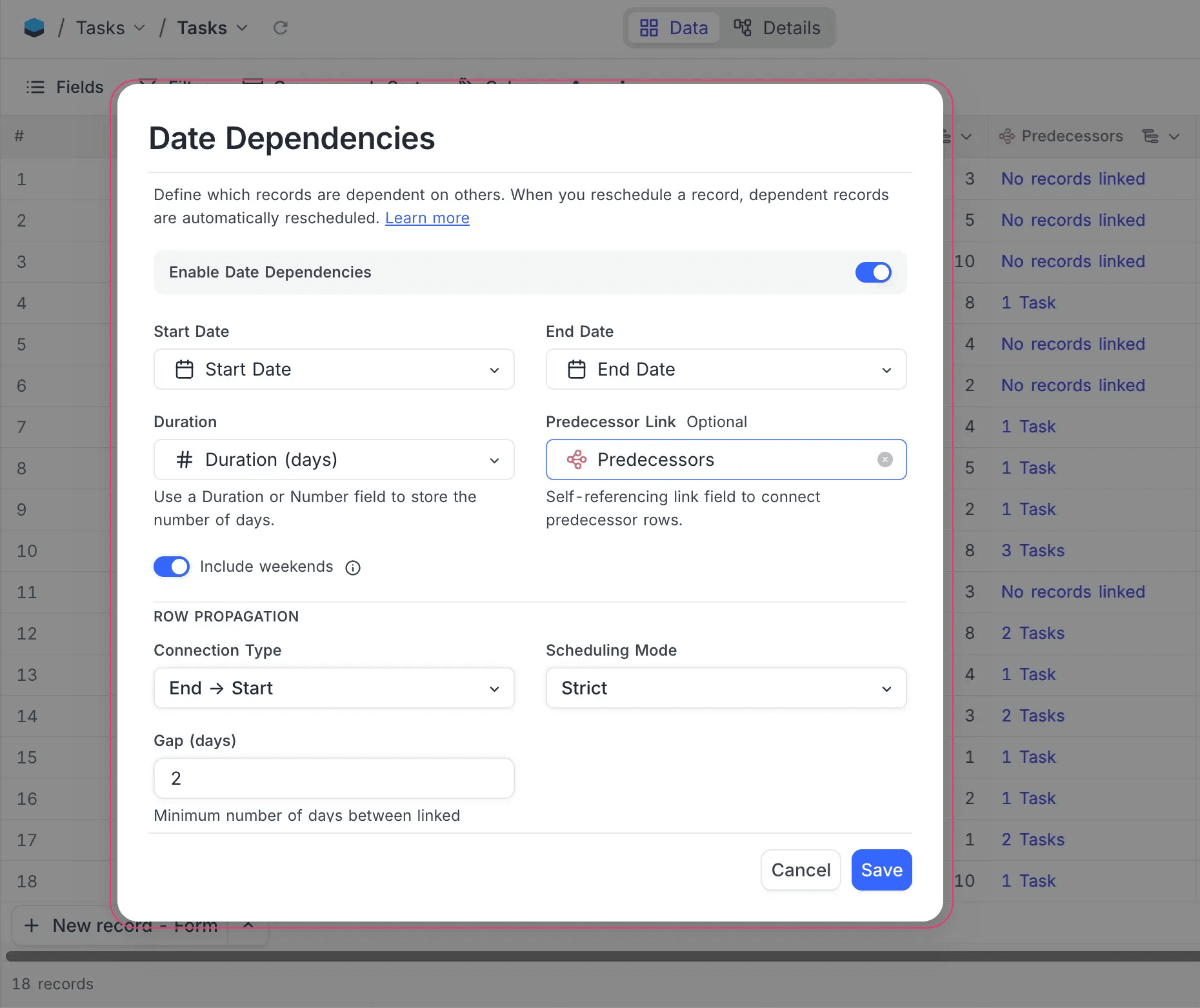
Date Dependencies is a Grid View feature for tables with self-linked records and date fields. Define which records depend on others within the same table, and when a date moves, every downstream record adjusts automatically. Whether it's a task list where subtasks chain off parent tasks, a product roadmap where a delayed design phase pushes development and QA, or an event timeline where one shift ripples through the rest, dependencies keep the chain intact.
Configure connection types (End → Start, Start → Start), set minimum gap days, and choose whether weekends count. Every change is tracked in a full audit trail.
Meet NocoDocs
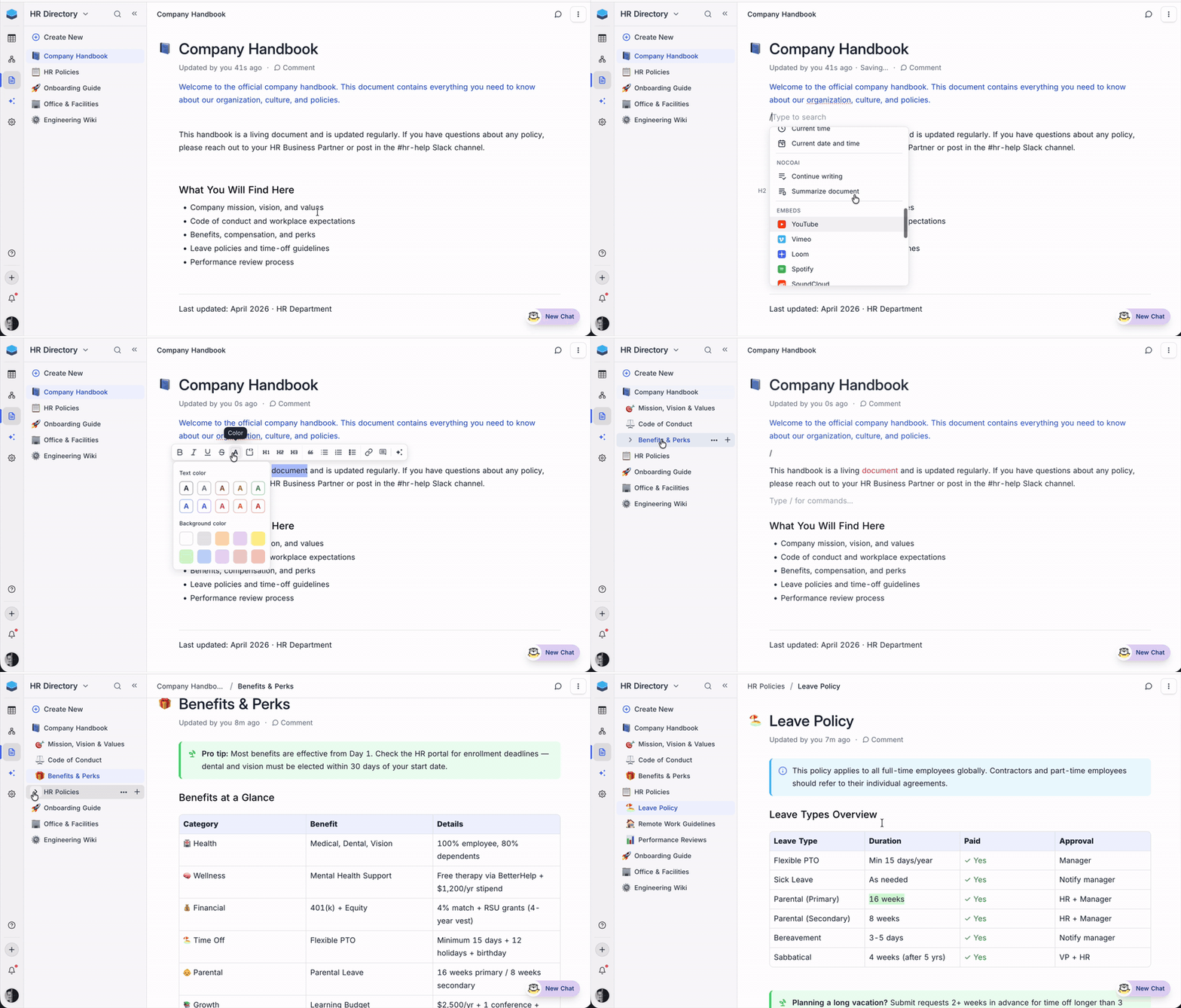
NocoDocs is a full-featured document editor built directly into your NocoDB base. Whether you're maintaining an internal wiki, writing product requirements alongside your feature tracker, documenting onboarding processes, or building a client-facing knowledge base, NocoDocs keeps your documentation right next to the data it references.
- Rich editing: Headings, code blocks, callouts, tables, images, file attachments, embeds, math expressions, and a slash command palette for rapid block insertion
- Real-time collaboration: Inline comments, threaded discussions, and @mentions to loop in teammates without leaving the document
- Hierarchical organisation: Drag-and-drop document tree to structure your knowledge base with nested pages
- Auto-save: Every change is saved automatically as you type, so you never lose work
- Export anywhere: Markdown, HTML, or PDF with a single click
Accessible from the minibar as a dedicated section in your base.
NocoDocs AI
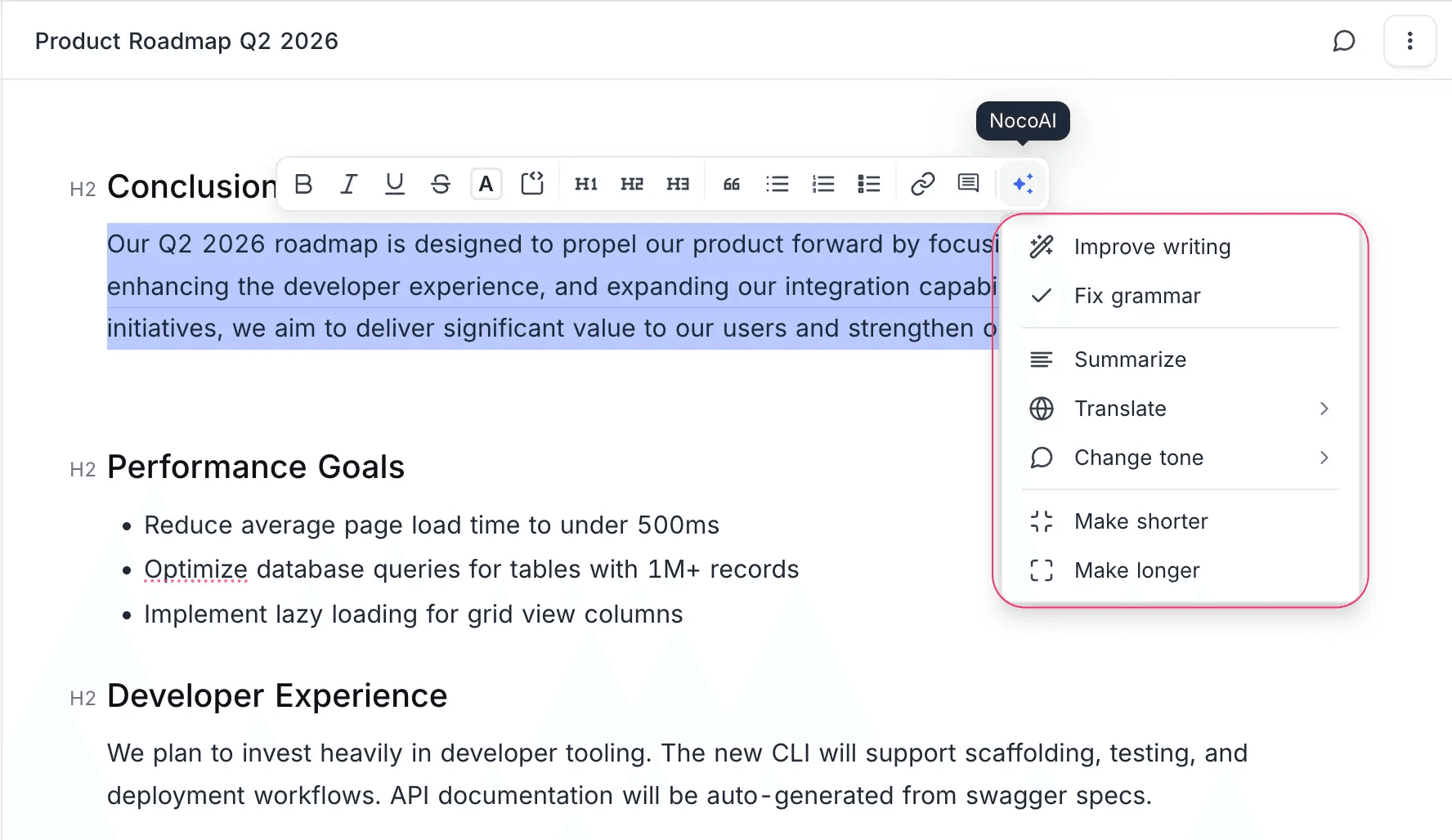
NocoDocs AI is a built-in writing assistant that edits text inline as you work. Whether you're polishing a product spec, fixing grammar in meeting notes, or translating documentation for a global team, highlight any text and let AI do the heavy lifting.
Choose from Improve writing, Fix grammar, Summarize, Translate, Change tone, Make shorter, or Make longer. Suggestions appear inline for you to accept or discard.
NocoDocs Tabs
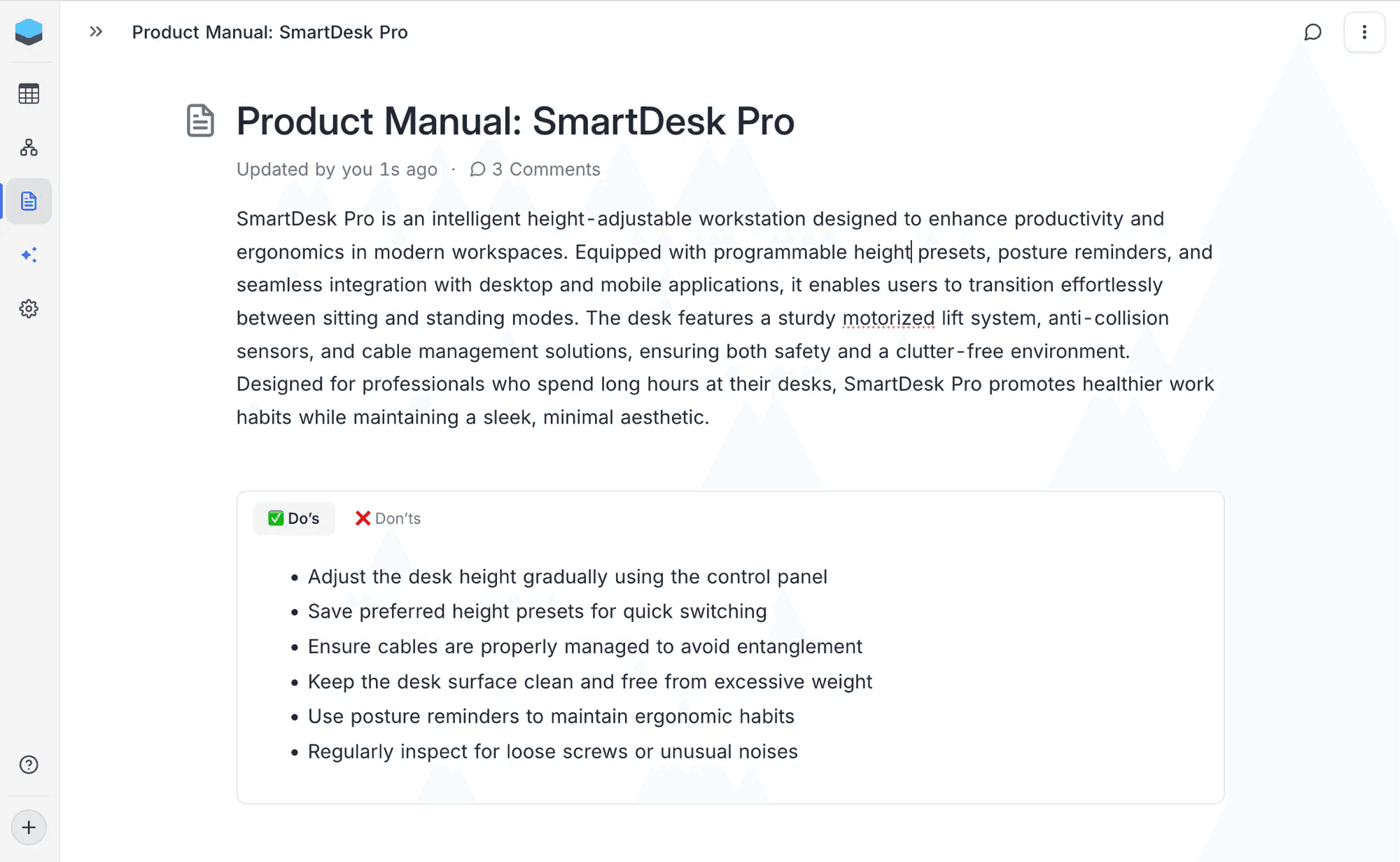
NocoDocs Tabs let you organise document sections into a tabbed layout within a single page. Whether you're separating Do's and Don'ts, writing platform-specific instructions, or showing before-and-after comparisons, Tabs keep related content grouped without the clutter.
Add a Tabs block from the slash command menu, then create, rename, reorder, and delete tabs as needed.
Document Permissions
Document Permissions give you granular control over who can view and edit each document within NocoDocs. Whether you need to restrict a product spec to engineering, limit a board deck to leadership, or let the people team edit an HR policy while everyone else gets read-only access, permissions are set at the individual document level.
Users without edit access see a clean, read-only document with no editing menus, toolbar actions, or comment options.
Power Tools
Record Templates
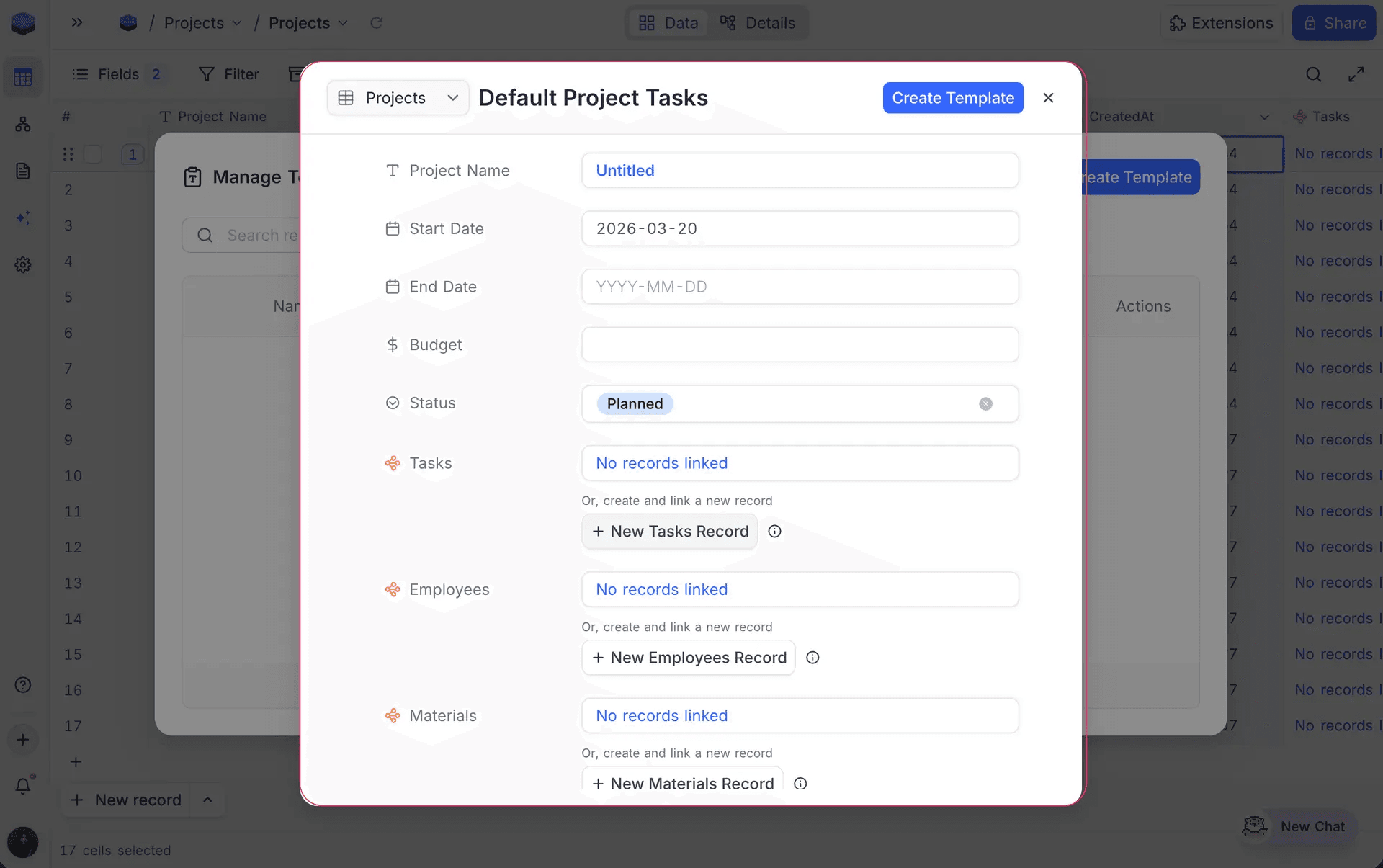
Record Templates let you define reusable blueprints with pre-filled field values and linked records, then create new records from them in a single click. Whether your team repeatedly creates client onboarding records, bug report intakes, or project kickoffs, templates eliminate the redundant data entry.
Templates support nested linked records up to 3 levels deep and are managed at the base level, so they work across tables and views.
Multi-Field De-Duplication
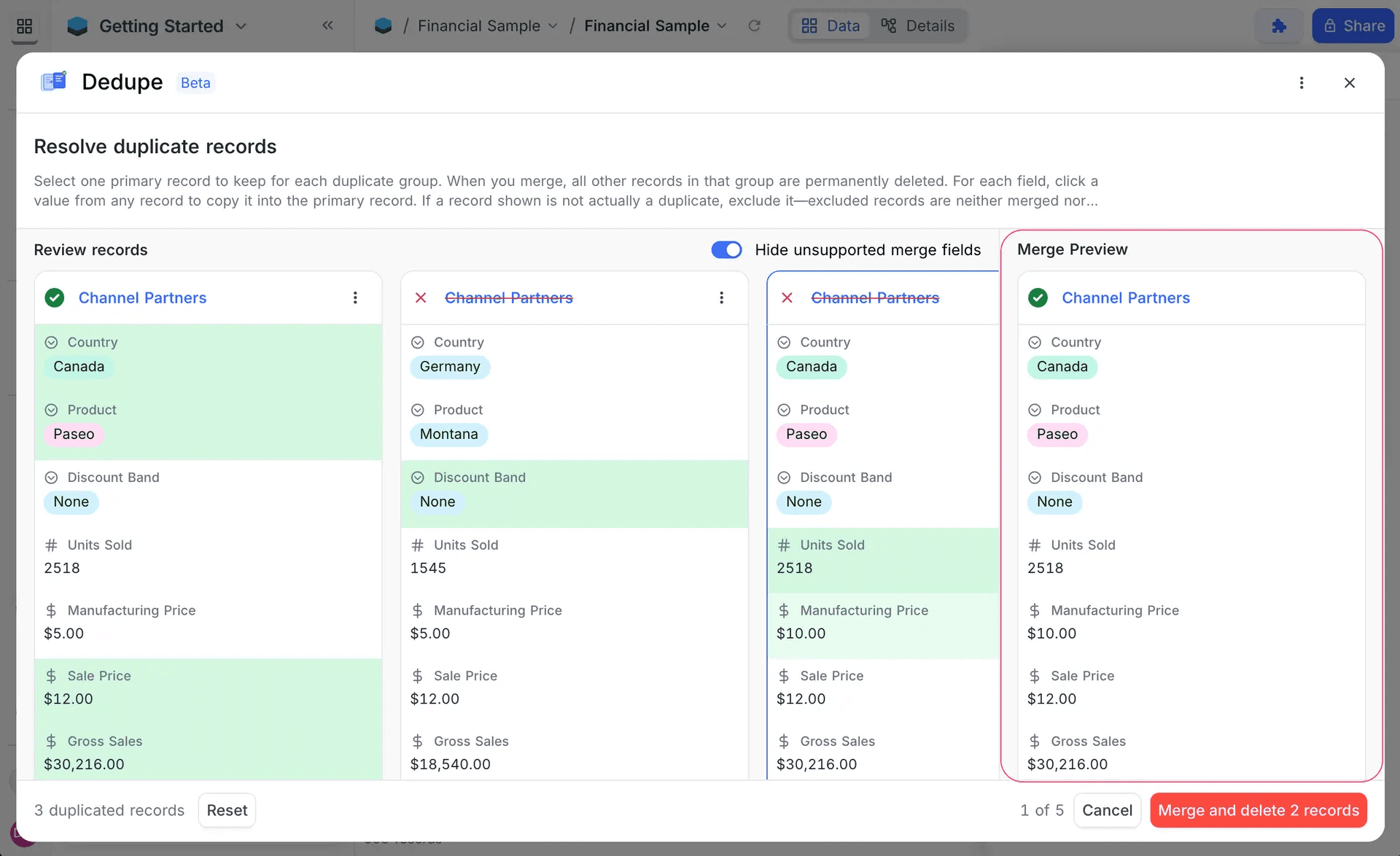
De-Duplicate now supports matching on multiple fields to identify true duplicates with precision. Whether you're cleaning up a CRM where contacts share common names, deduplicating vendor records where email alone isn't enough, or consolidating imported data from multiple sources, multi-field matching like "Email + Name" or "Phone + Company" catches real duplicates while avoiding false matches.
Form Scheduling
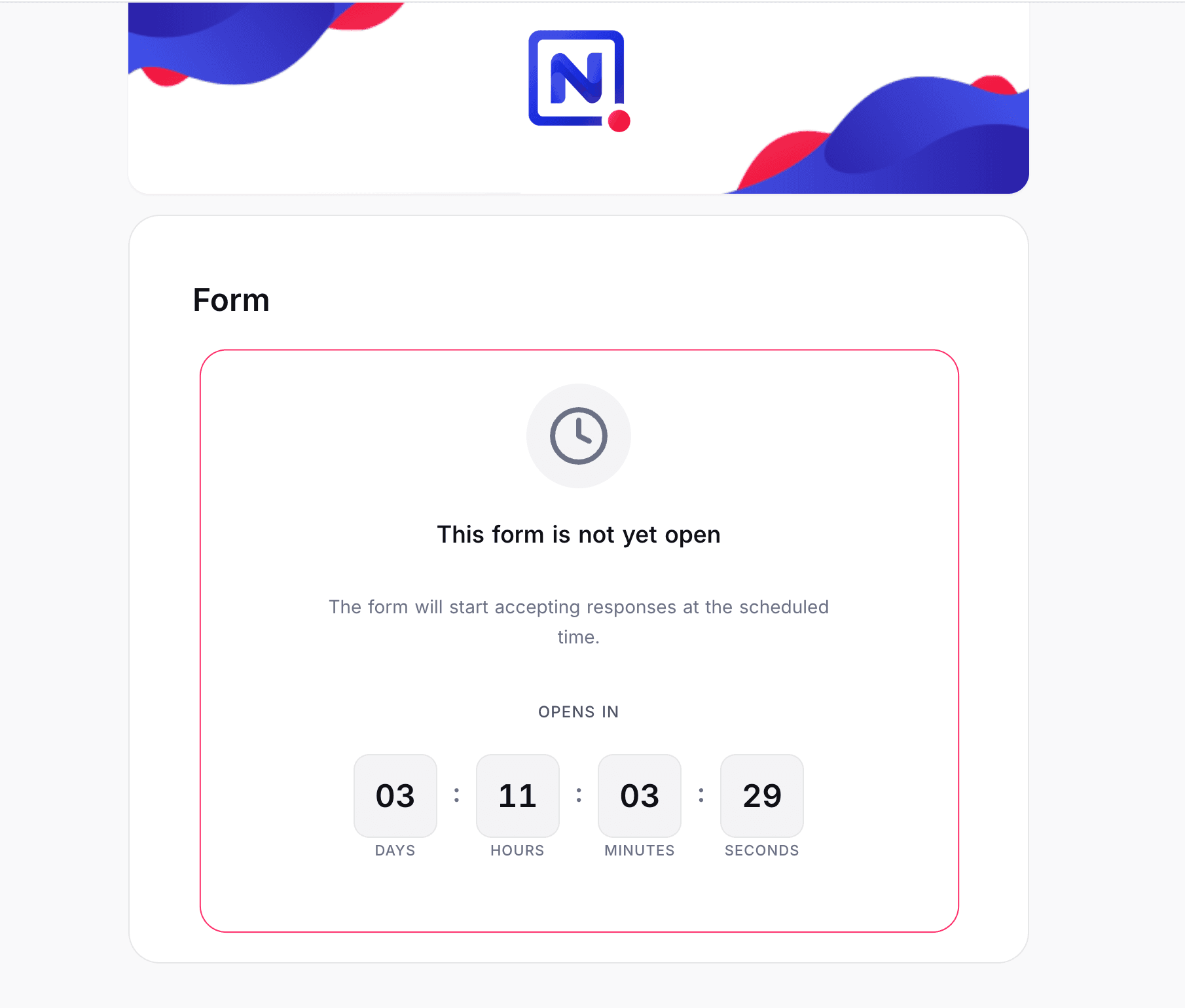
Form Scheduling lets you set start and end dates on any form so it automatically opens and closes on schedule. Whether you're running event registrations that close after a deadline, collecting job applications within a hiring window, or limiting feedback surveys to a specific period, forms manage themselves.
Submissions outside the allowed window are blocked with a clear message, no manual toggling required.
Fine-Grained API Tokens
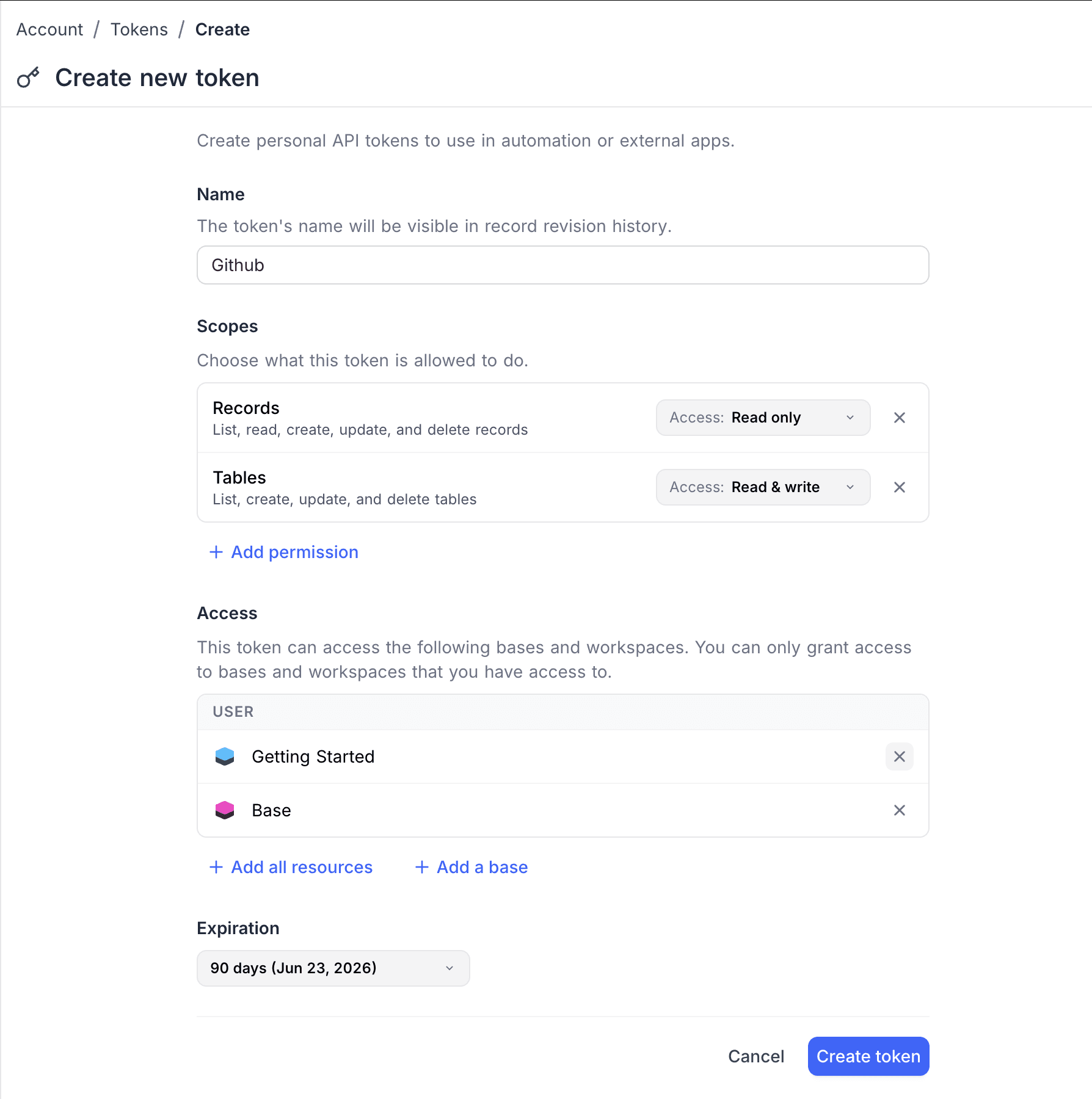
Fine-grained API tokens let you lock down exactly what an external integration can do and where it can do it. Whether you're securing a CI/CD pipeline that only needs access to one base, limiting a third-party integration to read-only record access, or issuing short-lived tokens for contractors, fine-grained tokens replace the old all-or-nothing model. When creating a token, you configure three things:
- Scopes: Choose from eight permission categories (Records, Tables, Fields, Views, Comments, Webhooks, Base, Users) and set each to Read only or Read & write. Anything you don't add is denied by default.
- Access: Restrict the token to specific bases, or grant access to all resources. A CI/CD pipeline that only touches one base doesn't need access to your entire workspace.
- Expiration: Set tokens to expire after 7 days, 30 days, 90 days, up to 1 year, or pick a custom date. No more forgotten tokens with permanent access.
Tokens can be enabled or disabled instantly from the token list, useful for pausing an integration during maintenance or investigating suspicious activity without permanently revoking access. The token string is shown only once at creation and stored as a SHA-256 hash, so it can never be retrieved from NocoDB.
Enterprise Grade
Teams Hierarchy
Picture a sales org with 200 reps across 4 regions, each region split into Enterprise, Mid-Market, and SMB pods. When the APAC Enterprise pod needs access to a new deal pipeline, you shouldn't have to assign permissions to 15 people one by one. And when someone moves from APAC to EMEA, you shouldn't have to hunt through every base to update their access.
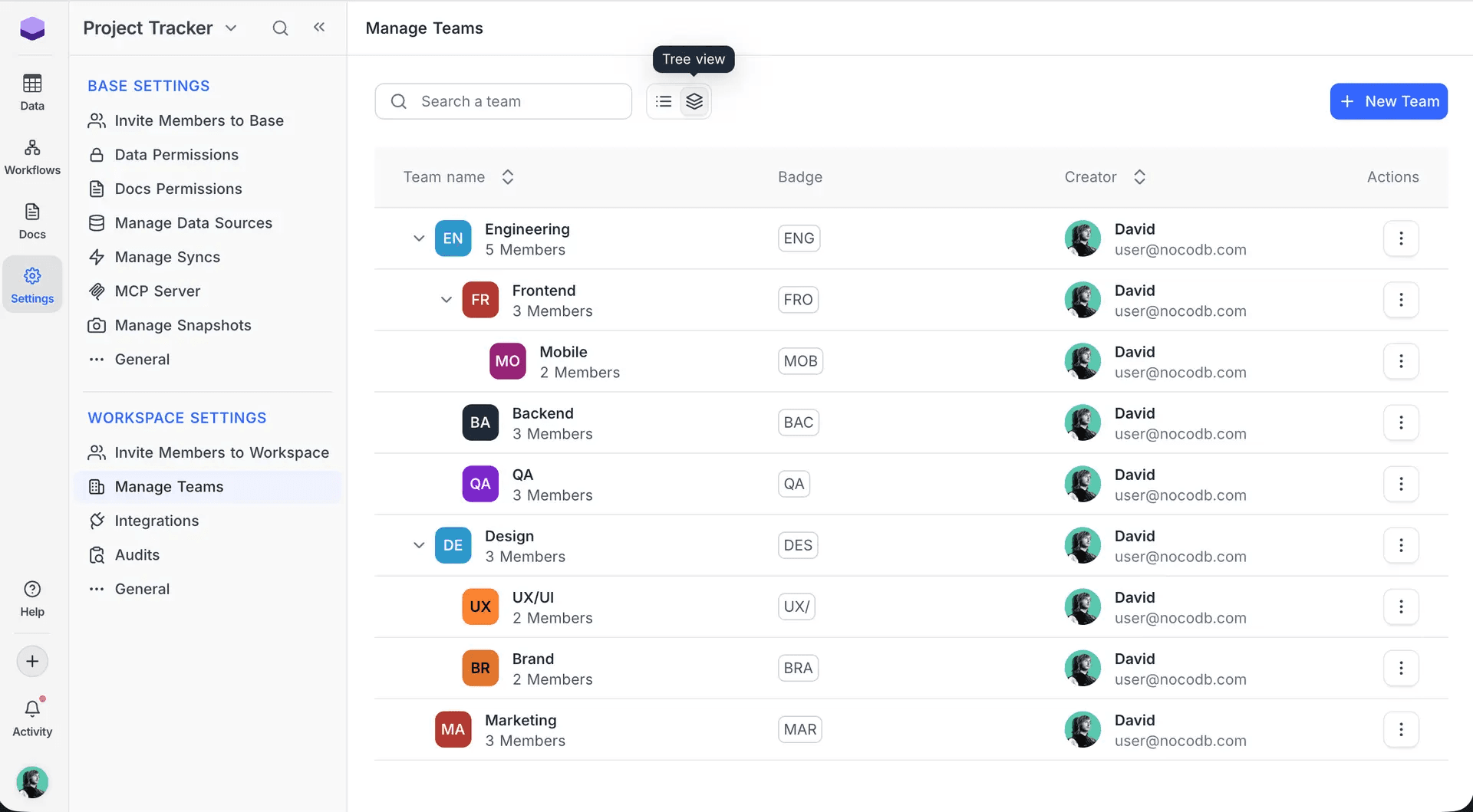
Teams Hierarchy lets you organise workspace members into nested teams up to 4 levels deep. Create a "Sales" team with "APAC", "EMEA", "NA", and "LATAM" beneath it. Nest further: "APAC → Enterprise → Key Accounts", and the hierarchy stays clean.
Permissions cascade automatically: grant access to "Sales" and every sub-team inherits it. Restrict a sensitive pipeline to "APAC → Enterprise" and only that pod sees it. When a rep moves teams, their permissions update everywhere instantly. Need an exception for a specific person? Individual assignments always override team roles, so edge cases never require restructuring. Move teams between parents, reassign scope at any level, and let the hierarchy handle the rest.
SCIM Provisioning
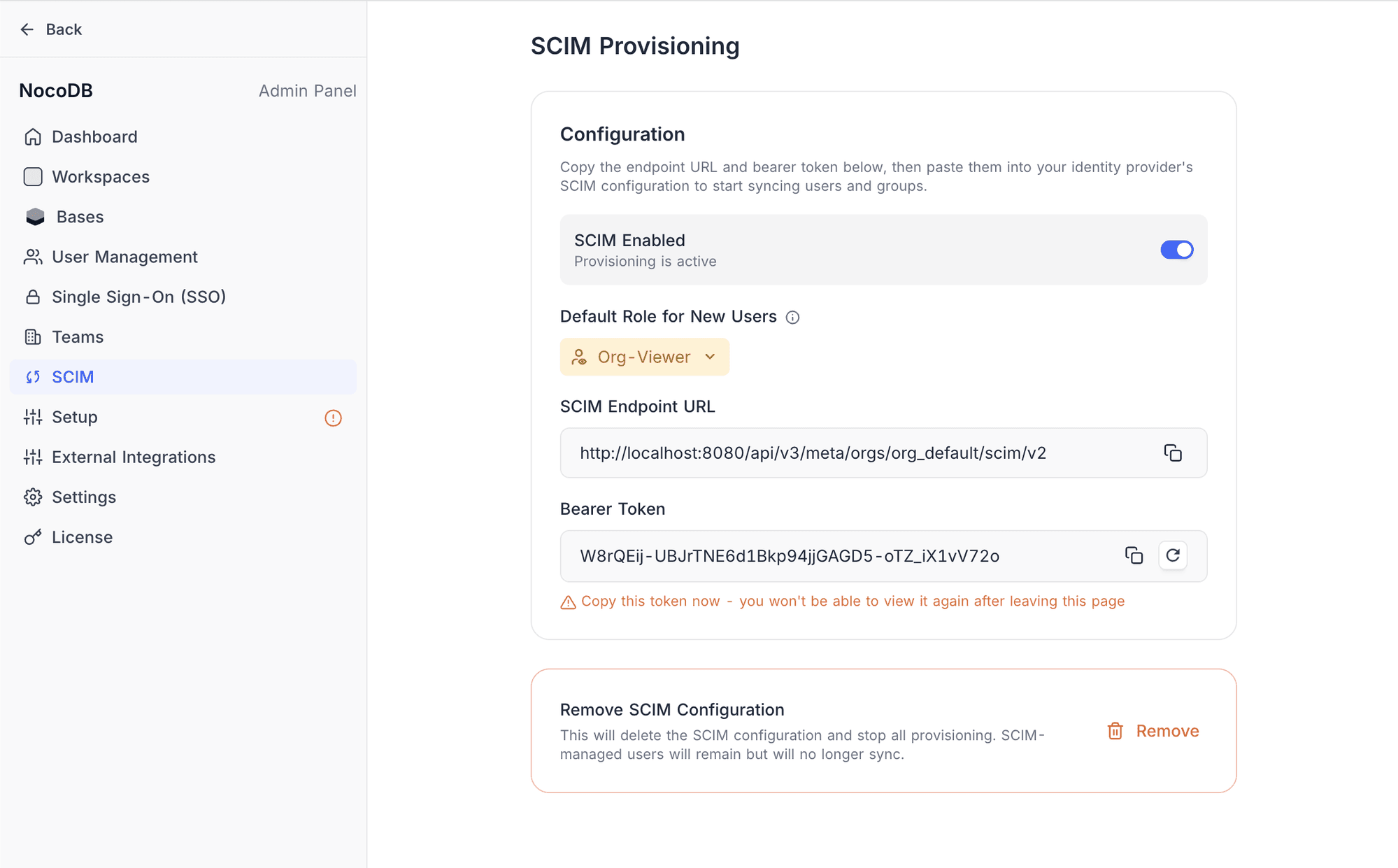
SCIM Provisioning syncs your identity provider with NocoDB so user access is managed automatically. Whether you're onboarding new hires across departments, offboarding employees who leave, or restructuring teams after a reorg, SCIM ensures NocoDB access stays in sync with your directory. No tickets, no manual updates, no stale accounts.
Works with Okta, Azure AD / Entra ID, Google Workspace, OneLogin, JumpCloud, PingIdentity, and any SCIM v2.0-compliant provider. Team memberships and workspace roles sync automatically. Enable it from Admin Panel → SCIM with an endpoint URL and bearer token.
Record-Level Security (RLS)
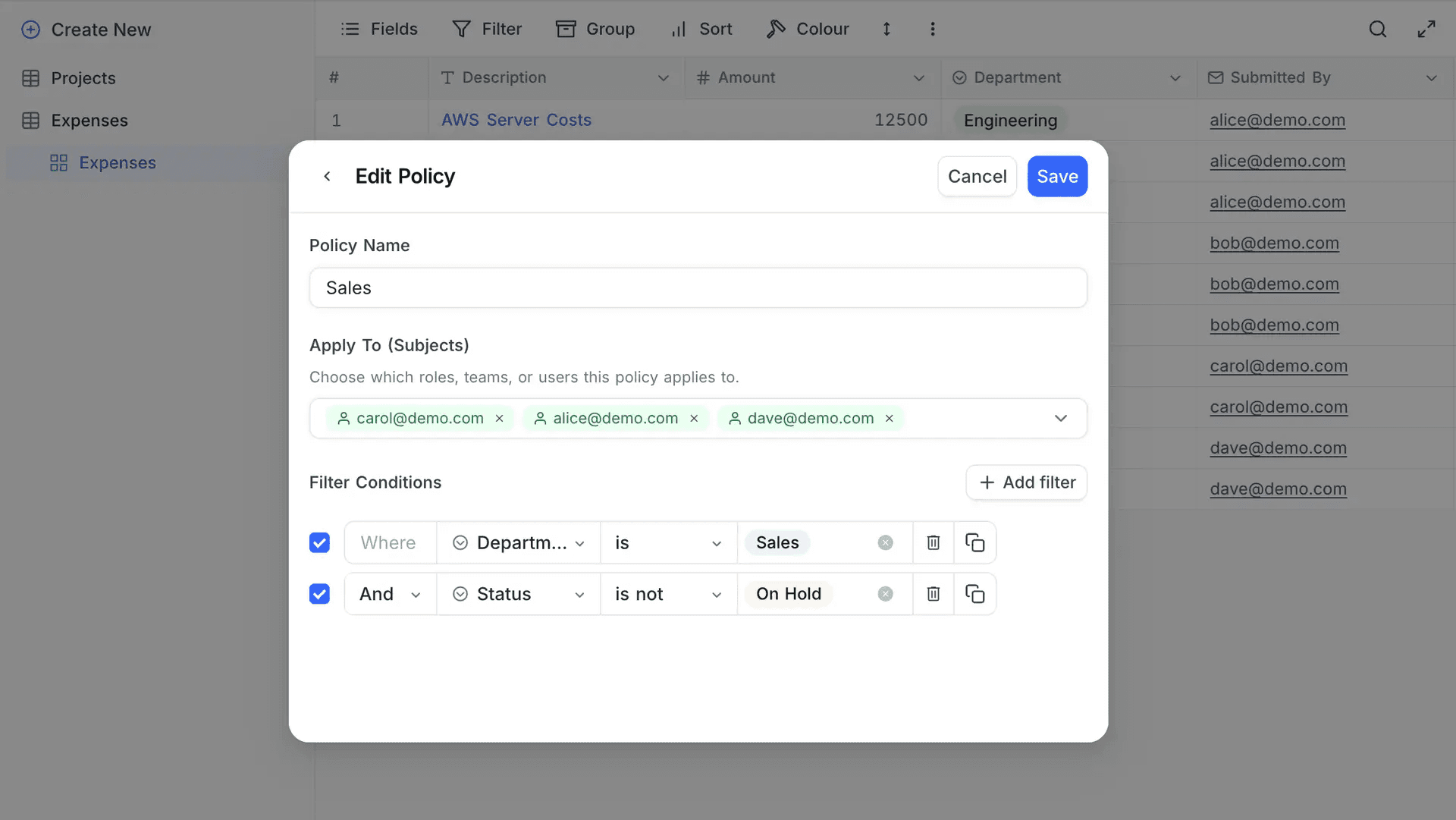
Record-Level Security (RLS) lets you create policies that filter which rows each user or team can see within a table. Whether a regional sales manager should only see their region's deals, a vendor should only access their own purchase orders, or a department head needs visibility limited to their team's records, RLS makes the same table serve different audiences with different visibility.
Set a default policy (show all, deny all, or conditional), then add scoped policies targeting specific roles, individual users, or teams with full team hierarchy support. Each policy uses the familiar filter builder with AND/OR logic across any column.
Org Management
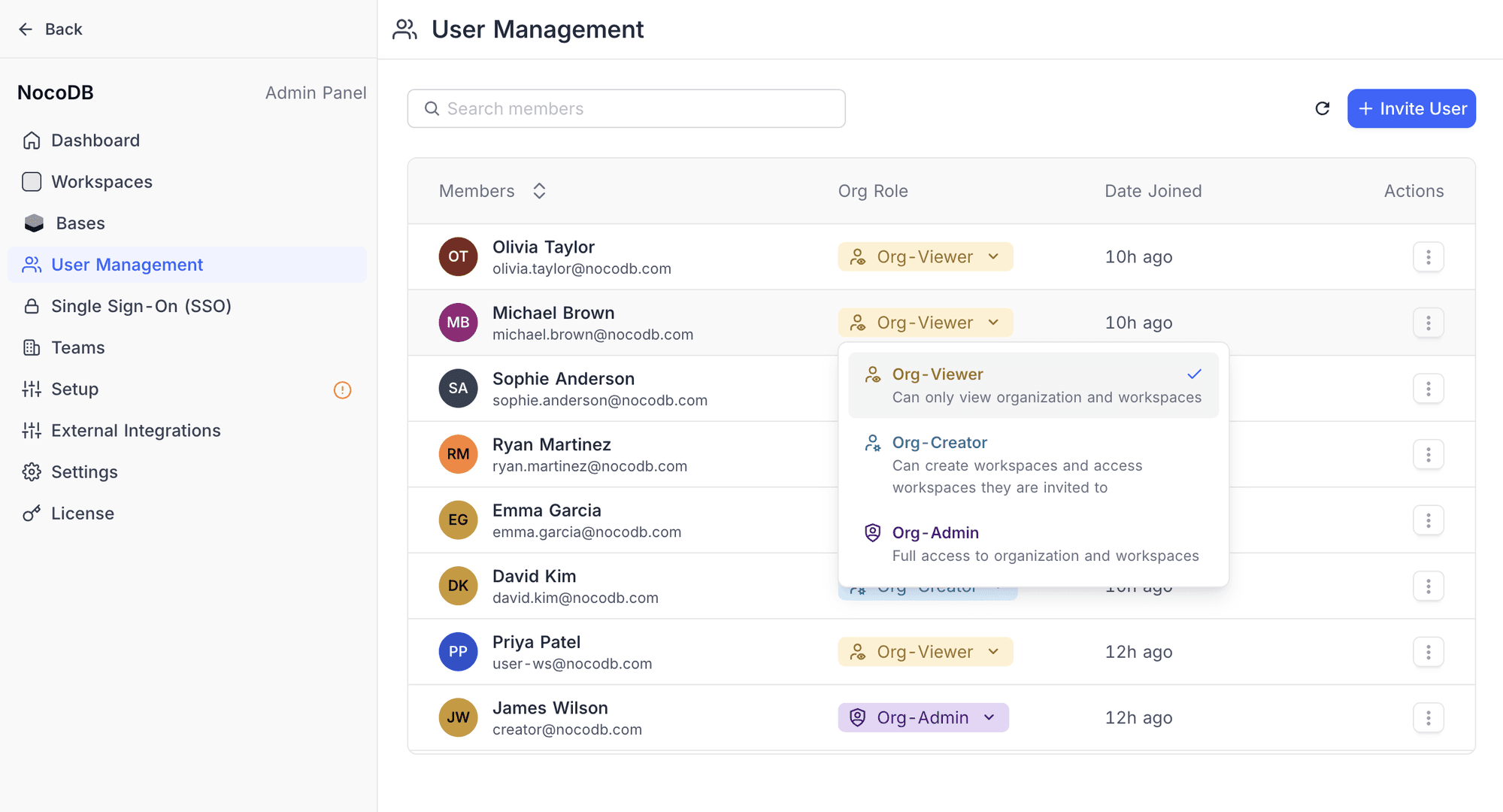
Organisations add a centralised management layer above workspaces for controlling members, teams, security policies, and governance from a single place. Whether you're an enterprise with dozens of workspaces and hundreds of members, a growing company that needs to restrict who can create workspaces, or an IT team rolling out SSO and SCIM across the board, Organisations bring it all under one roof.
When a workspace is upgraded to Enterprise (or on self-hosted instances), an Organisation is created automatically, and the upgrader becomes the Org Admin. The Org Admin gets a dedicated Admin Panel to manage every workspace, base, member, and team. Configure SSO, set up SCIM, manage billing, and control workspace creation permissions.
Members are assigned one of three roles: Org Viewer (access invited workspaces only), Org Creator (can also create workspaces), or Org Admin (full control). These roles are independent from workspace or base roles. Organisations also introduce org-level teams that span the entire organisation and can be assigned roles across any workspace, managed from the Admin Panel with an ORG badge to distinguish them from workspace teams.
Workflow Nodes
Automate more of your business processes with six new workflow capabilities. Connect NocoDB to the tools your team already uses, trigger actions from data changes, and push updates back without writing code.
GitHub
Automate your development workflow: create and update issues, manage labels, open pull requests, and trigger workflows on push, PR, or release events.
👉 Learn more about the GitHub node →
Google Calendar
Trigger workflows when new calendar events are created, useful for scheduling follow-ups, syncing meeting notes, or kicking off prep workflows.
👉 Learn more about the Google Calendar node →
Twilio
Reach customers and team members via SMS, WhatsApp, or automated voice calls, directly from your workflows.
👉 Learn more about the Twilio node →
HubSpot CRM
Keep your CRM in sync: create, update, find, and retrieve contacts, companies, and deals as part of any automation.
👉 Learn more about the HubSpot CRM node →
HTTP Request
Connect to any external API or service with configurable methods, headers, query parameters, and request body.
👉 Learn more about the HTTP Request node →
Outlook/Gmail
Schedule and send follow-up emails directly from workflows, no external email tool required.
👉 Learn more about Outlook → | Learn more about Gmail →
Base-Level Integration Management
Previously, only workspace admins could set up integrations. Base Creators and Owners can now create database, AI, and auth integrations directly from Base Settings → Integrations, no workspace admin access required. Integrations are still stored at the workspace level, so workspace admins retain full visibility.
Workspace admins get finer control too. A new "Manage Base Access" dialog lets you restrict each integration to specific bases or make it available to all. A "Connections" tab in Base Settings shows every integration linked to that base: who added it, when, and its access level.
Base-created integrations are automatically marked as Restricted (only that base can see them). Workspace admins can broaden or narrow access at any time.
API v3 Expansions
Building on NocoDB? The v3 API continues to grow with new endpoints for deeper programmatic access:
- Comments: Read, create, update, and delete comments on records
- Forms: Manage form views with type-safe field mappings
- Webhooks: Configure and manage webhooks with validation
- Documents: Full CRUD for NocoDocs with block type support and reordering
- Dashboard: Programmatic dashboard management
- ID Fields:
id_fieldsproperty added to API v3 responses for reliable record identification across integrations
UI Revamped
Side Minibar
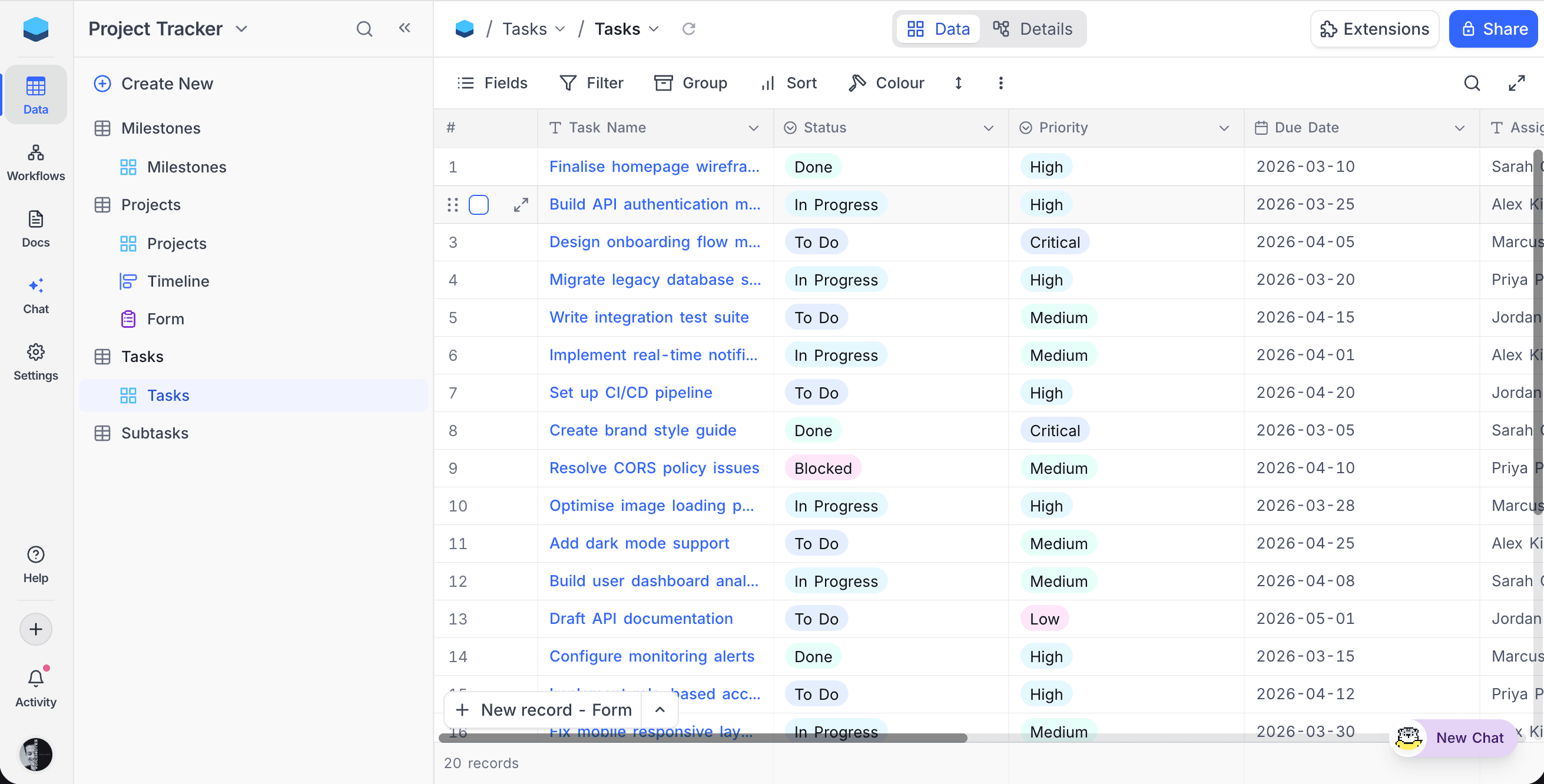
The navigation experience has been redesigned to help you move between data, docs, workflows, and settings faster.
- Dedicated minibar sections for Data, Docs, Workflows, Chat, and Settings, one click to switch context
- Compact rail layout on smaller screens for space efficiency
- Cleaner workspace and base switching from the top of the minibar
- Improved mobile navigation with adaptive sidebar behaviour
New Workspace Page
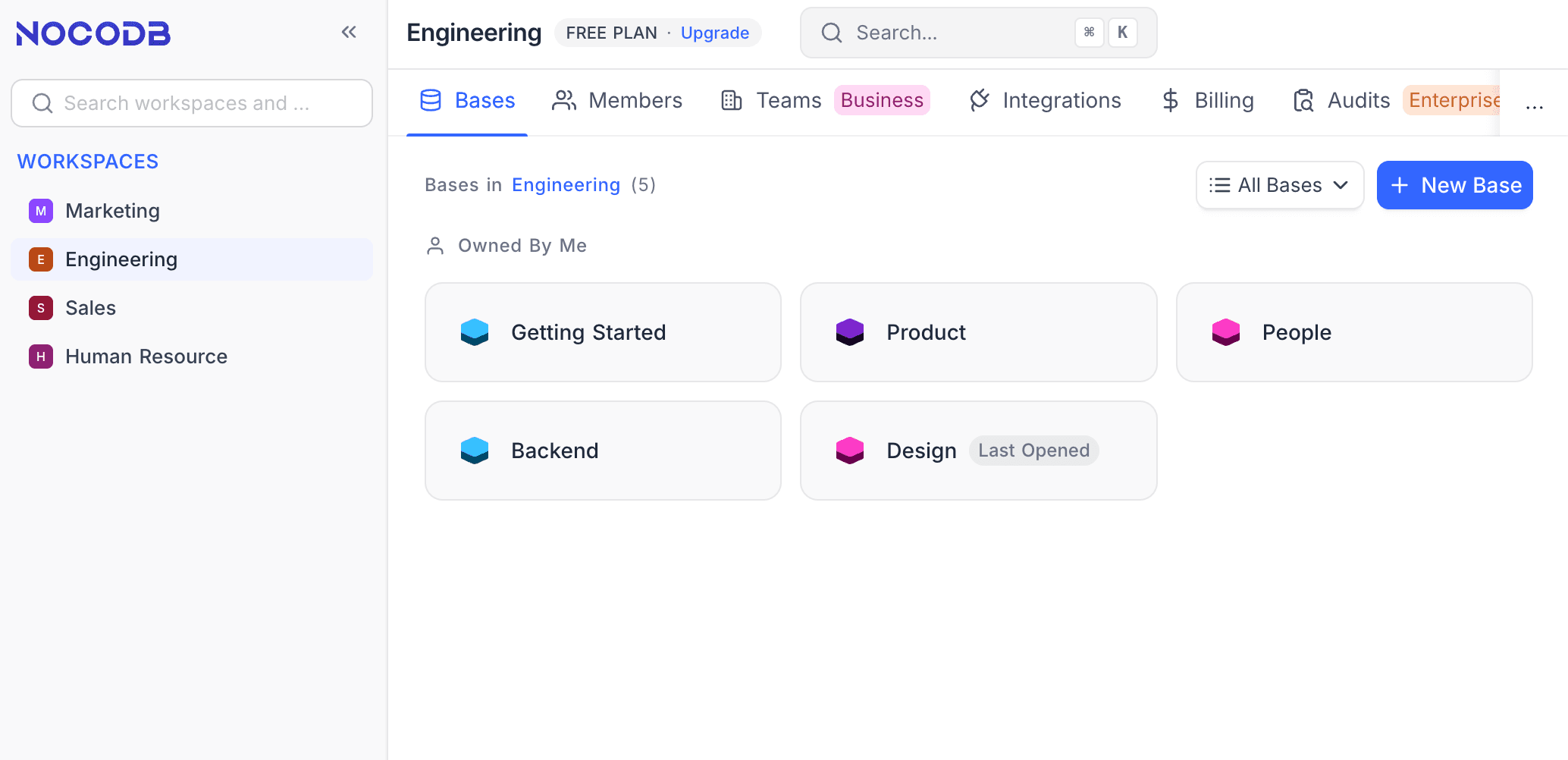
The workspace landing page has been refreshed with a cleaner layout: browse all your workspaces in the left sidebar, see bases as cards with "Last Opened" indicators, and access Members, Teams, Integrations, Billing, and Audits from a single tab bar.
Responsive Mobile UI
NocoDB now works better on tablets and phones. Mobile-optimised drawers, adaptive toolbars, and smarter sidebar behaviour make it practical to review data, approve records, or check dashboards on the go.
Change in Product Behaviour
Organisation-Level Access Control (Enterprise)
NocoDB now introduces the concept of an Organisation for enterprise deployments, changing how workspace creation permissions work.
Previously, all members could create workspaces freely. Starting with this release, workspace creation is restricted by default. All existing members are assigned the Org Viewer role, which lets them access workspaces they've been invited to but not create new ones. To grant workspace creation permission, an Org Admin must change a member's role from Org Viewer to Org Creator.
This gives enterprises tighter control over workspace sprawl while keeping day-to-day access unchanged for most users.
LTAR Linked Record Search: Display Value Only
Linked record search in LTAR fields now matches against the display value field only. Secondary fields are no longer included in search results. Supporting search across diverse secondary field data types introduced reliability challenges that affected the overall experience. We've scoped search to the display value field for now to keep results consistent and accurate, and plan to bring back broader field search in a future release.
Integrations Management
Base Creators and Owners can now manage integrations directly from Base Settings without needing a workspace-level role. See Base-Level Integration Management for full details.
Links Field Deprecated
With the introduction of LTAR V2, the legacy Links field type is now deprecated. You can no longer create new Links fields; use Link to Another Record (LTAR) instead. Existing Links fields continue to work without any disruption, so no action is needed on your current data.
Quality of Life Improvements
- Date display format: Configure the display format for CreatedAt and UpdatedAt system fields to match what works best for your team instead of relying on the default
- Grid performance: Tables with thousands of rows now scroll noticeably smoother with pre-computed row colour evaluation, reduced rendering calls, optimised scroll handling, and cached colour computations
- Rollup formatting fix: Rollup fields now respect the formatting of Formula fields (currency, percent, decimal) instead of displaying raw numbers
- Personal view fix: Owners of personal views were incorrectly blocked from deleting filters on their own views; this is now resolved
- Calendar fix: Records with only a start date (no end date) now display correctly as single-day events in Calendar view instead of being hidden
- Formula SWITCH & IF fixes: Improved reliability across edge cases; mixed-type comparisons now work correctly on PostgreSQL, and SWITCH with BLANK-only conditions generates valid SQL
- Record bookkeeping: Scaled back unnecessary record-count tracking for on-premise deployments, reducing overhead under heavy load
- Group-by Lookup fix: Grid views grouped by a Lookup field referencing a User field now render correctly instead of showing loading skeletons
- Better AJV validation messages: Clearer error messages for API validation failures
- CSV import: Improved handling of Date objects and empty strings
- Column resize optimisation: Smoother column resizing in grid views
- Select field colours: Improved colour rendering in light mode
- Node 24 upgrade: Runtime upgraded to Node.js 24
- View section skeletons: Loading skeletons shown while view sections load
Security Fixes
- Fixed SQL injection vector in array sort operations
- OAuth scope enforcement improvements
- XSS vulnerability patches
- Hidden columns no longer leak through shared view API query params
- CE rate limiting added