2026.09.0 : NocoDB available as a Claude Connector with 1200% more MCP tools!
NocoDB is now in Claude Connectors with 1200% more MCP tools. Build entire databases, workflows, and interfaces and manage permissions from any MCP client. Plus rich text emails in workflows, buttons available on interfaces, and drag and drop in List View.
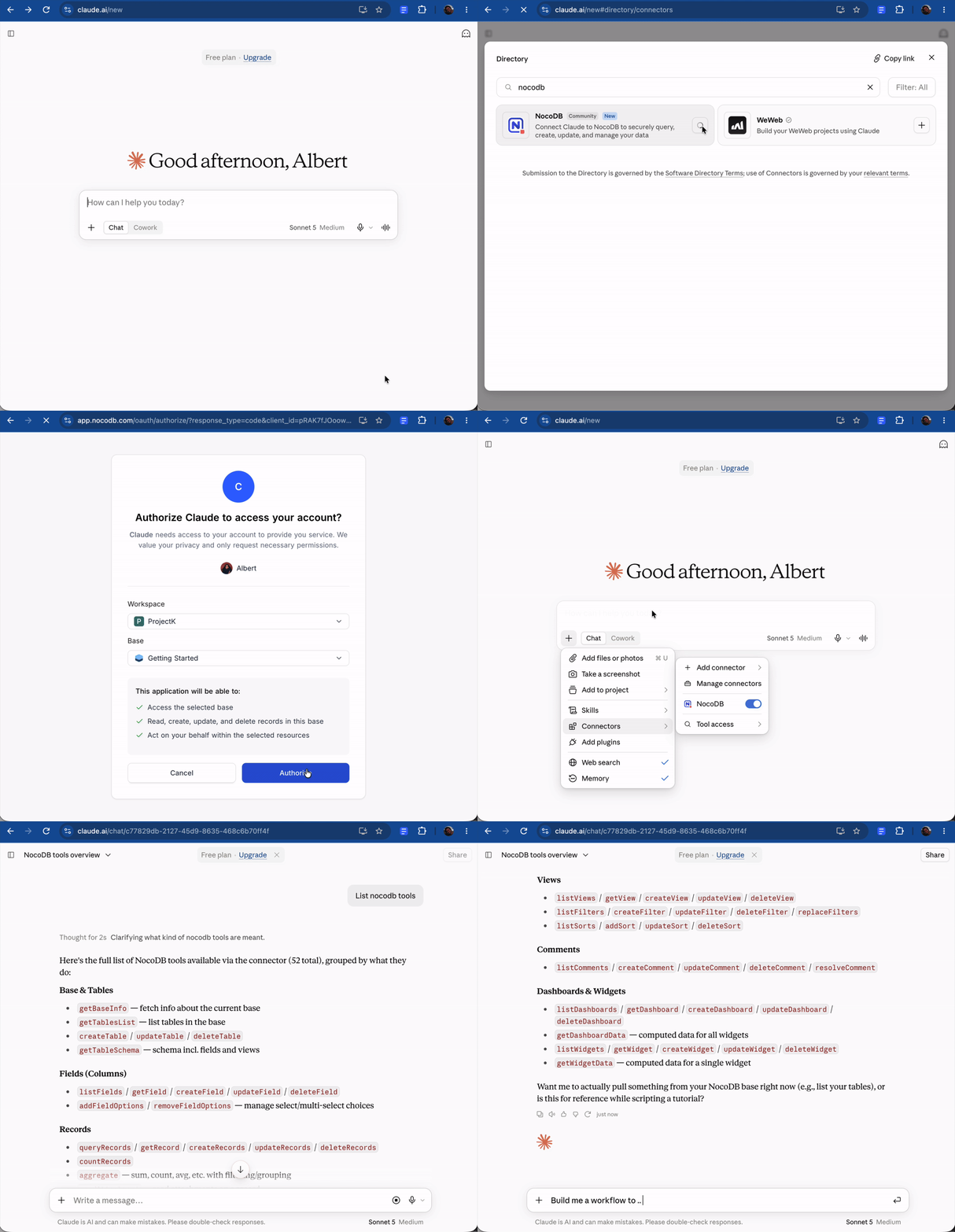
NocoDB in Claude Connectors
NocoDB is now available in Claude Connectors, so a base can be connected to Claude from the connectors directory rather than adding the MCP URL manually. Once connected, Claude can use every MCP tool the connecting user's role allows, which as of this release is a set of 149 covering the whole workspace.
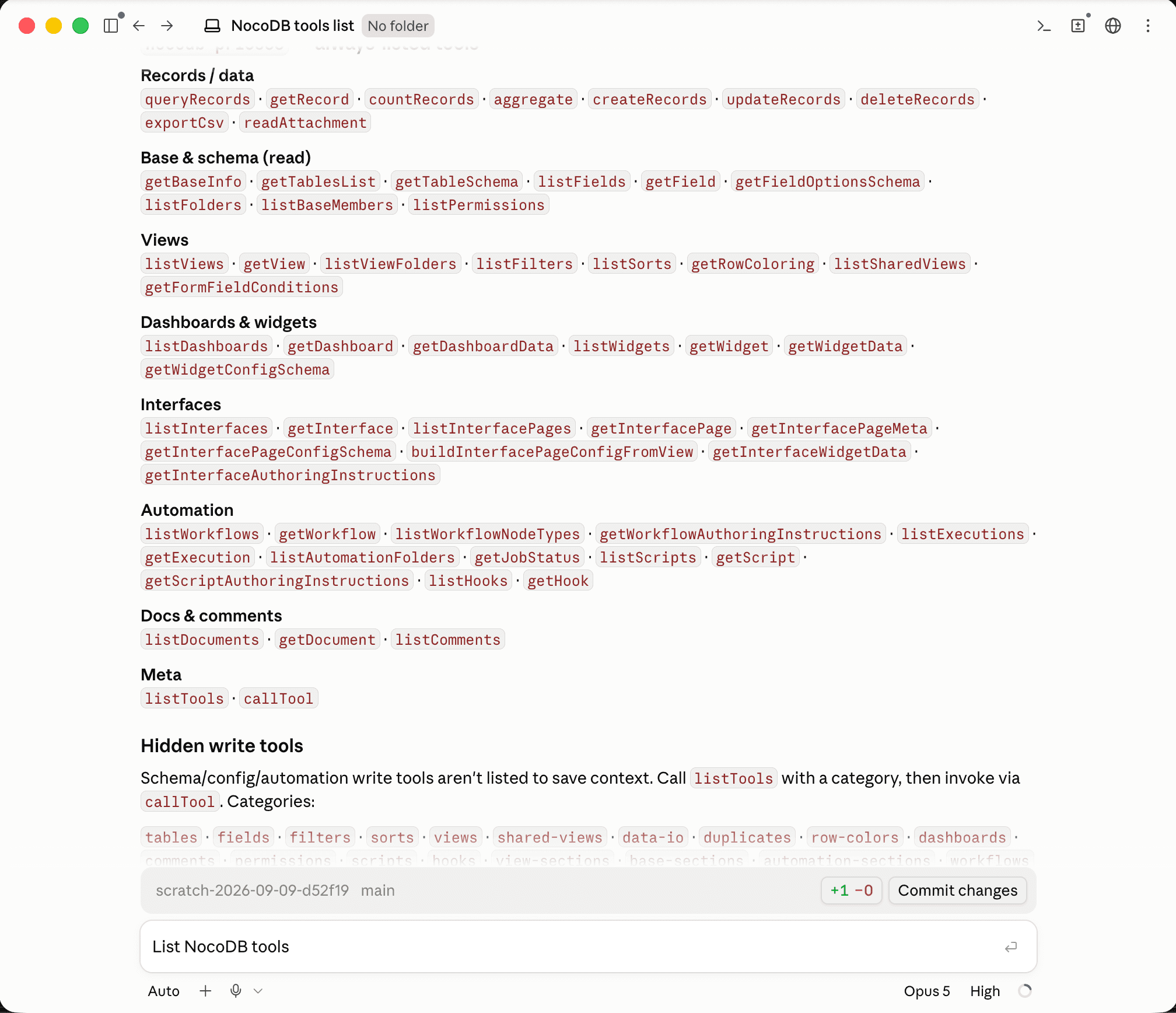
1200% More MCP Tools
The MCP server has gone from 11 tools to 149, covering the whole workspace, not just records. Claude, ChatGPT, Cursor, or any MCP client can now build in NocoDB: stand up a table, wire a workflow to a webhook, assemble an interface page, or lock down permissions, all in one conversation.
Tools span tables, fields, views, filters, sorts, workflows, interfaces, dashboards, widgets, scripts, documents, webhooks, comments, permissions, Record-Level Security, row coloring, folders, members, and CSV import and export. Each wraps the same service as its REST API, so validation, permissions, and audit are identical, and every call respects the caller's role: viewers read, editors write, creators change schema.
Setup guides now cover Claude, Cursor, Windsurf, AntiGravity, and Codex, and the endpoint also accepts the token in an x-api-key header for clients that cannot rename the header.
149 is just the start. We are already building the next set, and that is the one that changes business software for good.
Rich Text Emails in Workflows
Workflow emails can now be formatted. The Send Email, SMTP, Gmail, and Outlook nodes share a rich text editor that supports headings, text styling, lists, colors, and links with custom anchor text. Workflow variables can be inserted anywhere in the body.
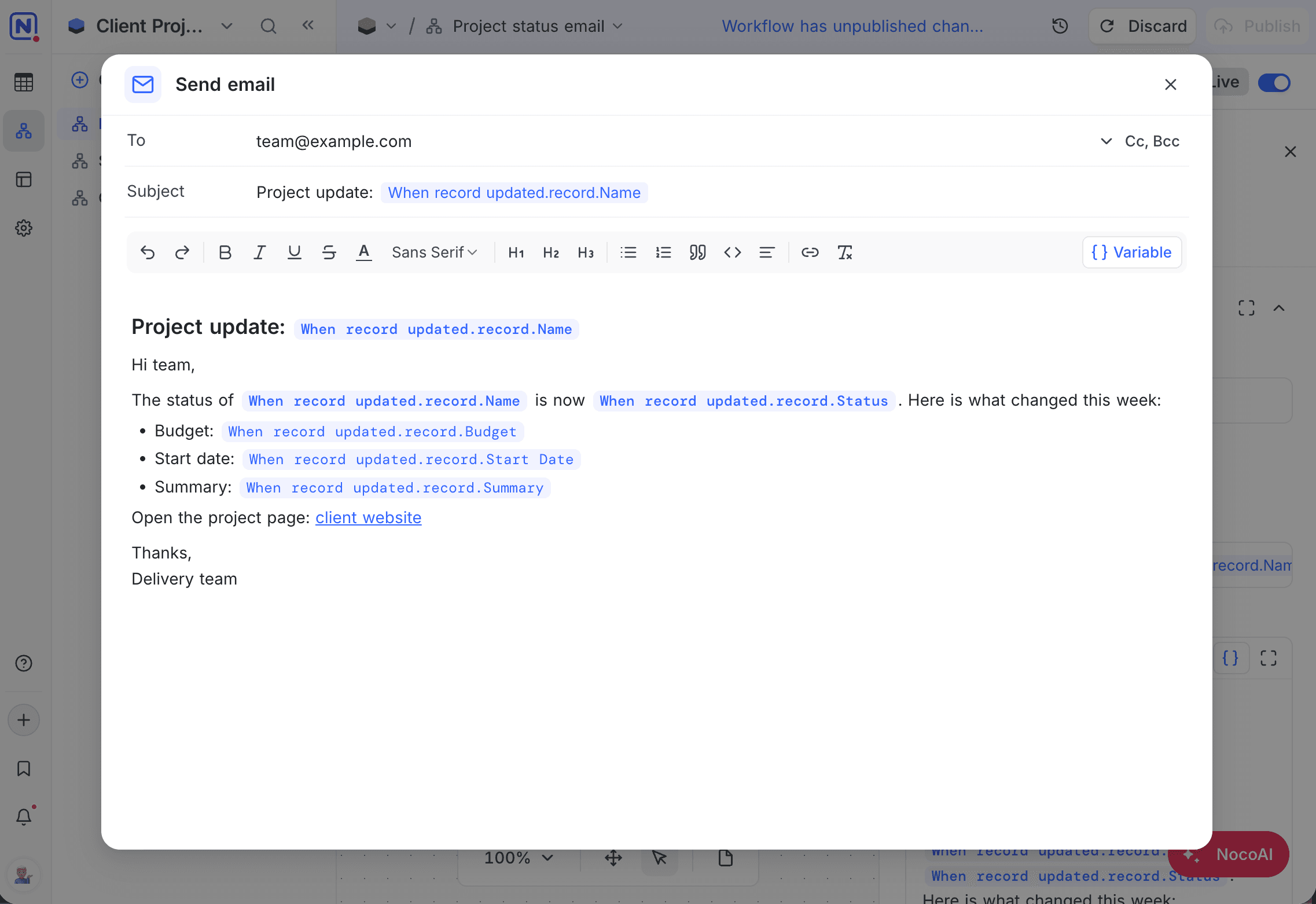
Learn more about the Send Email node →
Improvements
- Buttons across interface pages - Buttons can now be placed on table page headers, record review toolbars, dashboard group headers, and field groups inside a record sheet. Page-level buttons run an automation without a record, and Go to interface page can open a page in any interface in the base. Learn more
- Drag and drop in List View - Records in List View can be dragged across the hierarchy: drop one onto another to nest it, or onto a different parent to move it there. Sub-records travel with their parent, and the underlying links are updated for you. Learn more
- Create a linked record field inline - When List View levels or nested records need a link that does not exist yet, click Create a linked record field to create it on the spot, in both the base view and the interface builder. Learn more
- Date helpers in workflow expressions -
$now()returns the current time and$dateAdd(date, amount, unit)offsets it, for example$dateAdd($now(), 3, 'days'). - Faster Kanban - The optimized Kanban board, previously a feature preview, is now the default everywhere, including the Community Edition. Stacks load progressively as you scroll.
- Excel downloads of large tables - Excel exports are streamed, so very large tables download reliably and produce smaller files.
- Task progress in long documents - The task count of a checklist document follows you into the header once the title scrolls out of view.
What's Fixed
- Nested lookups - A lookup of a lookup shows every value in the grid and resolves correctly over many-to-one links, on MySQL, SQL Server, and Oracle.
- Conditional rollups with Current User - Rollup, lookup, and link fields whose conditions use Current User are computed for each user rather than served from a shared cache.
- Sync reliability - A table sync now always completes rather than staying in the syncing state, and editing an app sync saves without error.
- Workflow record nodes - Testing a Create record or Update record node reports any field key that does not match the target table, instead of writing a blank record.
- Interface record sheets - Edits made while stepping through records appear in the grid immediately, link and unlink actions offer Undo, and a record created inside a group stays in that group.
- Interface keyboard navigation - With a record sheet open, arrow keys move through the grid and the sheet follows, and Alt+Left and Alt+Right step between records.
- Interface builder - Adding a sort keeps the dropdown open, grouping an embedded linked view leaves the page behind it in place, a launched interface reflects changes published from another tab, overview pages switch between edit and preview without error, and the Set field to value rows of an Update record button render every field type at a consistent height and scroll when there are many.
- Document checklists - Ticking a task is reflected for every collaborator in realtime, and a new unchecked sub-item under a completed task renders without strikethrough.
- Integration permissions - Attempting to edit an integration created by someone else shows a clear message instead of signing you out.
- MCP - Sorting records works in the Community Edition, tokens without a base role receive a clear access denied response, OAuth authorization completes from clients such as OpenAI's platform, unknown tool parameters are rejected rather than silently dropped, and delete tools report what was removed.
- External sources - An oversized page of results explains how to reduce fields or page size instead of reporting the source as unreachable, and formula fields on a source that was temporarily unreachable recover on their own once it is back.
- API filters and aggregations - A
~notcondition wrapping a group of conditions now negates the whole group, and requesting several aggregations on the same field returns each of them. - Folders - The + button on an external data source now offers Folder alongside Table, and a folder created from an item's Move to menu takes the item's position in the sidebar instead of the end of the list.
Self-Hosting Notes
- Community mode keeps Free features visible - With Show only community edition features on, Workflows, Interfaces, and folders stay available, and plan-locked sub-features are hidden rather than shown as dead controls.
- Security hardening - Disabled or expired API tokens are rejected in the Community Edition, members without workspace access receive only the workspace name and plan, hidden fields stay hidden behind row color rules and group-by on shared views, shared view metadata no longer includes other views' share links, uploaded file paths and job progress endpoints are checked against their owner, comments are scoped to their base, and table visibility is enforced on every route.
- Clearer PostgreSQL permission errors - A schema change attempted without table ownership names the affected table in full, including quoted names with spaces or mixed case.
- Paid field types on unlicensed deployments - Field types not included in the Community Edition (UUID, AutoNumber, Color, unique constraints, and lookup limits) are now rejected by the API as well as the UI.
Planned Breaking Change to API Datetime Format
On PostgreSQL and SQLite deployments, datetime values returned by NocoDB will move from second to millisecond precision:
| Today | Upcoming release |
|---|---|
2026-07-25 12:34:56+00:00 | 2026-07-25 12:34:56.000+00:00 |
- Scope: REST API responses, webhook payloads, and CSV/file exports. Values are formatted on read, so existing records are returned in the new format too. No data migration or backfill is required.
- What to check: Consumers that parse datetimes with a strict or fixed format may need to accept the millisecond component. Tolerant parsers such as Day.js and most ISO 8601 parsers are unaffected.
- Filters: Range filters and sorting are unaffected. Exact datetime equality filters compare at second precision, so they may not match values carrying non-zero milliseconds. Millisecond-aware filtering is planned as a follow-up.
- Not affected: MySQL, SQL Server, and Oracle connections keep second precision, formula-rendered datetimes stay at second precision, and the datetime display in the app is unchanged.
For more details on the features introduced in 2026.08.2, see the 2026.08.2 changelog.
Availability
| Feature | Community Edition | Cloud Free Plan | Paid Plans In Cloud/On-Prem |
|---|---|---|---|
| NocoDB in Claude Connectors | ✅ | ✅ | ✅ |
| 1200% More MCP Tools | – | ✅ | ✅ |
| Rich Text Emails in Workflows | – | – | ✅ |
Rich Text Emails require the Plus plan and above on NocoDB Cloud. In the Community Edition, the MCP server keeps its record tools.