Tools and Access
Copy a prompt, paste it into NocoAI in any base, and replace the words in [brackets] with your own.
- Let [Lead qualifier] update records
- Give [Answer bot] access to the documents of this project
- Turn off web access for [Weekly digest]
Tools and access sets the tools of an AI agent in NocoDB: what the agent can read and change. For each kind of item, you pick a level: None, Read or Edit. The project role of the agent sets the upper limit: an agent can only change records when its role is Editor.
Before you begin
- To change the access of an agent, you need the Creator role or higher in the project.
Set the agent tools and access level
- Open the agent.
- In the top bar, click Settings.
- Go to Tools & access.
- For each row, click a level.
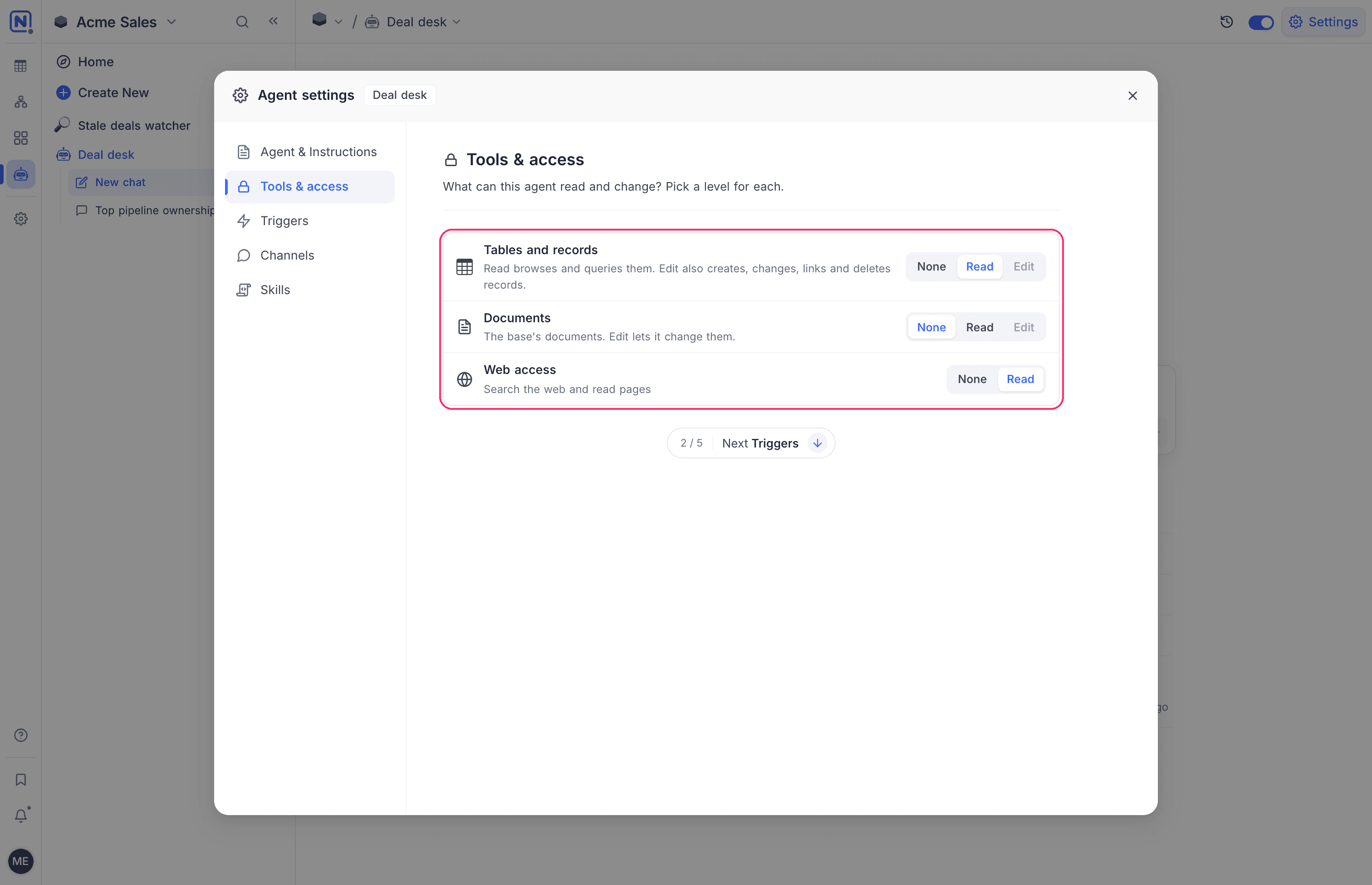
NocoDB saves the change at once. It applies from the next run.
| Row | Levels | What each level lets the agent do |
|---|---|---|
| Tables and records | None, Read, Edit | Read browses and queries the tables and records. Edit also creates, changes, links and deletes records. |
| Documents | None, Read, Edit | Read reads the documents of the project. Edit also changes them. |
| Web access | None, Read | Read searches the web and reads pages. |
| GitHub | Edit | Coding agents only. The agent reads code, pushes branches and opens pull requests in its repositories. This row is always on. |
Give each agent the lowest level that does the job. An agent that answers questions or writes reports needs Read. Give Edit only when the job is to change data, for example to triage requests or to fill in records.
Sometimes the tools of an agent were picked one by one, for example through the API. NocoDB then shows Some of these tools were picked one by one. Choose a level to set them all. Click a level to replace them.
The project role of an agent
Every agent is a member of its project, with its own role. The role is Viewer, Commenter or Editor. An agent cannot have a higher role than Editor.
The Edit levels need the Editor role. When the agent has a lower role, the Edit option is not available and shows Requires Editor access or higher.
An agent that you create manually starts with the Viewer role. An agent from the setup chat gets the Editor role only when its draft changes records. See Create an agent.
To change the role of an agent:
- In the mini sidebar, click Settings. The project settings open at Members.
- In the All members menu, select Agents. The list shows the agents with a role in this project.
- Click the role of the agent. The role menu opens.
- Select a new role.
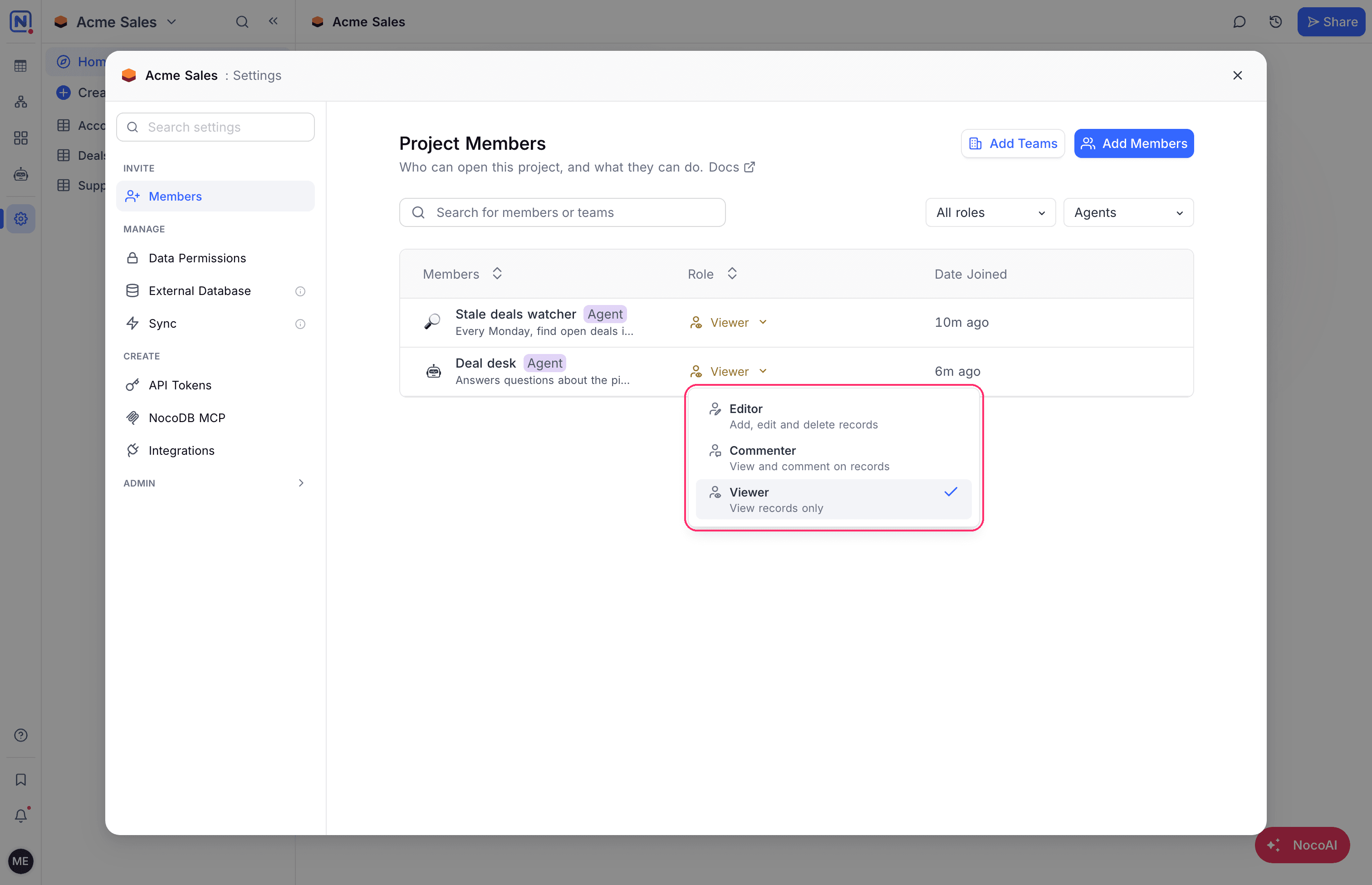
An agent is a subject like a member or a team. You can use it in table permissions, field permissions and record-level security policies. For example, a policy can show an agent only the records of one region.
What an agent can reach
An agent can do an action only when both of these allow it:
- Its access level in Tools & access.
- Its role in the project, and any table permissions, field permissions or record-level security policies that apply to it.
In a chat, the agent also acts with no more than the role of the person who chats with it. See Chat with an agent.
The managed machine
Every general agent can run code on a managed machine. The agent uses the machine to work with files and data, for example to read an attached spreadsheet, convert a file or calculate a result. NocoDB sets up the machine. You do not configure it.
- The machine starts the first time the agent needs it in a session.
- Code on the machine can reach the internet only when Web access is on.
- The files of the agent are on the machine at every run. See Files.
Coding agents run on a machine that you configure. See Machines.
Good to know
- Records that an agent creates or changes show the agent as the author, in the record history and the audit log.
- A change that an agent makes does not start the triggers of that agent again. It can start the triggers of another agent. NocoDB stops a chain of agents that start each other after 3 steps.
Related
Last updated on