Machines: Cloud Development Environments
A machine is the cloud development environment of a NocoDB coding agent: the computer that each coding session runs on. It has the languages, databases and tools that your code needs to build and run its tests. Every session starts on a fresh copy of a machine, so sessions do not affect each other. New sessions use the Default machine of the agent.
Before you begin
- To create, change, build or delete machines, you need the Creator role or higher in the project. Members with the Editor role can see the machines and pick one for a session. NocoDB shows them Only Creators can create, edit or build machines.
- To build a machine, the workspace must have credits.
The base machine
Every machine builds on the Base machine. The base machine runs Ubuntu 22.04 with a desktop. It has these tools:
- Node.js 24
- Python 3
- git
- GitHub CLI
- ripgrep
- Chrome
A session with no machine of its own runs on the base machine.
When you set up a coding agent, NocoDB creates a machine for the default repository. It adds the tools that it finds in the repository and builds the machine before the first run.
An ephemeral environment for every run
A NocoDB coding agent machine gives each run an ephemeral environment. Each run starts on a fresh copy of the machine, so runs do not affect each other. The copy is an isolated cloud sandbox: sessions do not share files or processes. See Security.
The cloud dev environment of a session stops when it is idle, and the session keeps its work. When you archive a session, NocoDB releases its machine and stores its work. See Stop when idle.
Open the machines of an agent
The machines of a coding agent are in its settings.
- Open the coding agent.
- In the top bar, click Settings.
- Go to Machines.
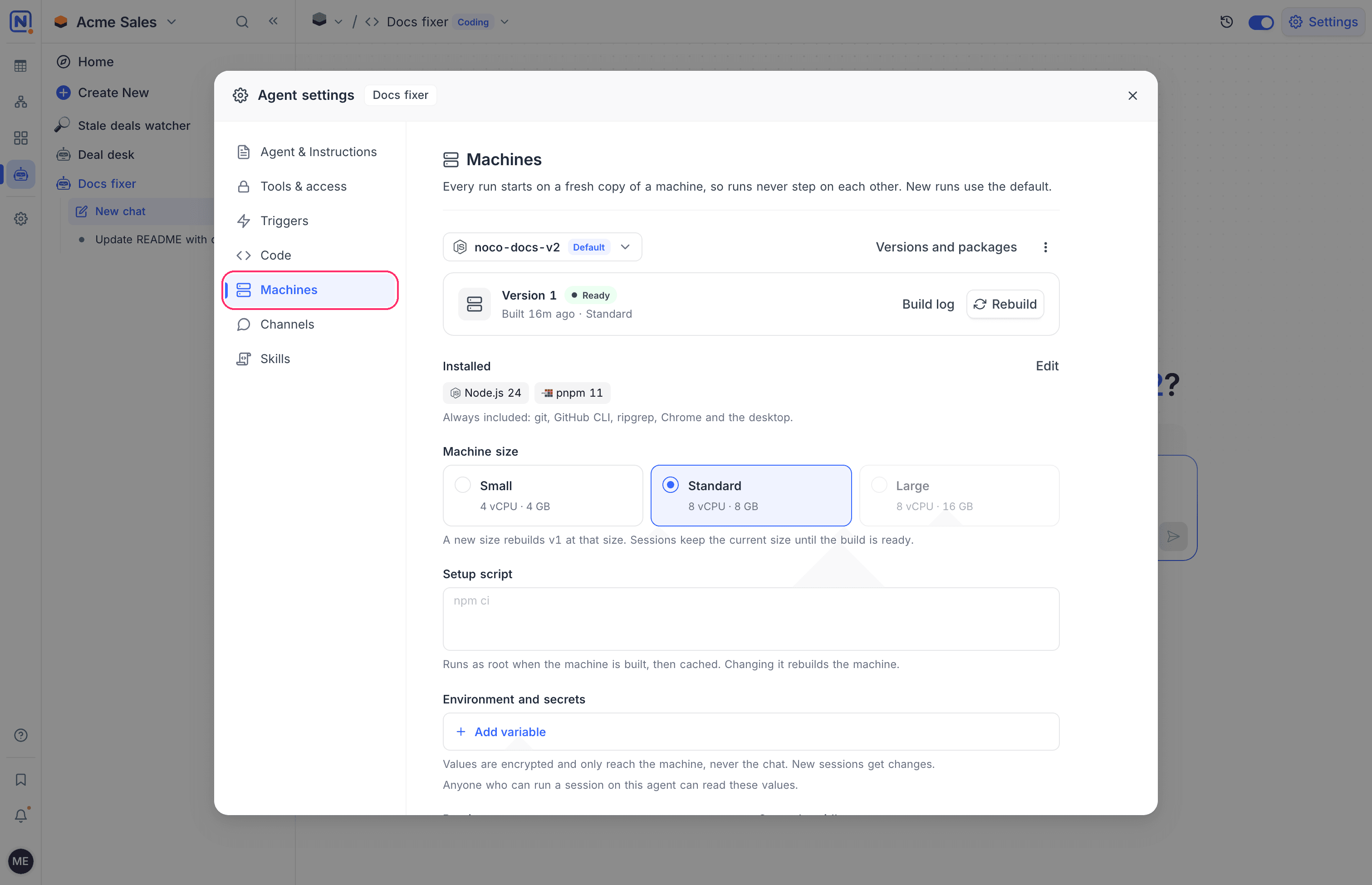
The Machines section shows the selected machine and its settings. Use the menu at the top to select another machine. Click Versions and packages to open the machine page, with the tabs Overview, Versions and Build log.
Create a machine
A coding agent can have more than one machine.
- In the Machines section, open the machine menu.
- Click New machine.
- Type a Name.
- In Copy packages from, select a machine to start from. To start empty, select None. You then pick the packages after you create the machine.
- Click Create machine.
- Pick the packages.
- Build the first version. See Pick packages and build.
Until you build its first version, a machine shows Not built yet, and sessions on it use the base machine.
To make a machine the default:
- Open More actions.
- Click Make default. New sessions then start on the machine.
You can also rename and delete a machine from the More actions menu.
Pick packages and build
You pick the packages of a machine on the machine page. Then you build a new version of the machine.
- Open the machine page.
- Open the tab for the new version, for example Build first version or New version.
- Turn on the packages that the machine needs. Search the catalog, or browse its tabs: Languages, Package managers, Services, Tools, Extra packages and Commands.
- For a language, select a version.
- Click Build and the version, for example Build v2.
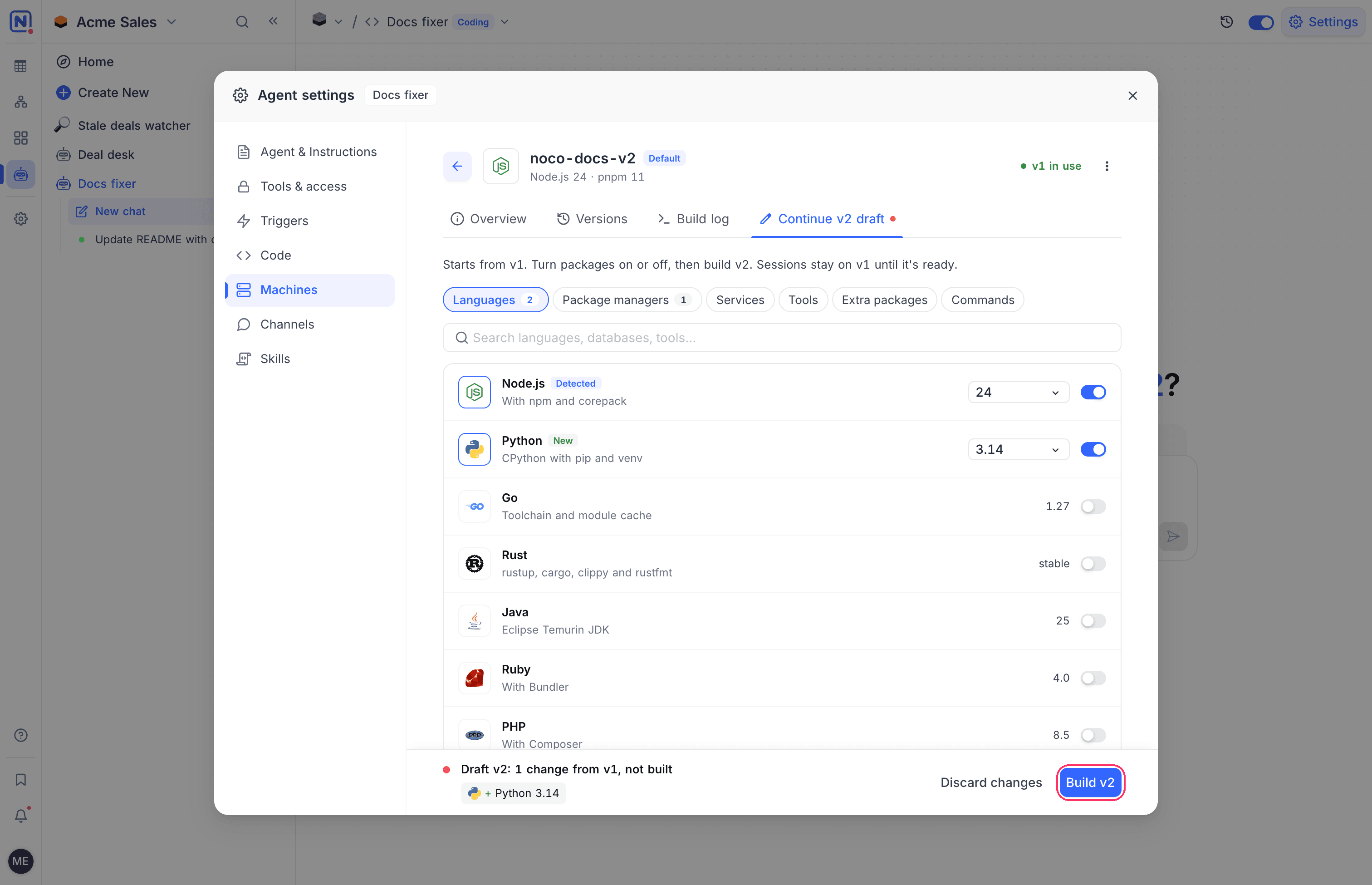
Until you build it, the new version is a draft. The footer shows the changes from the version in use, for example Draft v2: 1 change from v1, not built. The tab shows Continue v2 draft. To drop the changes, click Discard changes.
Builds take a few minutes. You can continue to work. Sessions stay on the current version until the new version is ready. When the build is ready, new sessions use it.
The catalog has these packages:
| Category | Packages |
|---|---|
| Languages | Node.js, Python, Go, Rust, Java, Ruby, PHP, .NET, Bun, Deno |
| Package managers | pnpm, Yarn, uv, Poetry |
| Services | PostgreSQL, MySQL, Redis, MongoDB |
| Tools | Docker, Playwright browsers, ffmpeg, AWS CLI, Terraform, kubectl |
A Detected tag marks the packages that NocoDB found in the repository, for example from package.json, .nvmrc, pyproject.toml, go.mod or docker-compose.yml.
Extra packages
For anything that is not in the catalog, add it by name under Extra packages:
| Field | Installs with |
|---|---|
| System (apt) | apt |
| Global npm | npm install -g |
| Global pip | pip install |
Type the package name. Then press Enter.
Services
A service, for example PostgreSQL or Redis, starts with every session. The agent gets its connection details as environment variables, so tests and dev servers connect without setup. For example, PostgreSQL sets DATABASE_URL, and Redis sets REDIS_URL.
Setup script
The Setup script runs as root when the machine is built, after the packages. Use it for steps that the catalog does not cover, for example to install a tool from its own installer. Write one command per line.
A command that fails makes the build fail. NocoDB caches the result, so the script does not run again in each session.
To save a change, click Save and rebuild.
Environment and secrets
Environment and secrets are environment variables that NocoDB sets on the machine of every session, for example an API key for a test service.
- In Environment and secrets, click Add variable.
- Type the name, for example
STRIPE_TEST_KEY. Use letters, digits and underscores. The name cannot start with a digit. - Type the value.
- Click Add, or press Enter. NocoDB saves the variable.
The values reach the machine only, never the chat. NocoDB hides the values in the command output and the files that the agent reads.
New sessions get the changes.
A machine can have up to 50 variables.
Preview port
Preview port sets the port that the Preview pane of a session opens. Leave it empty to open the first port that the app listens on. Type a port from 1 to 65535 to open that port.
Stop when idle
Stop when idle sets how long the machine of a session stays up after the last reply of the agent. Select 10, 15 or 30 minutes, or 1 hour. The default is 30 minutes.
When the machine stops, the session keeps its work. The machine starts again when you send a message.
Machine size
Machine size sets the CPU and memory of the machine:
| Size | CPU | Memory |
|---|---|---|
| Small | 4 vCPU | 4 GB |
| Standard | 8 vCPU | 8 GB |
Standard is the default. A machine with no size runs at Standard. When you change the size of a built machine, NocoDB rebuilds the current version at the new size. Sessions keep the current size until the build is ready.
Versions
Each build makes a new version of the machine, for example v1, v2 and v3. The Versions tab lists every version. New sessions use the version that is in use. A change of the version does not affect sessions that already run.
| Action | Where | What it does |
|---|---|---|
| Rebuild with updates | At the top of the Versions tab | Builds the packages of the version in use again, as a new version. |
| Use this version | On a version that is ready | New sessions use this version. |
| New version from this | In the menu of a version | Starts a new version with the packages of this version. |
| View log | In the menu of a version | Opens the build log of this version. |
| Cancel build | On Overview and in the Machines settings, while a build runs | NocoDB no longer waits for the build, and ignores its result. |
When a build has the same packages and commands as an earlier build, NocoDB reuses that build. The version shows Reused an identical build.
When a build fails, the version shows Build failed. Open Build log to see why. NocoDB can also suggest a fix. Review the fix. Then click Apply fix and rebuild. The suggested fix uses AI credits.
When a machine was built on an older base image, it shows Update available. New sessions cannot start from it. Click Upgrade to rebuild the same packages on the current base image.
Machine suggestions from a session
When a session needs a tool that the machine does not have, the agent can suggest a change. The session shows a card that asks to add the package or command to the machine for future sessions.
| Member | What happens |
|---|---|
| A Creator | Can click Add and rebuild. NocoDB builds a new version in the background. The current session continues as it is. |
| Other members | See Only Creators can change machines. Ask one to apply this. |
An agent can have no machines yet while its repository needs tools that the base machine does not have. Creators then see This repository needs tools the base machine doesn't have on the agent page. Click Set up machine to create one.
Good to know
- A workspace can build up to 3 machines at the same time. Each machine builds one version at a time. A canceled build counts toward this limit for up to 2 hours, because it continues in the background.
- When you delete a machine, NocoDB deletes all its versions. Sessions that already run continue. New sessions use the default machine.
Related
Last updated on