Connect HashiCorp Vault
NocoDB reads secrets from one KV version 2 mount of your HashiCorp Vault. It authenticates with an AppRole (a role ID and a secret ID), or with a token you supply. Vault Community, Vault Enterprise and HCP Vault all work.
Before you begin
- The Enterprise Vaults add-on, on the NocoDB Enterprise plan or a Self-hosted Enterprise license. No plan includes it. See Turning on Enterprise Vaults.
- Workspace Owner for a workspace vault, or Org Admin for an organization vault. See Permissions.
- The
vaultCLI, signed in with permission to write policies, enable auth methods and write secrets. - A Vault address NocoDB can reach. NocoDB Cloud needs a public
https://address. See Network.
1. Write a policy
NocoDB needs read on the secrets it will resolve, and nothing else. For secrets under prod/ on a KV v2 mount called secret:
# nocodb.hcl
path "secret/data/prod/*" {
  capabilities = ["read"]
}
KV v2 stores data under <mount>/data/<path>, so the policy names secret/data/… even though you will reference the secret as prod/….
vault policy write nocodb nocodb.hclThe connection test calls auth/token/lookup-self, which Vault's default policy allows. Keep the default policy on the token; the AppRole below attaches it unless you set token_no_default_policy.
2. Create an AppRole
vault auth enable approle
vault write auth/approle/role/nocodb \
    token_policies="nocodb" \
    token_ttl=1h \
    token_max_ttl=4h \
    secret_id_ttl=0 \
    secret_id_num_uses=0

vault read -field=role_id auth/approle/role/nocodb/role-id
vault write -f -field=secret_id auth/approle/role/nocodb/secret-id
Copy the role ID and the secret ID. Vault shows the secret ID once.
Keep secret_id_ttl and secret_id_num_uses at 0. NocoDB logs in with the secret ID again at least every 10 minutes, so a secret ID that expires or has a use limit stops working, and every connection that uses the vault fails with it.
NocoDB logs in with the pair and caches the resulting token for its lease, up to 10 minutes, sharing one login across all connections that use the vault. When Vault answers 403 to a token older than a minute, NocoDB logs in again once before reporting the error, so a short token_ttl is fine. A token with a use limit (token_num_uses on the role) is never cached or shared, so every read logs in again; leave it at 0 unless you need it.
Using a token instead. Leave both AppRole fields empty and paste a token. NocoDB does not renew it, so it must be a periodic token or one with a long TTL. A token is used only when no AppRole pair is given.
3. Store a secret
vault kv put secret/prod/db username=app password=s3cretA KV v2 secret is a JSON document, so a reference must name the field inside it: username or password here. A secret with a single value still needs a field name, for example value.
4. Connect the vault in NocoDB
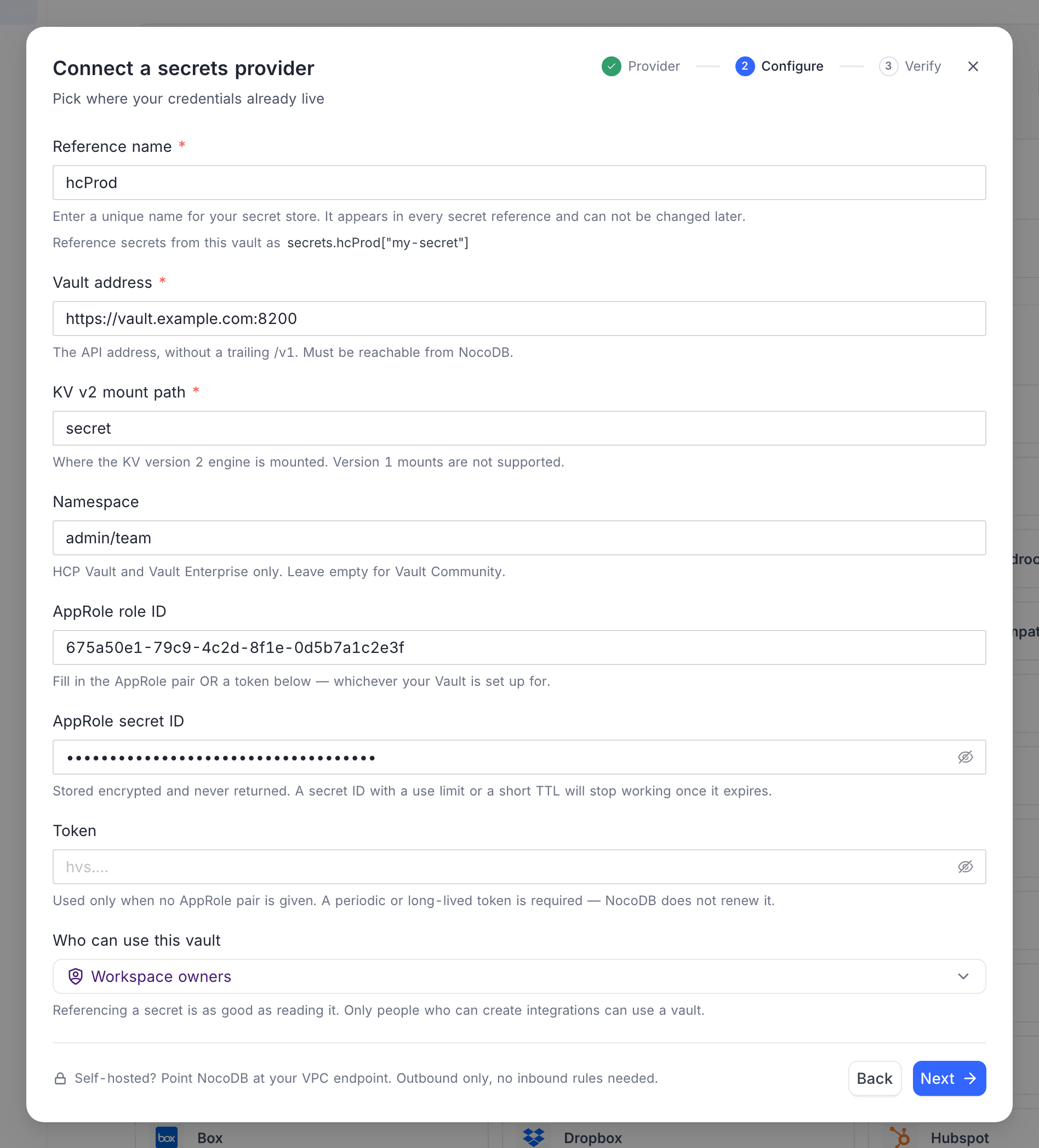
Click Connect a vault on the banner at the top of the workspace Integrations page, or open Vaults in the Admin Panel for an organization-scoped vault. Choose HashiCorp Vault, click Next, and fill in:
| Field | Value |
|---|---|
| Reference name | a short alias such as hcProd. See Choosing the reference name |
| Vault address | https://vault.example.com:8200, the API address without /v1. A pasted /v1, query or fragment is dropped |
| KV v2 mount path | the path the KV engine is enabled at, for example secret or kv. Only the mount, never data/ or the namespace. A KV version 1 mount is not supported; the test refuses it when the token may see the mount's type |
| Namespace | HCP Vault and Vault Enterprise only, for example admin/team. Leave empty on Vault Community |
| AppRole role ID, AppRole secret ID | from step 2 |
| Token | only when not using AppRole |
| Who can use this vault | Workspace owners for a workspace vault, Org owners and admins for an organization vault. See Who can use a vault |
Click Next and run the test on the Verify step. With AppRole, NocoDB makes a fresh login and then looks up the token; with a token, it looks up the token. It then checks the mount path: a KV version 1 engine, or no engine at that path, fails the test. A green result means the address, the namespace and the credentials are right. The mount check needs Vault to answer, so a policy narrow enough to hide the mount lets the test pass, and the test does not read a secret: a policy that does not cover your secrets shows only when a reference is first read. Then save.
Reference a secret
Reference a field of the KV v2 secret from a credential field as:
secrets.hcProd["prod/db"].passwordThe part in brackets is the secret's path under the mount. It is not the <namespace>/<mount>/data/… path the HCP UI shows. The last part is the field inside the secret, and it is required. NocoDB reads the latest version. See Use a vault reference.
Network
- NocoDB Cloud reaches your Vault over the public internet, so the address must be
https://and must resolve to a public address. A private or link-local address is refused with a message saying so. Allow NocoDB Cloud through your firewall. - Self-hosted NocoDB may use
http://and private addresses. A private address is still refused until you setNC_ALLOW_LOCAL_VAULTS=trueon the NocoDB server, which is the same guard the other outbound features use. - A Vault behind a private CA needs that CA added with
NODE_EXTRA_CA_CERTSon the NocoDB server. On Cloud, use a certificate from a public CA. - Point the address at Vault's API directly. NocoDB refuses a proxy that redirects, rather than following it.
- A performance standby that cannot serve the request, or a node in another cluster, is reported as such. Point the address at the primary cluster, or at a load balancer in front of it.
Rotate the credentials
To rotate an AppRole secret ID:
- In Vault, generate a new secret ID:
vault write -f -field=secret_id auth/approle/role/nocodb/secret-id. - In NocoDB, open Edit vault and re-enter every field: the vault address, the KV v2 mount, the namespace if you use one, the role ID and the new secret ID. Click Verify, then Save.
- Destroy the old secret ID in Vault.
To rotate a token, create the new token, enter it with the other fields in Edit vault, save, and then revoke the old token. See Rotating a vault's credentials.
Common errors
| Message | What to do |
|---|---|
| HashiCorp Vault requires a vault address and a KV v2 mount path. | Fill in both. Also returned when saving the vault, and nothing is saved |
| HashiCorp Vault requires either an AppRole role ID and secret ID, or a token. | Enter the AppRole pair or a token. Also shown when only one half of the AppRole pair is filled in and the token is empty |
| HashiCorp Vault AppRole authentication needs BOTH a role ID and a secret ID. | A token is filled in together with only one half of the AppRole pair. Fill in the missing half, or clear the stray role ID or secret ID to use the token |
| The vault address must be a full URL, for example https://vault.example.com:8200. | Enter the scheme and host, not only a host name |
| The vault address must be an http:// or https:// URL. | Use https:// (or http:// on self-hosted NocoDB) |
| The vault address must be an https:// URL. | On NocoDB Cloud the address must use TLS. See Network |
| The vault address could not be resolved. Check the host name. | The host name in the address is misspelled or not in public DNS |
| The vault address resolves to a private or link-local network… | See Network |
| Could not reach the Vault server at this address. Check the address, the port and that NocoDB is allowed through the network. | A wrong port, or a firewall that does not let NocoDB through |
| The Vault server's TLS certificate is not trusted. … | A private CA. See Network |
| The vault address redirected the request. Point it at the Vault API address directly, without a proxy that redirects. | Use the API address, not a proxy or UI URL |
| Vault rejected the login. Check the AppRole role ID and secret ID… | The pair is wrong, the secret ID has expired or was used up, or the AppRole method is mounted somewhere other than auth/approle |
| Vault accepted the AppRole login but returned no token. Check that the AppRole auth method is mounted at auth/approle. | Mount AppRole at auth/approle |
| Vault answered 404 for the login. Check the vault address and, on HCP or Enterprise, the namespace. | Usually a missing or wrong namespace on HCP Vault |
| Vault rejected the credentials. The token or AppRole secret ID may have expired, or the namespace may be wrong. | A token that has expired or been revoked, or a wrong namespace |
| Vault denied access to this secret. The token's policy needs read on this KV v2 path, and the mount path must be where the KV v2 engine is enabled… | Two causes look the same from outside: the policy does not cover <mount>/data/<path>, or the vault's KV v2 mount path names a mount the token cannot see. Vault answers 403 even for a mount that does not exist. Compare the mount in NocoDB with where the engine is enabled (vault secrets list), and the policy path with it |
| No such secret at this path. Check the KV v2 mount path and the secret path — a KV version 1 mount also answers 404 here. | Wrong mount or path, or the mount is KV v1 |
| Vault rejected the request. Check the mount path and the secret path. | Vault refused the request as malformed. Check both paths for typos |
| The mount path is not a KV version 2 secrets engine. NocoDB reads KV v2 only. | The test found a KV v1 engine, or another engine, at the mount path. Enable a KV v2 mount, or point the mount path at one |
| No KV v2 secrets engine is mounted at this mount path. Check the mount path. | The test found nothing mounted there. Compare the mount path with vault secrets list |
| The requested version of this KV v2 secret is deleted. Undelete it in Vault, or reference another version. | The version the reference reads was soft-deleted. Undelete it (vault kv undelete), or write a new version |
| This KV v2 secret has no readable value. A deleted version reads as empty until it is undeleted. | Vault returned the secret without data. Write a new version |
The secret path is empty. / A vault path cannot contain . or .. segments. | Fix the secret path in the reference |
| The Vault server is sealed or unavailable. Unseal it and try again. | Unseal it |
| The Vault server is not initialized. | Initialize Vault, or point the address at an initialized cluster |
| Vault is rate limiting or is a performance standby that cannot serve this request. Try again shortly. | Wait and retry, or point the address at the active node |
| This Vault node is a performance standby in another cluster. Point the address at the primary cluster. | Point the address at the primary cluster |
| Could not test the vault connection in HashiCorp Vault. Check the address, the namespace and the credentials. | Any other failure. The raw error is in the NocoDB server log |
For errors shared by every provider, see Vaults troubleshooting.
Related
Last updated on