Another Workflow Completes
This NocoDB trigger starts a workflow when a run of another workflow ends. Use it to split a long automation into parts, or to run a follow-up only after the main work succeeds. The watched workflow must be in the same project.
Ask NocoAI
Copy a prompt, paste it into NocoAI in any base, and replace the words in [brackets] with your own.
- When [Import invoices] succeeds, send a summary email to [Finance]
- When [Nightly sync] fails, create a record in [Incidents]
- When [Onboard customer] ends, update [Status] on the customer record
Configuration
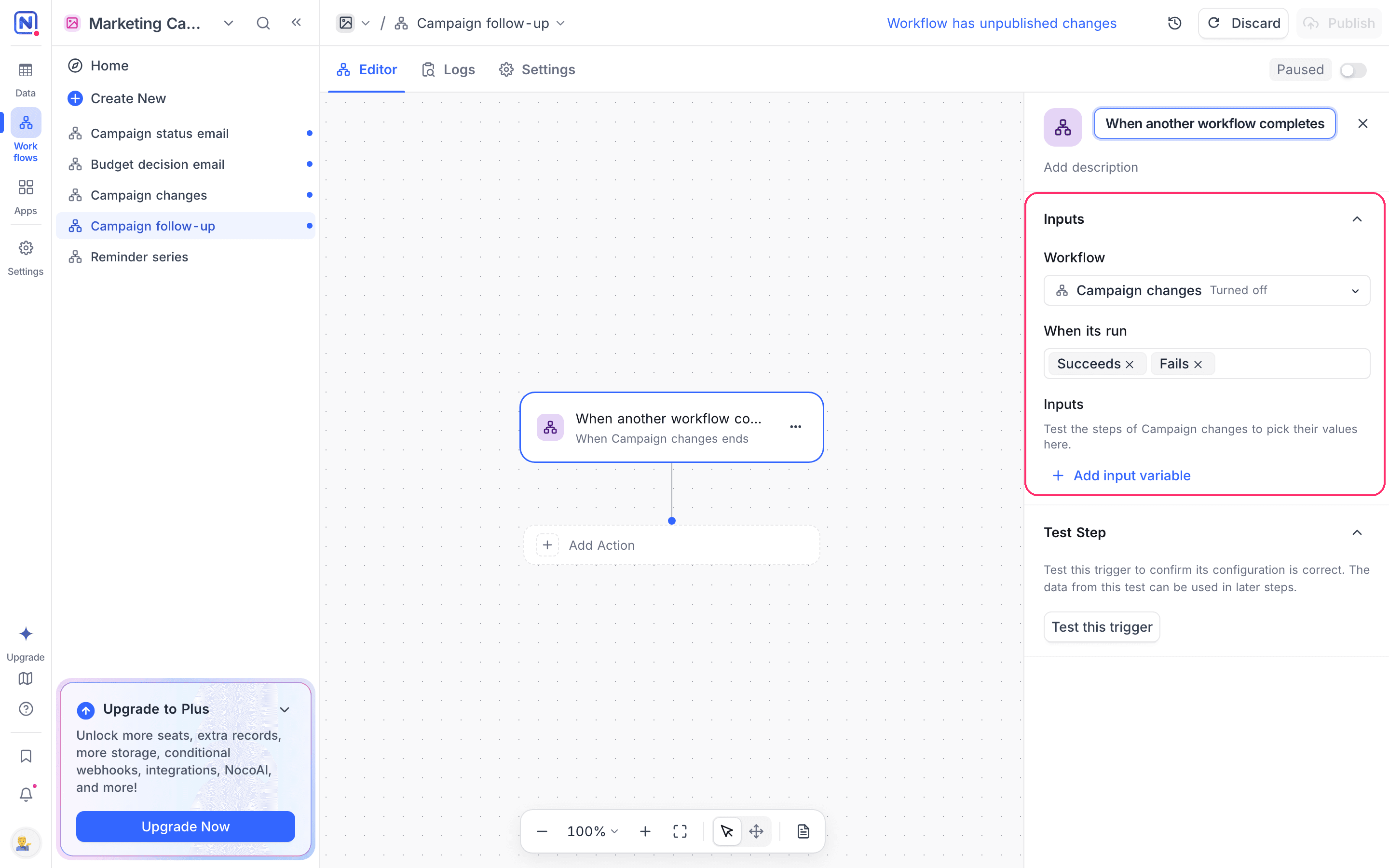
- Workflow: Select the workflow to watch. The list has the workflows of the project. A workflow that is turned off has no runs, so it never starts this one.
- When its run: Select one or more endings: Succeeds, Fails, Is cancelled. The default is Succeeds. A run that ends any other way does not start the workflow.
- Inputs: Name the values to carry over, and select each one from a step of the watched workflow. Later steps in this workflow read them as
inputs.<name>.
How it works
- When a run of the watched workflow ends with one of the selected endings, this workflow starts, once for that run.
- The output has
workflow(the watched workflow),run(its id, status,succeeded, start and finish times, and the error when it failed), andinputs. - An input can read only a top-level step of the watched workflow. A step inside a loop has one result per item, so it has no single value to pass.
- Test the steps of the watched workflow first. The input picker offers the values that those tests produced.
- If a step that an input reads is renamed or removed, the run still goes ahead with that input empty, and the run log says which input was empty and why.
- A workflow cannot watch itself, and NocoDB refuses a chain that leads back to the same workflow when you publish it.
- NocoDB stops a chain of workflows and agents that start each other after 3 runs. A 4th run is recorded as skipped.
When you publish the watched workflow, NocoDB lists the turned-on workflows that start after it. It flags each input that will be empty because the new version removes its step or puts it in a loop.
Use cases
- Run a report only after the import that fills it succeeds
- Open an incident record when a nightly job fails
- Split one long automation into parts that are easier to test and retry
Availability
- Available on NocoDB Cloud (all plans) and licensed on-premise deployments.
Last updated on
Latest product updates?See Changelog