Trash Settings ☁
Configure per-table trash retention and disable trash on a per-table basis.
Trash settings are available on NocoDB Cloud (Enterprise plan) and self-hosted Scale and Enterprise plans.
Owners can control Trash per table — turn it off when deletes should be permanent, or pick a retention period that differs from the plan default.
Open trash settings
- Click Overview in the left sidebar.
- Open the Settings tab.
- Select Record Trash.
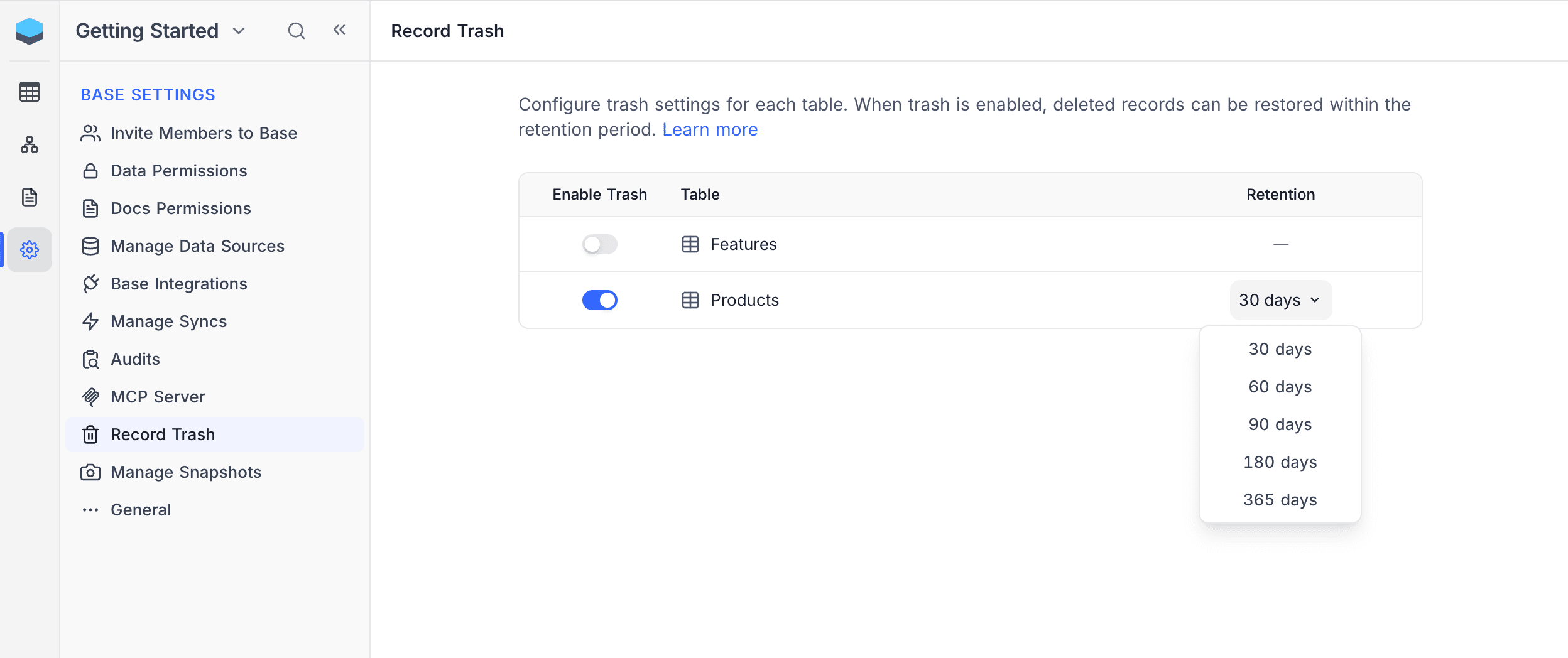
Per-table controls
Each table has two controls:
- Enable Trash — When on, deletes go to the Trash. When off, deletes are permanent and cannot be restored. The retention column shows
—for disabled tables. - Retention — How long trashed records are kept before automatic cleanup. Pick from 30 / 60 / 90 / 180 / 365 days. The default varies by workspace plan.
Disable trash
- Toggle Enable Trash off for the table.
- Confirm the dialog.
All existing trashed records for the table are permanently deleted when trash is turned off and cannot be recovered. Future deletes skip the Trash.
Change retention
- Click the retention value (e.g. 30 days) for the table.
- Select one of the preset durations — the change is saved immediately.
Role permissions
| Action | Owner | Creator | Editor | Commenter | Viewer |
|---|---|---|---|---|---|
| View trash settings | Yes | No | No | No | No |
| Modify trash settings | Yes | No | No | No | No |