Connect GitHub Copilot to NocoDB
GitHub Copilot in VS Code works with NocoDB through the NocoDB MCP server. You add NocoDB as an HTTP server and sign in to NocoDB in your browser, or you paste the JSON block from your MCP connection.
| GitHub Copilot | |
|---|---|
| Type | Desktop |
| How it connects | HTTP server in mcp.json, with OAuth or a token |
| You need | VS Code with Copilot, and an MCP connection for the token method |
Copilot uses at most 100 tools, so it connects to the /mcp-discovery endpoint. That endpoint lists most read tools and the record create, update, delete, link and unlink tools, and gives Copilot the rest on request. Refer to Clients that cap the tool list.
Connect with OAuth
-
In VS Code, open the Command Palette, run MCP: Add Server and choose HTTP.
-
Enter
https://app.nocodb.com/mcp-discoveryas the URL andnocodbas the name.To edit the file by hand instead, run MCP: Open User Configuration, or create
.vscode/mcp.jsonfor one workspace, and add:{ "servers": { "nocodb": { "type": "http", "url": "https://app.nocodb.com/mcp-discovery" } } } -
When VS Code asks to authenticate NocoDB, select Allow. The NocoDB authorization screen opens in your browser.
-
Sign in to NocoDB if it asks you to. Below Access, add the projects that Copilot can reach. Below Tools & Permissions, allow the tools that it can call. Click Authorize.
-
Open Copilot Chat, switch to Agent mode, and check that the NocoDB tools are listed.
In NocoDB, the Copilot card on the AI apps tab also has an Add to VS Code link. Select it, then select Install when VS Code opens.
On a licensed self-hosted deployment, use https://<your-nocodb-host>/mcp-discovery. The URL must be the public HTTPS address of your instance, set in NC_SITE_URL (or NC_PUBLIC_URL).
Connect with an MCP connection
Use an MCP connection when you want to pin Copilot to the projects of one connection, or on the Community Edition, which has no OAuth.
-
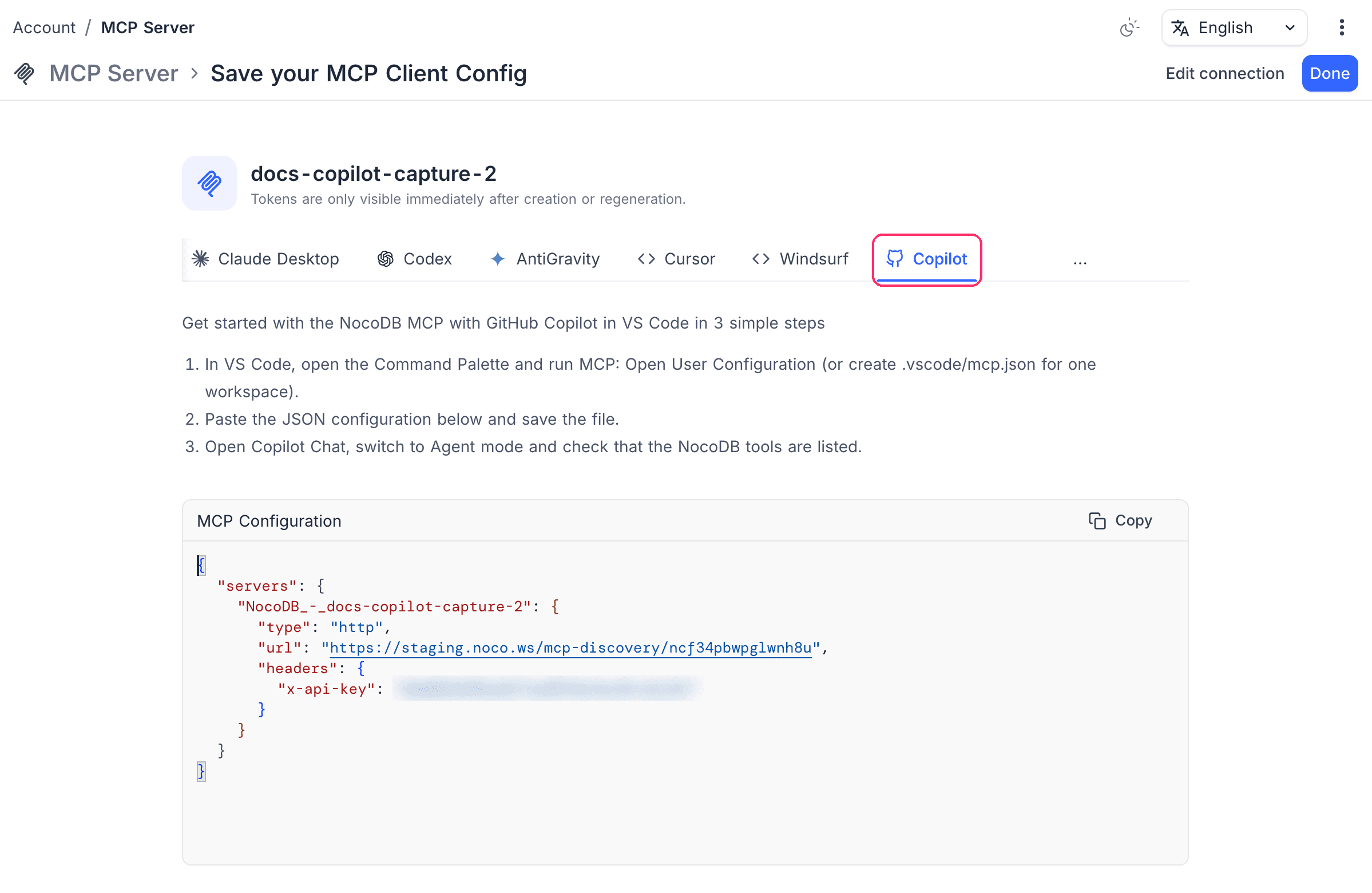
Create an MCP connection and copy the JSON block from its Copilot tab.
-
Open the Command Palette and run MCP: Open User Configuration, or create
.vscode/mcp.json. -
Paste the block and save the file.
Configuration example
Copilot names the server map servers and takes the address as url, with the token in a header:
{
  "servers": {
    "NocoDB_MCP": {
      "type": "http",
      "url": "https://your-domain.com/mcp-discovery/<ncId>",
      "headers": { "x-api-key": "<ncToken>" }
    }
  }
}
On the Community Edition, the connection URL is https://your-domain.com/mcp/<ncId>, because that edition gives the record tools only.
Related
Last updated on