Members and Roles
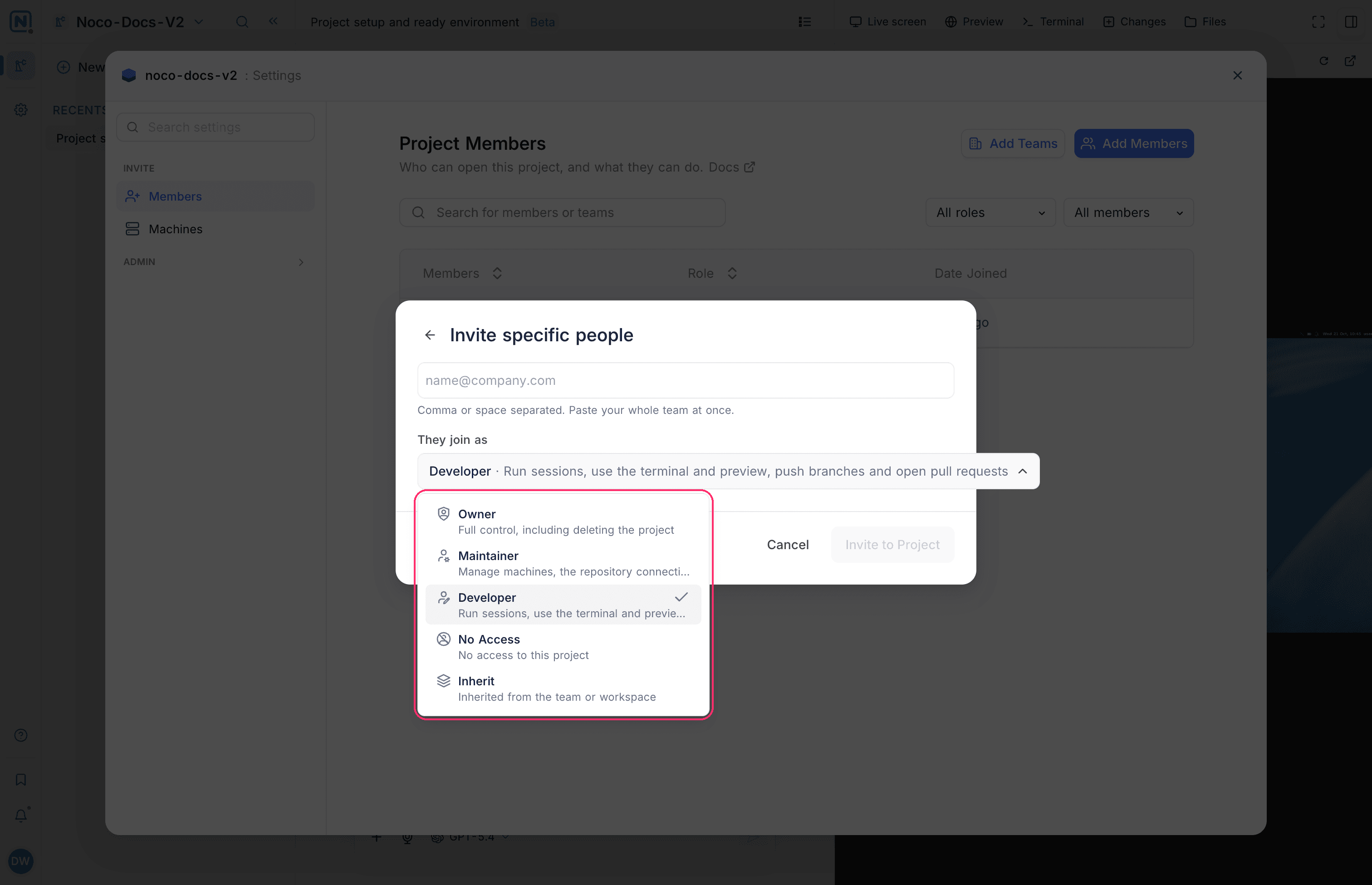
A NocoDB factory has three roles: Owner, Maintainer and Developer. The role of a member sets what they can do in the factory. Every member with the Developer role or above can start sessions and watch the sessions of others.
Factory roles
| Role | Description |
|---|---|
| Owner | "Full control, including deleting the project" |
| Maintainer | "Manage machines, the repository connection and members" |
| Developer | "Run sessions, use the terminal and preview, push branches and open pull requests" |
A factory does not use the Viewer and Commenter roles of other projects. Members with those roles have no access to the factory. The role menu also has No Access, and Inherit to take the role from the team or the workspace. When you invite people with an invite link, you can give them the Maintainer or Developer role.
What each role can do
| Action | Developer | Maintainer | Owner |
|---|---|---|---|
| Start sessions and work in their own sessions | Yes | Yes | Yes |
| Watch the sessions of other members | Yes | Yes | Yes |
| Open previews | Yes | Yes | Yes |
| Pick a machine for a session | Yes | Yes | Yes |
| Stop, archive or delete the sessions of other members | No | Yes | Yes |
| Create, edit and build machines | No | Yes | Yes |
| Manage members | No | Yes | Yes |
| Delete the factory | No | No | Yes |
Members without the Developer role see "Sessions need Developer access". Ask a factory Owner for the role.
Add members to a factory
- In the factory, click Settings (the gear icon) in the left rail. The Members page opens. You can also select Settings in the project context menu of the factory.
- Click Add Members.
- Click the email box, and type the email addresses. Separate them with commas or spaces.
- Under They join as, select a role: Owner, Maintainer or Developer.
- Click Invite to Project.
See Project collaboration for how invites work.
Sessions are shared, work is not
Every session of a factory is open to all members with the Developer role or above. Members see the chat of a session as it happens. Only the person who started a session can work in it: "Only the person who started this session can work in it."
| Part of a session | The person who started it | Other members |
|---|---|---|
| Chat | Send messages | Read only |
| Live screen | Use the desktop | View only |
| Preview | Use | Use |
| Terminal | Use | Not shown |
| Changes and Files | Comment, edit and commit | Read only |
Good to know
- The factory settings show only Members, Machines, Audit Log and AI Skills. A factory has no tables, so it has no data settings.
- The workspace Owner connects GitHub for the workspace. The roles of a factory do not change who can connect GitHub. See Connect GitHub.
Related
Last updated on