Connect GitHub
Noco Factory connects to GitHub through the NocoDB GitHub App. You install the app on a GitHub account or organization, and you choose the repositories that it can reach. NocoAI can work only on those repositories.
The workspace Owner connects GitHub once for the whole workspace. After that, workspace Creators can create factories from the connected repositories.
Before you begin
- You need the Owner role in the NocoDB workspace.
- You need permission to install GitHub Apps on the GitHub account or organization that owns the repositories.
Connect GitHub from the home screen
- On the workspace home screen, select Dev Factory. The Connect your code step opens.
- On the GitHub card, click Connect. GitHub opens in a pop-up window, and the card shows Waiting for GitHub.
- In GitHub, select the account or organization.
- Select All repositories, or select Only select repositories and pick the repositories.
- Click Install. The pop-up closes, and the Pick a repository step opens.
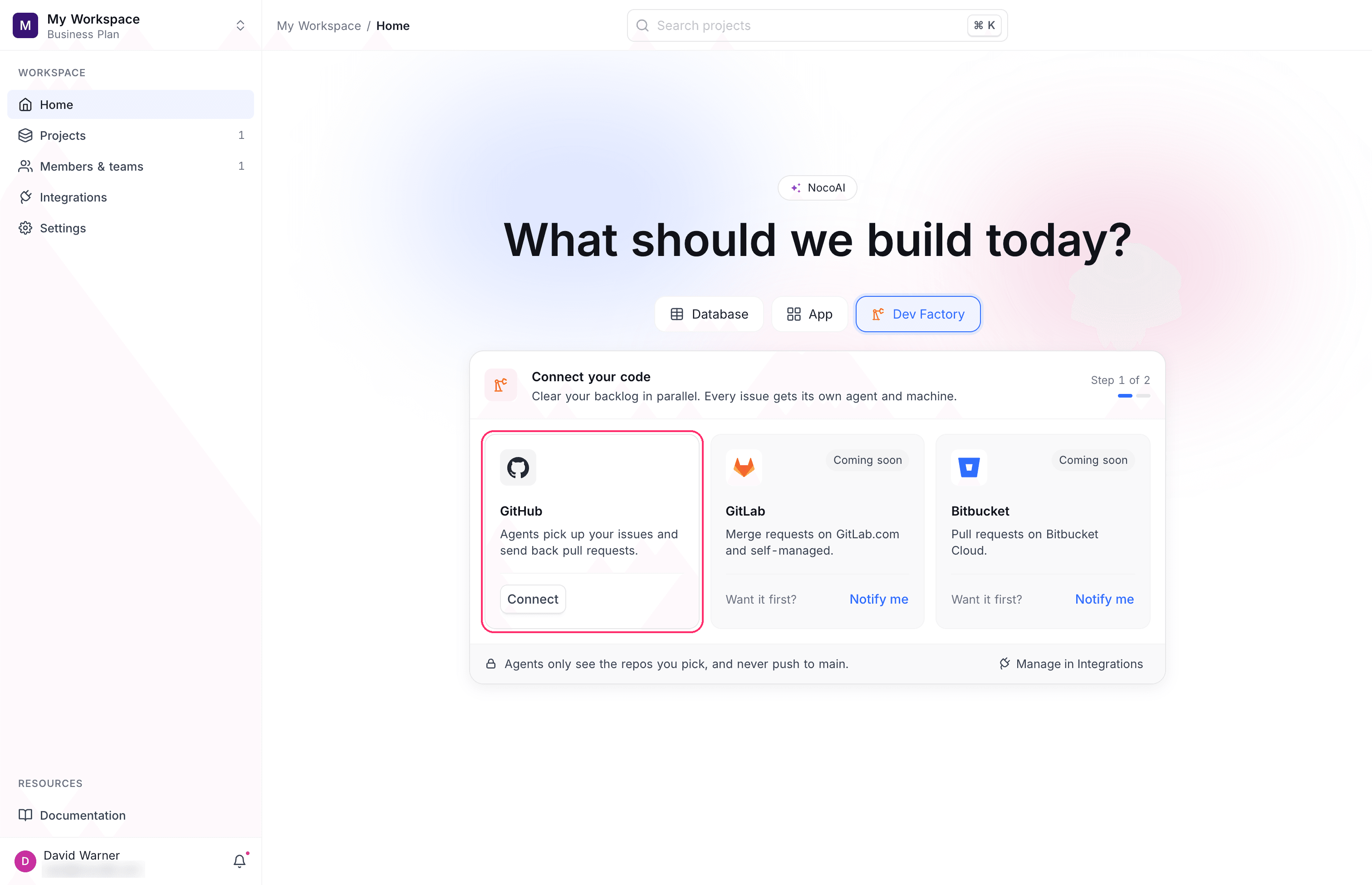
The footer of the panel shows Connected to GitHub as [account]. To manage the connection, click Manage in Integrations. If you are not the workspace Owner, the GitHub card shows Ask a workspace admin to connect.
Connect GitHub from Integrations
You can also connect Noco Factory to GitHub on the Integrations page of the workspace:
- In the workspace sidebar, click Integrations.
- Select GitHub in the catalog.
- For Auth type, select GitHub App.
- Under GitHub App installation, click Authenticate With GitHub.
- On GitHub, install the app on the repositories that you want to use.
- Click Create integration.
Noco Factory accepts only a GitHub App connection. A GitHub connection that uses an API key or OAuth shows this error: "Code projects need a GitHub App connection. Personal tokens and OAuth connections cannot be used."
What NocoAI can access
For each turn of a session, NocoDB gives NocoAI a short-lived GitHub token. The token:
| Property | Value |
|---|---|
| Repositories | Only the repository of the factory |
| Permissions | Contents (write), pull requests (write) and metadata (read) |
| Where it is kept | NocoDB adds the token to requests that leave the machine. The token is not stored on the machine. |
With this token, git push and the GitHub CLI (gh) work in the session without a sign-in. NocoAI commits as the NocoDB App Factory bot.
NocoAI can push only to the branch of its session. It cannot push to the default branch, so changes reach the default branch only through a pull request that a person merges. See Branches and pull requests.
Remove access to a repository
To stop NocoAI from working on a repository, remove the repository from the NocoDB GitHub App installation in GitHub, or uninstall the app. Sessions of that factory then cannot start: "Access to [repository] was revoked. Reconnect it to start a session."
NocoDB does not delete the factory, its sessions or its machines when you remove access.
GitLab and Bitbucket
GitLab and Bitbucket are coming soon. The Connect your code step shows a card for each, with Notify me. Click Notify me to get a message when your provider is ready.
Related
Last updated on