Noco FactoryBeta
Copy a prompt, paste it into NocoAI in a factory session, and replace the words in [brackets] with your own.
- Fix [the failing test in the checkout flow] and open a pull request
- Add [a dark mode toggle] to [the settings page], then show it to me in the browser
- Review [pull request #123] and suggest changes
- Upgrade [React] to [the latest version] and fix what breaks
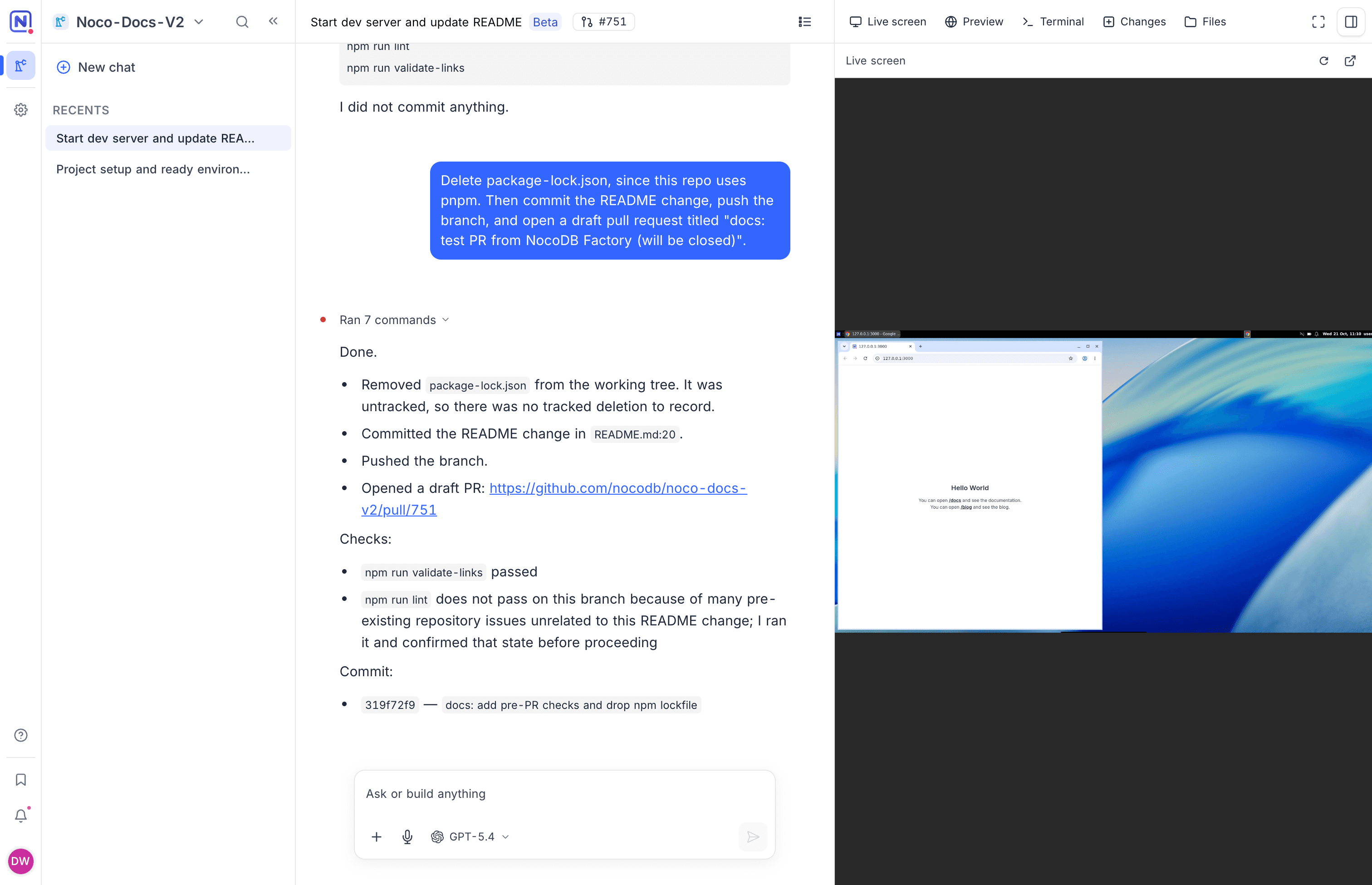
Noco Factory is an AI coding agent for your GitHub repositories. You give NocoAI a task. NocoAI does the work on its own cloud machine and its own branch, and you get back a pull request to review. On the workspace home screen, Noco Factory is the Dev Factory tab.
Each task runs in its own session, so you can start many sessions at the same time and clear a backlog in parallel.
Why teams use Noco Factory
Noco Factory gives each task its own agent, machine and branch, and keeps a person in charge of what reaches the default branch.
| Benefit | How Noco Factory does it |
|---|---|
| A backlog that moves in parallel | Every task gets its own session, with its own NocoAI agent, cloud machine and branch. Start many sessions at the same time. |
| Work that you can see | Watch NocoAI use its desktop on the Live screen, try the app in Preview, then read the diff. |
| Safe by default | NocoAI reaches only the repositories that you pick. It pushes only to the branch of its session, never to the default branch. Changes reach the default branch through a pull request that a person merges. |
| Your conventions | NocoAI reads CLAUDE.md, AGENTS.md and your rule files before it starts. |
| Your models | Pick the AI model for each message, or run NocoAI on your own API keys. |
| Sessions that start ready | Machines start with the languages, databases and tools that your repository needs. |
| One workspace | Factories are projects in your NocoDB workspace, next to your tables, apps and workflows, with the same members, audit log and credits. |
What NocoAI can do in a session
NocoAI in a Noco Factory session works like a developer on a fresh computer. In one session it can:
- Read the repository, and edit, add and delete files.
- Run commands in a shell: install packages, run the tests, start the app.
- Use the browser on its machine to check the app it started.
- Fix an open issue, or review an open pull request.
- Commit, push the branch and open a pull request, when you ask it to.
- Start helper agents that explore the code or make changes in parallel.
NocoAI reads the instructions in your repository before it starts: CLAUDE.md, AGENTS.md, .claude/CLAUDE.md, CLAUDE.local.md and the files in .claude/rules.
How Noco Factory is structured
| Concept | Description |
|---|---|
| Factory | A NocoDB project that is connected to one GitHub repository. It holds sessions and machines, not tables. Project lists show factories in their own Factories group. See Create a factory. |
| Session | One chat with NocoAI, on one branch and one machine. A session belongs to the person who started it. See Sessions. |
| NocoAI | The AI coding agent of a session. You pick the AI model that it runs on. See Models and credits. |
| Machine | The cloud computer of a session, with a desktop, a browser and a clone of the repository. A machine stops after some time without use, and starts again when you need it. |
| Machines (setting) | The packages and services that a session's machine starts with. Without a custom machine, sessions use the Base machine. See Machines. |
| Side panel | The panes next to the chat: Live screen, Preview, Terminal, Changes and Files. See Live screen and preview. |
Noco Factory or Apps?
NocoDB has two AI builders. Apps builds work apps on your NocoDB data and on all your data sources. Noco Factory works on the code in your own repository.
| AI app | Noco Factory | |
|---|---|---|
| Works on | Your NocoDB data and your data sources | The code of a GitHub repository |
| Who uses it | Teams that need a work app, without code | Developers and teams that ship software |
| Where the result lives | NocoDB hosts and runs the app | Your repository, as a branch and a pull request |
| How you check the work | A live preview of the app | NocoAI's screen, a live preview, the diff and the pull request |
| Plans | See Apps availability | Paid plans of NocoDB Cloud, during the beta |
To compare Noco Factory with other AI coding agents, see Noco Factory and other coding agents.
Who can do what
| Action | Who and how |
|---|---|
| Connect GitHub | The workspace Owner. See Connect GitHub. |
| Create a factory | Workspace Creator and Owner roles. The person who creates a factory becomes its Owner. |
| Run sessions | Project Developer, Maintainer and Owner roles. Each person works in their own sessions, and can watch the sessions of others. |
| Manage machines | Project Maintainer and Owner roles. |
See Members and roles for the full list.
Get started
- Connect GitHub to the workspace.
- Create a factory from a repository. NocoAI sets up the project in the first session.
- Start a session and describe a task.
- Review the changes, then open a pull request.
Frequently asked questions
Does Noco Factory push to the default branch?
No. NocoAI in Noco Factory pushes only to the branch of its session, named nocodb-factory/[name]. Changes reach the default branch only through a pull request that a person merges in GitHub. See Branches and pull requests.
Which Git providers does Noco Factory support?
Noco Factory supports GitHub, through the NocoDB GitHub App. GitLab and Bitbucket are coming soon. See Connect GitHub.
What can NocoAI access in my GitHub account?
NocoAI in Noco Factory can reach only the repositories that you select when you install the NocoDB GitHub App. For each turn, it gets a short-lived token for the repository of the factory. See What NocoAI can access.
What does a Noco Factory session cost?
A Noco Factory session uses the credits of the workspace: tokens for NocoAI on a model that NocoDB manages, and machine time for each second that the machine runs. See Models and credits.
Can Noco Factory use my own Claude, OpenAI or Gemini API keys?
Yes. On the Business plan and above, add an AI integration to the workspace. NocoAI can then run on your own API keys, and your provider bills you for AI directly. See Use your own API keys.
Can teammates watch a Noco Factory session?
Yes. Every member with the Developer role or above sees the chat and a view-only Live screen. Only the person who started the session can work in it. See Members and roles.
What happens to a Noco Factory session when I stop working?
The machine of a Noco Factory session pauses 30 minutes after NocoAI's last turn, or after the last time someone viewed the session. A paused machine does not use machine time. Archive the session to release its machine and keep its work. See Sessions.
Can I run Noco Factory on self-hosted NocoDB?
No. Noco Factory is available only on NocoDB Cloud.
Availability
Noco Factory is in beta. During the beta, it is available on the paid plans of NocoDB Cloud: Plus, Business, Scale and Enterprise. Noco Factory is not available for self-hosted NocoDB.
NocoAI and the machines use the credits of the workspace. See Models and credits.
Related
Last updated on