Reactions & Resolve
Add emoji reactions and resolve comments in NocoDocs.
Reactions and comment resolution help teams communicate efficiently — acknowledge feedback with a quick emoji or mark a discussion as resolved when the issue has been addressed.
Comment resolution is available on the Plus plan and above on Cloud. On self-hosted deployments, comment resolution is not included in the Community Edition and requires an Enterprise license.
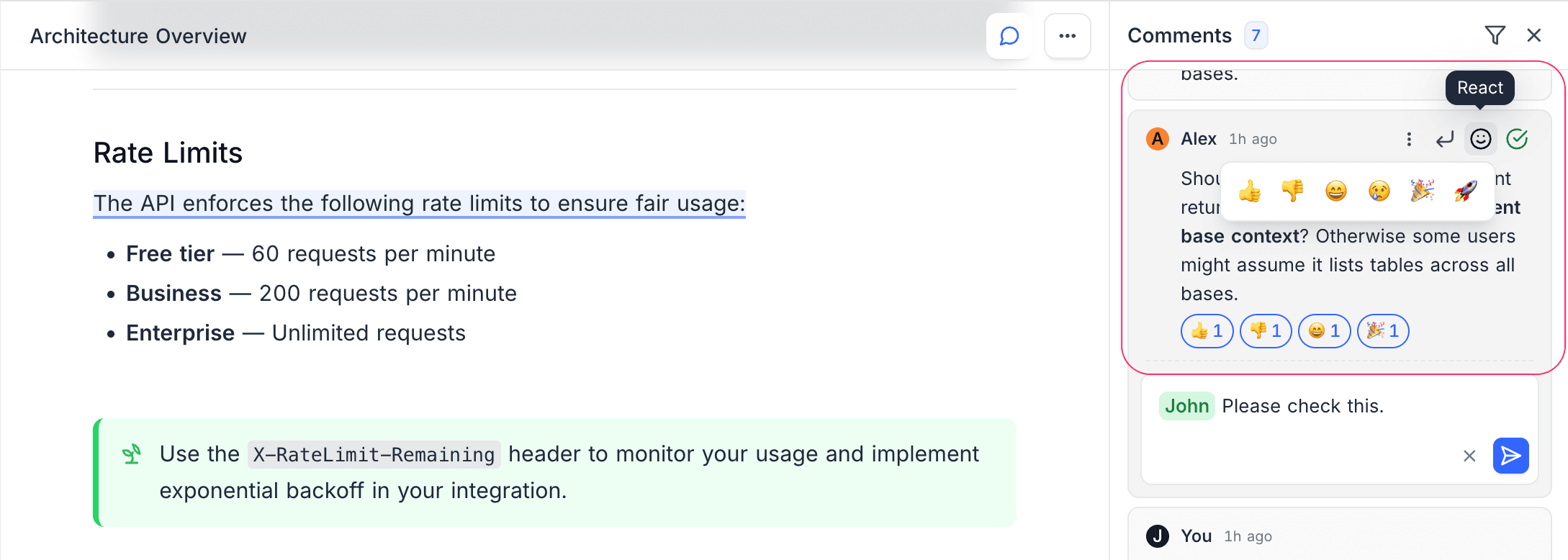
Emoji Reactions
Add a quick reaction to any comment without needing to write a reply.
- Hover over a comment.
- Click the reaction button (smiley face icon).
- Select one of the available emojis.
Available Reactions
| Emoji | Meaning |
|---|---|
| Thumbs Up | Agreement or approval |
| Thumbs Down | Disagreement |
| Laugh | Funny or entertaining |
| Sad | Unfortunate or concerning |
| Party | Celebration or milestone |
| Rocket | Exciting or impressive |
- Click a reaction again to toggle it off.
- You can see who reacted by hovering over the reaction count.
Resolve Comments ☁
Mark a comment as resolved when the feedback has been addressed. This helps track which discussions are still open.
- Click the checkmark icon on a comment to resolve it.
- Resolved comments are visually dimmed and can be filtered out using the Unresolved filter.
- Click the checkmark again to unresolve if the discussion needs to be reopened.
Workflow Example
A typical review workflow with comments:
- A reviewer creates inline comments pointing out changes needed.
- The author addresses the feedback and resolves each comment.
- The reviewer uses the Unresolved filter to check if any items remain open.
- Once all comments are resolved, the document is ready for publication.