Export Document
Export NocoDocs documents to Markdown, HTML, or PDF.
NocoDocs allows you to export any document to multiple formats for sharing, archiving, or offline use.
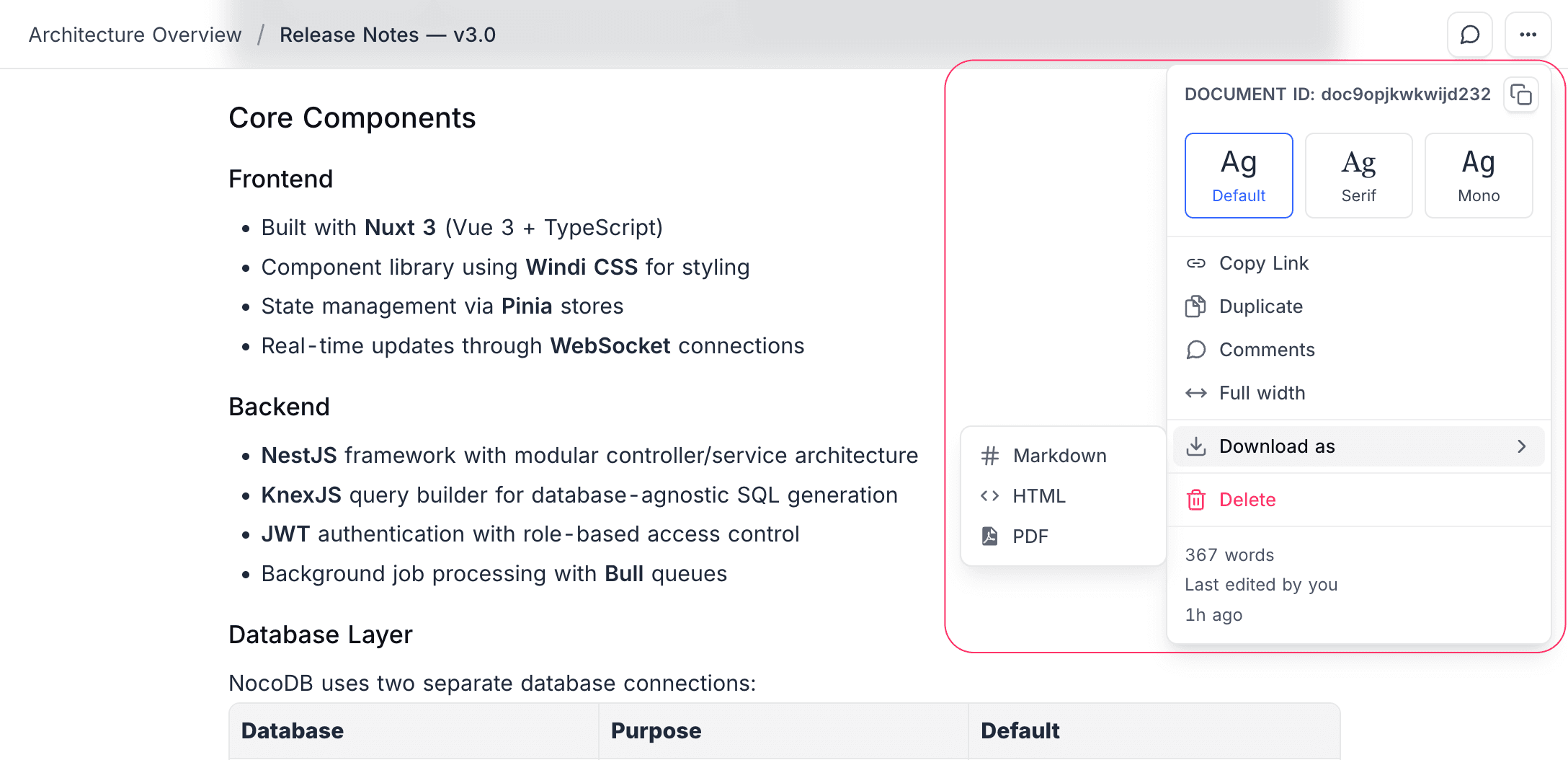
Supported Formats
| Format | Description |
|---|---|
| Markdown | Plain text with Markdown formatting. Ideal for use in GitHub, wikis, or other Markdown-compatible tools. |
| HTML | Full HTML with styling. Suitable for embedding in websites or sending via email. |
| Printable document format. Best for sharing with stakeholders who don't have NocoDB access. |
How to Export
- Open the document you want to export.
- Click the
...menu (more options) in the editor toolbar. - Select Export and choose the desired format.
- The file will be downloaded to your computer.
Export generates the current document only. Child documents are not included in the export — export each document individually if needed.
Mermaid diagrams are embedded as rendered SVG in HTML and PDF exports. Markdown exports keep the source as a
```mermaid fenced block, which renders automatically on GitHub and other Mermaid-aware viewers.PDF export is available on the Plus plan and above on Cloud, or with an Enterprise license on self-hosted deployments. Export to Markdown and HTML is available on all plans, including the Community Edition.