Run Script
Use the Run Script action node in NocoDB workflows to run custom JavaScript logic in an automated workflow. Use this node when the built-in actions are not sufficient. It gives you fine-grained control over tables, fields, records and workflow data.
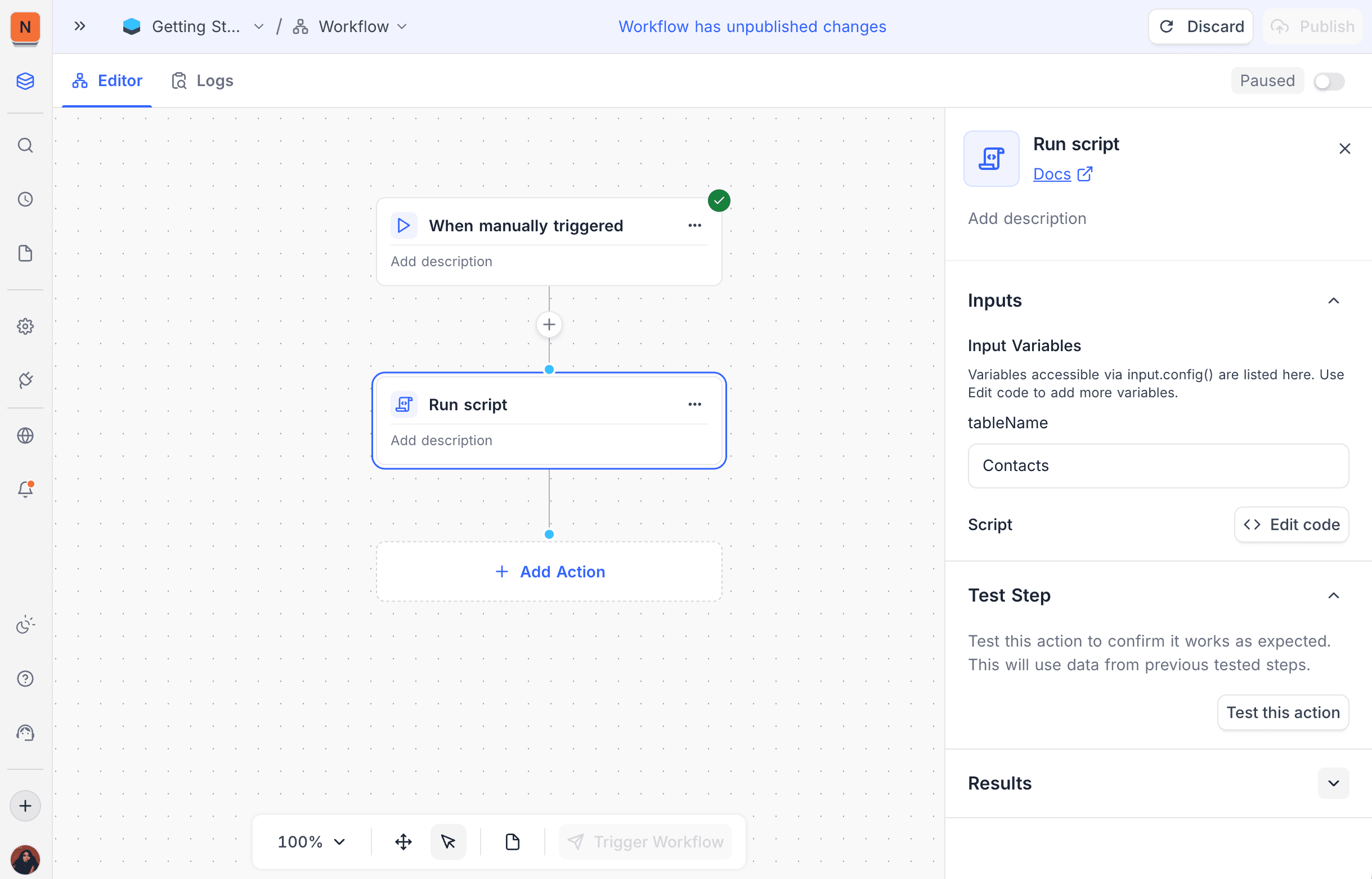
Configuration
Inputs
- Define input variables. The script gets them with
input.config(). - Inputs can be static values, or you can map them from the outputs of previous workflow nodes.
Script
- Write JavaScript code for custom logic.
- Scripts can read workflow inputs, work with tables and do conditional logic.
- To open the script editor, click Edit code.
Test Step
- To run the script with the configured inputs, click Test this action.
- The right panel shows the test results and logs.
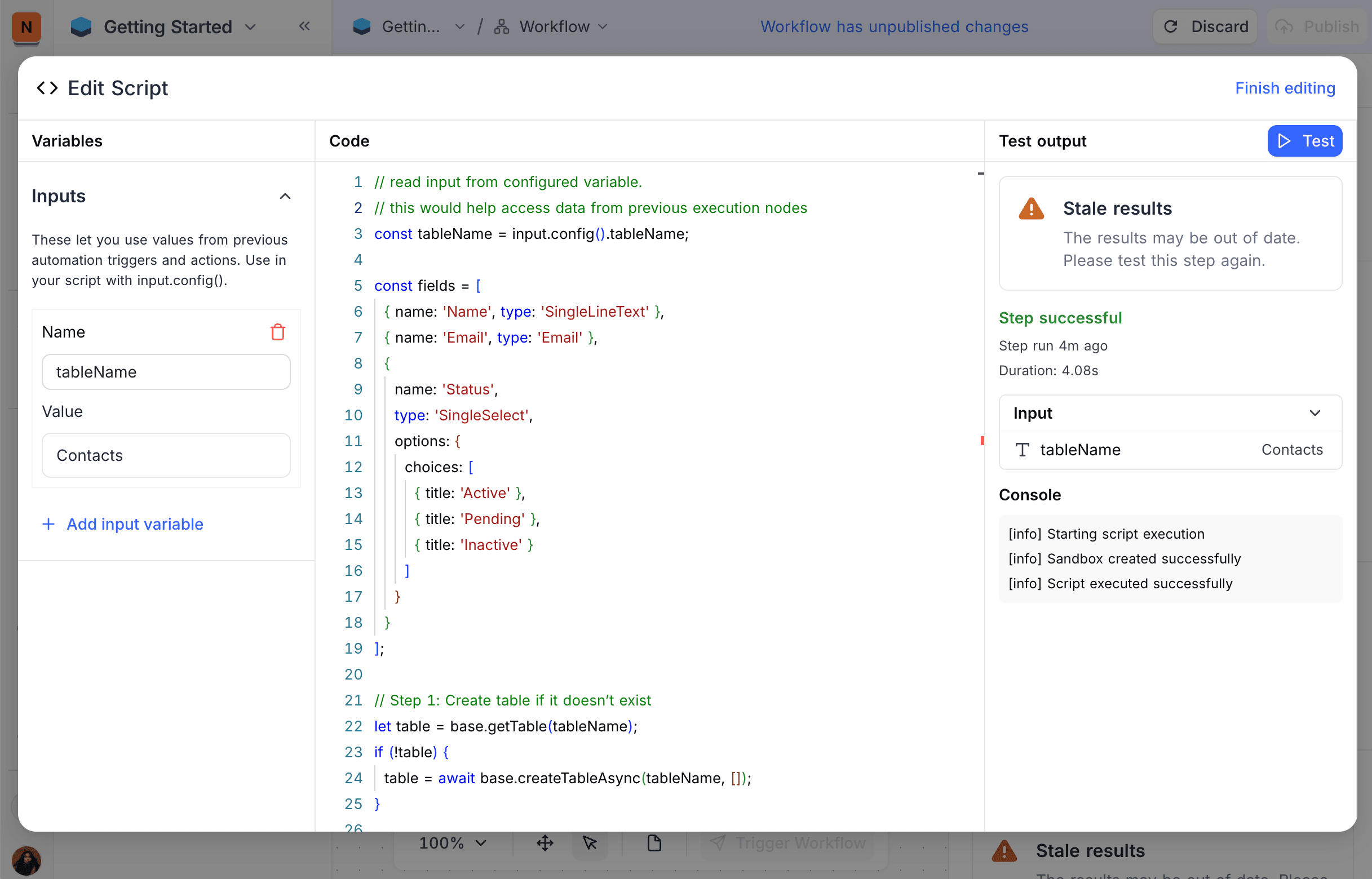
Script Editor
Use the script editor to write and test your JavaScript code. The editor has syntax highlighting and error checking. The panel on the right shows debugging information.
Available APIs
Workflow scripts can use a subset of the NocoDB Scripting APIs. Workflows run automatically, without user interaction. Thus some APIs are not available.
Input API
Get the input variables that you configured in the workflow node:
// Get all input values as an object
const config = input.config();

// Access specific input values
const recordId = input.config().recordId;
const tableName = input.config().tableName;
const threshold = input.config().threshold;
Output API
Set output values for later workflow nodes:
// Set a single output value
output.set('processedCount', 42);
output.set('status', 'success');
output.set('results', { updated: 10, skipped: 5 });

// Output values are available to subsequent nodes in the workflow
Other APIs
These APIs work the same as in interactive scripts. For full documentation, refer to the NocoDB Scripting Guide:
| API | What it does |
|---|---|
| Project & Table operations | Full CRUD operations on tables, views, fields and records |
| HTTP fetch | Makes external API calls |
| Console logging | console.log(), console.warn(), console.error() for debugging |
| Collaborators | Gets project collaborators through base.activeCollaborators |
| UITypes | Field type constants for type checking |
APIs Not Available in Workflows
These APIs from interactive scripts are not available in workflow scripts:
| API | Reason |
|---|---|
input.textAsync(), input.buttonsAsync(), input.selectAsync(), etc. | Workflows run without user interaction |
input.tableAsync(), input.viewAsync(), input.fieldAsync(), input.recordAsync() | Interactive selection not available |
input.fileAsync() | File uploads not available in automated context |
output.text(), output.markdown(), output.table(), output.inspect() | No UI display in workflows |
output.clear() | No UI to clear |
script.step(), script.clear() | Script steps are for interactive feedback |
session.currentUser | No user session in automated workflows |
cursor | No UI context for cursor position |
input.config({...}) with form builder | Use workflow node inputs instead |
How it Works
- When the workflow gets to the Run Script node, NocoDB starts a sandbox execution environment.
- The script gets the input variables of the node through
input.config(). - The script runs with full access to the tables and records of the project.
- Later nodes can use the output values that the script sets through
output.set(). - When the script completes, the workflow continues to the next node.
Examples
Process Records Based on Criteria
const config = input.config();
const table = base.getTable(config.tableName);

// Find records that need processing
const records = await table.selectRecordsAsync({
  where: '(Status,eq,Pending)',
  fields: ['Title', 'Status', 'Priority']
});

let processedCount = 0;

for (const record of records.records) {
  const priority = record.getCellValue('Priority');

  if (priority === 'High') {
    await table.updateRecordAsync(record.id, {
      'Status': 'In Progress'
    });
    processedCount++;
  }
}

output.set('processedCount', processedCount);
output.set('totalFound', records.records.length);
Call External API and Update Records
const config = input.config();
const recordId = config.recordId;

const table = base.getTable('Orders');
const record = await table.selectRecordAsync(recordId);
const orderId = record.getCellValue('External Order ID');

// Call external API
const response = await fetch(`https://api.shipping.com/status/${orderId}`, {
  headers: { 'Authorization': `Bearer ${config.apiKey}` }
});

if (response.status === 200) {
  const shippingStatus = response.data.status;

  await table.updateRecordAsync(recordId, {
    'Shipping Status': shippingStatus,
    'Last Updated': new Date().toISOString()
  });

  output.set('status', 'success');
  output.set('shippingStatus', shippingStatus);
} else {
  output.set('status', 'error');
  output.set('errorMessage', response.statusText);
}
Aggregate Data Across Tables
const ordersTable = base.getTable('Orders');
const customersTable = base.getTable('Customers');

const customerId = input.config().customerId;

// Get all orders for a customer
const orders = await ordersTable.selectRecordsAsync({
  where: `(Customer ID,eq,${customerId})`,
  fields: ['Order Total', 'Order Date', 'Status']
});

// Calculate totals
let totalSpent = 0;
let orderCount = 0;

for (const order of orders.records) {
  if (order.getCellValue('Status') === 'Completed') {
    totalSpent += order.getCellValue('Order Total') || 0;
    orderCount++;
  }
}

// Update customer record
await customersTable.updateRecordAsync(customerId, {
  'Total Spent': totalSpent,
  'Order Count': orderCount,
  'Last Calculated': new Date().toISOString()
});

output.set('totalSpent', totalSpent);
output.set('orderCount', orderCount);
Create Records in Bulk
const config = input.config();
const sourceTable = base.getTable(config.sourceTable);
const targetTable = base.getTable(config.targetTable);

const records = await sourceTable.selectRecordsAsync({
  where: '(Processed,eq,false)',
  pageSize: 10
});

const createdIds = [];

for (const record of records.records) {
  const newId = await targetTable.createRecordAsync({
    'Title': record.getCellValue('Title'),
    'Description': record.getCellValue('Description'),
    'Source Record ID': record.id
  });
  createdIds.push(newId);

  // Mark as processed
  await sourceTable.updateRecordAsync(record.id, {
    'Processed': true
  });
}

output.set('createdCount', createdIds.length);
output.set('createdIds', createdIds);
Use Cases
- Do complex data transformations or calculations that standard nodes do not support.
- Connect to external APIs or services.
- Add custom validation or business logic.
- Create or change records based on complex conditions.
- Aggregate data across many tables.
- Calculate values for later workflow nodes.
Availability
- Available on the NocoDB Cloud Business plan and higher, and on licensed on-premise deployments. On NocoDB Cloud, script steps run in a managed sandbox. They use credits based on execution time.
Related
- NocoDB Scripting Guide: full scripting documentation (some features are not available in workflows)
- Workflow Overview
- Action Nodes
Last updated on