# Date Dependencies
> Part of the NocoDB documentation (Product docs > Tables > Records). Index of all pages: https://nocodb.com/llms.txt. Any docs page is available as Markdown by adding `.md` to its URL.
URL: https://nocodb.com/docs/product/tables/records/date-dependency
Last updated: 2026-09-25
Define which records are dependent on others. When you reschedule a record, dependent records are automatically rescheduled.
Date dependencies let your project schedule update itself. When one record shifts, every record that depends on it automatically adjusts — no manual updates needed.
For example: if a design phase runs a week late, the development and QA records that follow it will automatically move forward to stay in sequence.
{/*  */}
### Requirements
Your table needs the following fields before you can enable date dependencies:
| Field | Type | Purpose |
| -------------- | ------------------------------------------------------------ | ----------------------------------------------------------------------------------------------------------------------------------------------------------------------------------------- |
| Start Date | Date | When the record begins |
| End Date | Date | When the record ends |
| Duration | Number or Duration | How many days the record lasts. A Number field stores days directly; a Duration field is internally converted to days. Optional — NocoDB can calculate duration from start and end dates. |
| Successor Link | Link (self-referencing Has-Many, One-to-Many, or One-to-One) | Points each row to the tasks scheduled after it. Optional — only needed if you want records to cascade automatically. |
The
**Successor Link**
field is a self-referencing link field (Has-Many, One-to-Many, or One-to-One) that points back to the same table — it creates a relationship between records. For example, if "Design" is followed by "Development", you'd link "Development" as the successor of "Design".
### Setting up date dependencies
1. Click `...` next to the table name in the left sidebar.
2. Select **Date Dependencies**.
 The `Date Dependencies` tool opens in the table's `Tools` panel with date dependencies disabled.
 3. Toggle **Enable Date Dependencies** on.
4. Select your **Start Date** and **End Date** fields from the dropdowns.
5. Optionally, select a **Duration** field (Duration or Number type).
6. Optionally, select a **Successor Link** field to enable automatic cascading across records.
7. Click **Save**.
3. Toggle **Enable Date Dependencies** on.
4. Select your **Start Date** and **End Date** fields from the dropdowns.
5. Optionally, select a **Duration** field (Duration or Number type).
6. Optionally, select a **Successor Link** field to enable automatic cascading across records.
7. Click **Save**.
 Start Date and End Date must be different fields.
### Include weekends
By default, date calculations include all calendar days (weekends included). Turn off **Include weekends** to skip Saturdays and Sundays in every calculation.
When **Include weekends** is turned off:
* **Duration** counts only business days (Mon–Fri). A record spanning Monday to Friday = 5 days, not 7.
* **End Date** skips weekends. A record starting Monday with a 6-day duration ends on the following Monday (skipping Saturday and Sunday).
* **Cascading** places dependent records on the next business day — never on a Saturday or Sunday.
### How fields stay in sync within a record
Once enabled, NocoDB keeps the date fields in sync whenever you edit a record:
| You change… | NocoDB auto-updates… |
| -------------- | ------------------------------------------- |
| **Start Date** | End Date moves to keep the same duration |
| **End Date** | Duration recalculates to match the new span |
| **Duration** | End Date adjusts to the new length |
When all three fields are present, Start Date and End Date take priority and duration is recalculated.
Duration counting is **inclusive** — a record from Jan 1 to Jan 10 has a duration of 10 days (both start and end dates are counted). A duration of **0** is valid and represents a same-day task where start and end dates are equal.
All calculations respect the **Include weekends** setting.
### Row propagation
When you set a Successor Link field, NocoDB can automatically shift dependent records to keep your timeline consistent. Cascading works in **both directions**:
* **Forward** — when a predecessor's dates change, successors shift later to avoid overlap.
* **Backward** — when a successor is moved earlier and collides with its predecessor, the predecessor shifts earlier to make room.
Row propagation (cascade updates across linked records) is only supported on
**PostgreSQL**
and
**MySQL 8+**
data sources. On other databases, only within-record field sync applies.
#### Scheduling mode
Choose how linked records respond when dates change:
| Mode | What happens |
| ------------ | -------------------------------------------------------------------------------------------------- |
| **Off** | No automatic rescheduling across linked records. Only within-record field sync applies. |
| **Flexible** | Only adjust when dates overlap or violate the gap. If there's already enough space, nothing moves. |
| **Strict** | Always snap to the exact gap — no slack allowed. Records shift even when there's no overlap. |
##### Flexible vs Strict — example
Consider two records with **End → Start** connection and **Gap = 2 days**:
```
Before — gap is 9 days (well above the required 2):
Design: ████████████
Development: ████████████
Jan 1 Jan 10 Jan 20 Jan 29
←── 9 days ──→
```
Now you move Design's End Date to **Jan 14**:
```
Flexible — gap shrinks to 5, still ≥ 2, so nothing moves:
Design: ████████████████
Development: ████████████
Jan 1 Jan 14 Jan 20 Jan 29
←─ 5 days ─→ ✓ no violation
```
```
Strict — snaps to exact gap of 2, Development shifts:
Design: ████████████████
Development: ████████████
Jan 1 Jan 14 Jan 17 Jan 26
←2→
```
Put simply: **Flexible** only prevents overlap, **Strict** enforces the exact spacing at all times.
#### Connection type
Choose how predecessor and successor records relate to each other:
| Type | Meaning | Example |
| ----------------- | ----------------------------------------- | ----------------------------------------------------------- |
| **End → Start** | Successor starts after predecessor ends | Design ends → Development begins. Most common. |
| **Start → Start** | Successor starts after predecessor starts | Design begins → QA monitoring begins alongside it. |
| **End → End** | Successor ends after predecessor ends | Development ends → Documentation wraps up at the same time. |
| **Start → End** | Successor ends after predecessor starts | Setup must be done before the event kicks off. |
##### Connection type examples
The examples below use **Strict** mode with **Gap = 0** to show how each connection type works. The predecessor is **Design** (Jan 1 – Jan 10, 10 days).
**End → Start** — Development starts the day after Design ends:
| Record | Start Date | End Date | Duration |
| ----------- | ---------- | -------- | -------- |
| Design | Jan 1 | Jan 10 | 10 days |
| Development | **Jan 11** | Jan 20 | 10 days |
If Design's End Date moves to Jan 15, Development shifts to start on **Jan 16**.
**Start → Start** — Development starts the same day as Design:
| Record | Start Date | End Date | Duration |
| ----------- | ---------- | -------- | -------- |
| Design | Jan 1 | Jan 10 | 10 days |
| Development | **Jan 1** | Jan 10 | 10 days |
If Design's Start Date moves to Jan 5, Development shifts to start on **Jan 5**.
**End → End** — Development ends the same day as Design:
| Record | Start Date | End Date | Duration |
| ----------- | ---------- | ---------- | -------- |
| Design | Jan 1 | Jan 10 | 10 days |
| Development | Jan 1 | **Jan 10** | 10 days |
If Design's End Date moves to Jan 15, Development shifts so it ends on **Jan 15** (Start Date adjusts to Jan 6 to maintain duration).
**Start → End** — Development ends the same day as Design starts:
| Record | Start Date | End Date | Duration |
| ----------- | ---------- | --------- | -------- |
| Design | Jan 1 | Jan 10 | 10 days |
| Development | Dec 23 | **Jan 1** | 10 days |
If Design's Start Date moves to Jan 5, Development shifts so it ends on **Jan 5** (Start Date adjusts to Dec 27 to maintain duration).
Note that
**End → Start**
is the only connection type with a +1 offset — the successor starts the
*day after*
the predecessor ends. All other types align dates to the
*same day*
. Use the
**Gap (days)**
setting to add spacing between records for any connection type.
#### Gap (days)
Set a minimum buffer between records. For example, with **End → Start** connection type:
* **Gap = 0** — the successor starts the day right after the predecessor ends.
* **Gap = 3** — there's a 3-day buffer between the predecessor ending and the successor starting.
When **Include weekends** is turned off, gap days count only business days.
### Examples
#### Basic cascade (Strict, End → Start, Gap = 0)
Three records in sequence — **Design → Development → QA**:
```
Before:
Design: ██████████
Development: ██████████
QA: ██████████
Jan 1 Jan 10 Jan 20 Jan 30
```
Design overruns — you move its End Date to **Jan 20**. NocoDB shifts the rest automatically:
```
After — cascade ripples forward:
Design: ████████████████████
Development: ██████████
QA: ██████████
Jan 1 Jan 20 Jan 30 Feb 9
```
Each successor keeps its original duration and the sequence stays intact.
#### Backward cascade (Strict, End → Start, Gap = 0)
Same three records. You move **Development** backward so it starts on **Jan 5** — colliding with Design which ends Jan 10:
```
Before:
Design: ██████████
Development: ██████████
QA: ██████████
Jan 1 Jan 10 Jan 20 Jan 30
```
```
You move Development to Jan 5 — it now overlaps Design:
Design: ██████████
Development: ██████████
Jan 5 Jan 14
↑ collision!
```
NocoDB pushes Design earlier to make room:
```
After — Design shifts backward:
Design: ██████████
Development: ██████████
QA: ██████████
Dec 26 Jan 4 Jan 5 Jan 14 Jan 21 Jan 30
```
Design keeps its original duration and shifts backward so Development can start on Jan 5 without overlap.
#### Working days cascade
Same setup but with **Include weekends** turned off. Design ends on **Friday Jan 10**:
| Record | Start Date | End Date | Duration |
| ----------- | --------------- | ----------- | -------- |
| Design | Mon, Jan 6 | Fri, Jan 10 | 5 days |
| Development | **Mon, Jan 13** | Fri, Jan 17 | 5 days |
Development starts on **Monday** — the next business day — not Saturday.
### Automations and webhooks
When NocoDB automatically reschedules dependent records, any automations or webhooks configured on the table will fire for those updated records — so you can notify your team, update a connected tool, or trigger any follow-up action.
### Things to know
* Each table supports one date dependency configuration.
* Start Date and End Date must be **Date** fields (not DateTime).
* Duration must be a **Duration** or **Number** field.
* The Successor Link must be a self-referencing link field (**Has-Many**, **One-to-Many**, or **One-to-One**).
* **Include weekends** applies everywhere — both within-record field sync and cascading across records.
* Row propagation (cascade across linked records) is only supported on **PostgreSQL** and **MySQL 8+** data sources.
* When dependent records are automatically rescheduled, they are briefly highlighted with a **light yellow background** in the grid to indicate which records were modified. The highlight fades after about 2 seconds.
Start Date and End Date must be different fields.
### Include weekends
By default, date calculations include all calendar days (weekends included). Turn off **Include weekends** to skip Saturdays and Sundays in every calculation.
When **Include weekends** is turned off:
* **Duration** counts only business days (Mon–Fri). A record spanning Monday to Friday = 5 days, not 7.
* **End Date** skips weekends. A record starting Monday with a 6-day duration ends on the following Monday (skipping Saturday and Sunday).
* **Cascading** places dependent records on the next business day — never on a Saturday or Sunday.
### How fields stay in sync within a record
Once enabled, NocoDB keeps the date fields in sync whenever you edit a record:
| You change… | NocoDB auto-updates… |
| -------------- | ------------------------------------------- |
| **Start Date** | End Date moves to keep the same duration |
| **End Date** | Duration recalculates to match the new span |
| **Duration** | End Date adjusts to the new length |
When all three fields are present, Start Date and End Date take priority and duration is recalculated.
Duration counting is **inclusive** — a record from Jan 1 to Jan 10 has a duration of 10 days (both start and end dates are counted). A duration of **0** is valid and represents a same-day task where start and end dates are equal.
All calculations respect the **Include weekends** setting.
### Row propagation
When you set a Successor Link field, NocoDB can automatically shift dependent records to keep your timeline consistent. Cascading works in **both directions**:
* **Forward** — when a predecessor's dates change, successors shift later to avoid overlap.
* **Backward** — when a successor is moved earlier and collides with its predecessor, the predecessor shifts earlier to make room.
Row propagation (cascade updates across linked records) is only supported on
**PostgreSQL**
and
**MySQL 8+**
data sources. On other databases, only within-record field sync applies.
#### Scheduling mode
Choose how linked records respond when dates change:
| Mode | What happens |
| ------------ | -------------------------------------------------------------------------------------------------- |
| **Off** | No automatic rescheduling across linked records. Only within-record field sync applies. |
| **Flexible** | Only adjust when dates overlap or violate the gap. If there's already enough space, nothing moves. |
| **Strict** | Always snap to the exact gap — no slack allowed. Records shift even when there's no overlap. |
##### Flexible vs Strict — example
Consider two records with **End → Start** connection and **Gap = 2 days**:
```
Before — gap is 9 days (well above the required 2):
Design: ████████████
Development: ████████████
Jan 1 Jan 10 Jan 20 Jan 29
←── 9 days ──→
```
Now you move Design's End Date to **Jan 14**:
```
Flexible — gap shrinks to 5, still ≥ 2, so nothing moves:
Design: ████████████████
Development: ████████████
Jan 1 Jan 14 Jan 20 Jan 29
←─ 5 days ─→ ✓ no violation
```
```
Strict — snaps to exact gap of 2, Development shifts:
Design: ████████████████
Development: ████████████
Jan 1 Jan 14 Jan 17 Jan 26
←2→
```
Put simply: **Flexible** only prevents overlap, **Strict** enforces the exact spacing at all times.
#### Connection type
Choose how predecessor and successor records relate to each other:
| Type | Meaning | Example |
| ----------------- | ----------------------------------------- | ----------------------------------------------------------- |
| **End → Start** | Successor starts after predecessor ends | Design ends → Development begins. Most common. |
| **Start → Start** | Successor starts after predecessor starts | Design begins → QA monitoring begins alongside it. |
| **End → End** | Successor ends after predecessor ends | Development ends → Documentation wraps up at the same time. |
| **Start → End** | Successor ends after predecessor starts | Setup must be done before the event kicks off. |
##### Connection type examples
The examples below use **Strict** mode with **Gap = 0** to show how each connection type works. The predecessor is **Design** (Jan 1 – Jan 10, 10 days).
**End → Start** — Development starts the day after Design ends:
| Record | Start Date | End Date | Duration |
| ----------- | ---------- | -------- | -------- |
| Design | Jan 1 | Jan 10 | 10 days |
| Development | **Jan 11** | Jan 20 | 10 days |
If Design's End Date moves to Jan 15, Development shifts to start on **Jan 16**.
**Start → Start** — Development starts the same day as Design:
| Record | Start Date | End Date | Duration |
| ----------- | ---------- | -------- | -------- |
| Design | Jan 1 | Jan 10 | 10 days |
| Development | **Jan 1** | Jan 10 | 10 days |
If Design's Start Date moves to Jan 5, Development shifts to start on **Jan 5**.
**End → End** — Development ends the same day as Design:
| Record | Start Date | End Date | Duration |
| ----------- | ---------- | ---------- | -------- |
| Design | Jan 1 | Jan 10 | 10 days |
| Development | Jan 1 | **Jan 10** | 10 days |
If Design's End Date moves to Jan 15, Development shifts so it ends on **Jan 15** (Start Date adjusts to Jan 6 to maintain duration).
**Start → End** — Development ends the same day as Design starts:
| Record | Start Date | End Date | Duration |
| ----------- | ---------- | --------- | -------- |
| Design | Jan 1 | Jan 10 | 10 days |
| Development | Dec 23 | **Jan 1** | 10 days |
If Design's Start Date moves to Jan 5, Development shifts so it ends on **Jan 5** (Start Date adjusts to Dec 27 to maintain duration).
Note that
**End → Start**
is the only connection type with a +1 offset — the successor starts the
*day after*
the predecessor ends. All other types align dates to the
*same day*
. Use the
**Gap (days)**
setting to add spacing between records for any connection type.
#### Gap (days)
Set a minimum buffer between records. For example, with **End → Start** connection type:
* **Gap = 0** — the successor starts the day right after the predecessor ends.
* **Gap = 3** — there's a 3-day buffer between the predecessor ending and the successor starting.
When **Include weekends** is turned off, gap days count only business days.
### Examples
#### Basic cascade (Strict, End → Start, Gap = 0)
Three records in sequence — **Design → Development → QA**:
```
Before:
Design: ██████████
Development: ██████████
QA: ██████████
Jan 1 Jan 10 Jan 20 Jan 30
```
Design overruns — you move its End Date to **Jan 20**. NocoDB shifts the rest automatically:
```
After — cascade ripples forward:
Design: ████████████████████
Development: ██████████
QA: ██████████
Jan 1 Jan 20 Jan 30 Feb 9
```
Each successor keeps its original duration and the sequence stays intact.
#### Backward cascade (Strict, End → Start, Gap = 0)
Same three records. You move **Development** backward so it starts on **Jan 5** — colliding with Design which ends Jan 10:
```
Before:
Design: ██████████
Development: ██████████
QA: ██████████
Jan 1 Jan 10 Jan 20 Jan 30
```
```
You move Development to Jan 5 — it now overlaps Design:
Design: ██████████
Development: ██████████
Jan 5 Jan 14
↑ collision!
```
NocoDB pushes Design earlier to make room:
```
After — Design shifts backward:
Design: ██████████
Development: ██████████
QA: ██████████
Dec 26 Jan 4 Jan 5 Jan 14 Jan 21 Jan 30
```
Design keeps its original duration and shifts backward so Development can start on Jan 5 without overlap.
#### Working days cascade
Same setup but with **Include weekends** turned off. Design ends on **Friday Jan 10**:
| Record | Start Date | End Date | Duration |
| ----------- | --------------- | ----------- | -------- |
| Design | Mon, Jan 6 | Fri, Jan 10 | 5 days |
| Development | **Mon, Jan 13** | Fri, Jan 17 | 5 days |
Development starts on **Monday** — the next business day — not Saturday.
### Automations and webhooks
When NocoDB automatically reschedules dependent records, any automations or webhooks configured on the table will fire for those updated records — so you can notify your team, update a connected tool, or trigger any follow-up action.
### Things to know
* Each table supports one date dependency configuration.
* Start Date and End Date must be **Date** fields (not DateTime).
* Duration must be a **Duration** or **Number** field.
* The Successor Link must be a self-referencing link field (**Has-Many**, **One-to-Many**, or **One-to-One**).
* **Include weekends** applies everywhere — both within-record field sync and cascading across records.
* Row propagation (cascade across linked records) is only supported on **PostgreSQL** and **MySQL 8+** data sources.
* When dependent records are automatically rescheduled, they are briefly highlighted with a **light yellow background** in the grid to indicate which records were modified. The highlight fades after about 2 seconds.
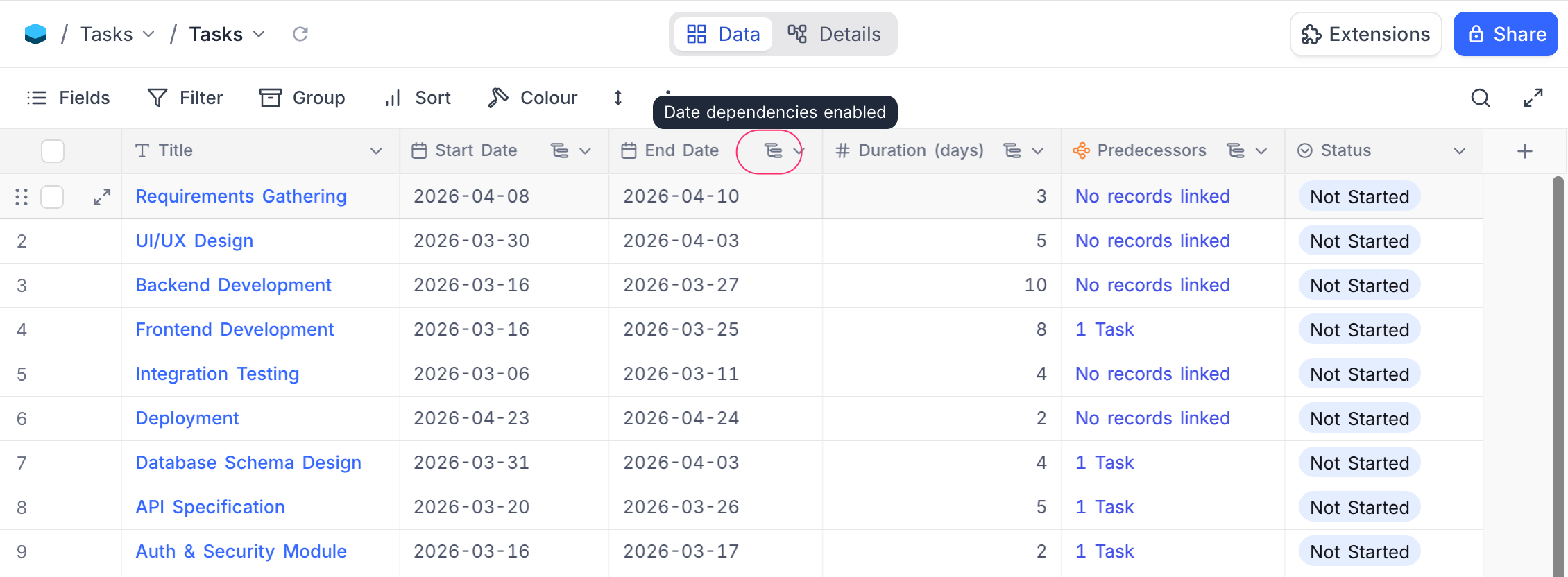
 * Fields that are part of an active date dependency configuration are marked with a small icon in their column header. Hovering the icon shows a **"Date dependencies enabled"** tooltip.
* If you delete a **Start Date** or **End Date** field that is referenced by a date dependency configuration, the configuration is automatically **deactivated**. Deleting a Duration or Successor Link field clears only that field reference — the configuration may remain active.
* Cascade-propagated row updates are logged as a distinct **cascade update** in the audit trail, so you can distinguish them from manual edits.
* **Sibling records are not re-propagated.** When a record is moved backward and its predecessor is pushed earlier, other successors of that predecessor (sibling records) are not automatically re-evaluated. Only the direct chain — predecessors upward and successors downward from the edited record — is adjusted. To update sibling records, edit any one of them to trigger a fresh cascade.
### FAQs
**What's the difference between Flexible and Strict?**
**Flexible** only moves records when they would overlap or violate the gap — if there's already enough space, nothing changes. **Strict** always enforces the exact gap you've set, moving records even when there's no overlap.
**What if two records depend on each other in a loop?**
NocoDB detects circular dependencies and stops the cascade safely. No records will be updated in a loop.
**Do automations fire when dates are rescheduled automatically?**
Yes — any automations or webhooks on the table fire for all records that are updated as part of a cascade.
**What does "Include weekends" do?**
When turned on (default), all calendar days including weekends are counted. When turned off, Saturdays and Sundays are skipped in all date calculations — duration counts only Mon–Fri, end dates land on weekdays, and rescheduled records never start on a weekend.
**Which databases support row propagation?**
Cascade propagation across linked records requires **PostgreSQL** or **MySQL 8+**. On other databases (SQLite, etc.), only within-record field sync (Start Date / End Date / Duration calculations) is available.
## Availability
* Date dependencies are available on **NocoDB Cloud** (Business plan and above) and licensed self-hosted deployments (Business plan and above).
---
## Related pages
- [Create Record](https://nocodb.com/docs/product/tables/records/create-record.md): Learn how to create a record in NocoDB.
- [Expanded Record](https://nocodb.com/docs/product/tables/records/expand-record.md): Learn how to expand a record & work with it in NocoDB.
- [Actions on Record](https://nocodb.com/docs/product/tables/records/actions-on-record.md): Learn how to perform actions (edit, duplicate, delete, etc) on a record in NocoDB.
- [Record Templates](https://nocodb.com/docs/product/tables/records/record-templates.md): Learn how to create and use record templates in NocoDB to quickly add records with pre-filled values.
* Fields that are part of an active date dependency configuration are marked with a small icon in their column header. Hovering the icon shows a **"Date dependencies enabled"** tooltip.
* If you delete a **Start Date** or **End Date** field that is referenced by a date dependency configuration, the configuration is automatically **deactivated**. Deleting a Duration or Successor Link field clears only that field reference — the configuration may remain active.
* Cascade-propagated row updates are logged as a distinct **cascade update** in the audit trail, so you can distinguish them from manual edits.
* **Sibling records are not re-propagated.** When a record is moved backward and its predecessor is pushed earlier, other successors of that predecessor (sibling records) are not automatically re-evaluated. Only the direct chain — predecessors upward and successors downward from the edited record — is adjusted. To update sibling records, edit any one of them to trigger a fresh cascade.
### FAQs
**What's the difference between Flexible and Strict?**
**Flexible** only moves records when they would overlap or violate the gap — if there's already enough space, nothing changes. **Strict** always enforces the exact gap you've set, moving records even when there's no overlap.
**What if two records depend on each other in a loop?**
NocoDB detects circular dependencies and stops the cascade safely. No records will be updated in a loop.
**Do automations fire when dates are rescheduled automatically?**
Yes — any automations or webhooks on the table fire for all records that are updated as part of a cascade.
**What does "Include weekends" do?**
When turned on (default), all calendar days including weekends are counted. When turned off, Saturdays and Sundays are skipped in all date calculations — duration counts only Mon–Fri, end dates land on weekdays, and rescheduled records never start on a weekend.
**Which databases support row propagation?**
Cascade propagation across linked records requires **PostgreSQL** or **MySQL 8+**. On other databases (SQLite, etc.), only within-record field sync (Start Date / End Date / Duration calculations) is available.
## Availability
* Date dependencies are available on **NocoDB Cloud** (Business plan and above) and licensed self-hosted deployments (Business plan and above).
---
## Related pages
- [Create Record](https://nocodb.com/docs/product/tables/records/create-record.md): Learn how to create a record in NocoDB.
- [Expanded Record](https://nocodb.com/docs/product/tables/records/expand-record.md): Learn how to expand a record & work with it in NocoDB.
- [Actions on Record](https://nocodb.com/docs/product/tables/records/actions-on-record.md): Learn how to perform actions (edit, duplicate, delete, etc) on a record in NocoDB.
- [Record Templates](https://nocodb.com/docs/product/tables/records/record-templates.md): Learn how to create and use record templates in NocoDB to quickly add records with pre-filled values.