# 2025.10.0 : ChatGPT & Claude OAuth Integration
> Part of the NocoDB documentation (Changelog). Index of all pages: https://nocodb.com/llms.txt. Any docs page is available as Markdown by adding `.md` to its URL.
URL: https://nocodb.com/docs/changelog/2025.10.0
Last updated: 2026-10-21
ChatGPT and Claude can now connect directly to NocoDB via OAuth — ask questions, pull data, and automate workflows.
 ## MCP OAuth Integration
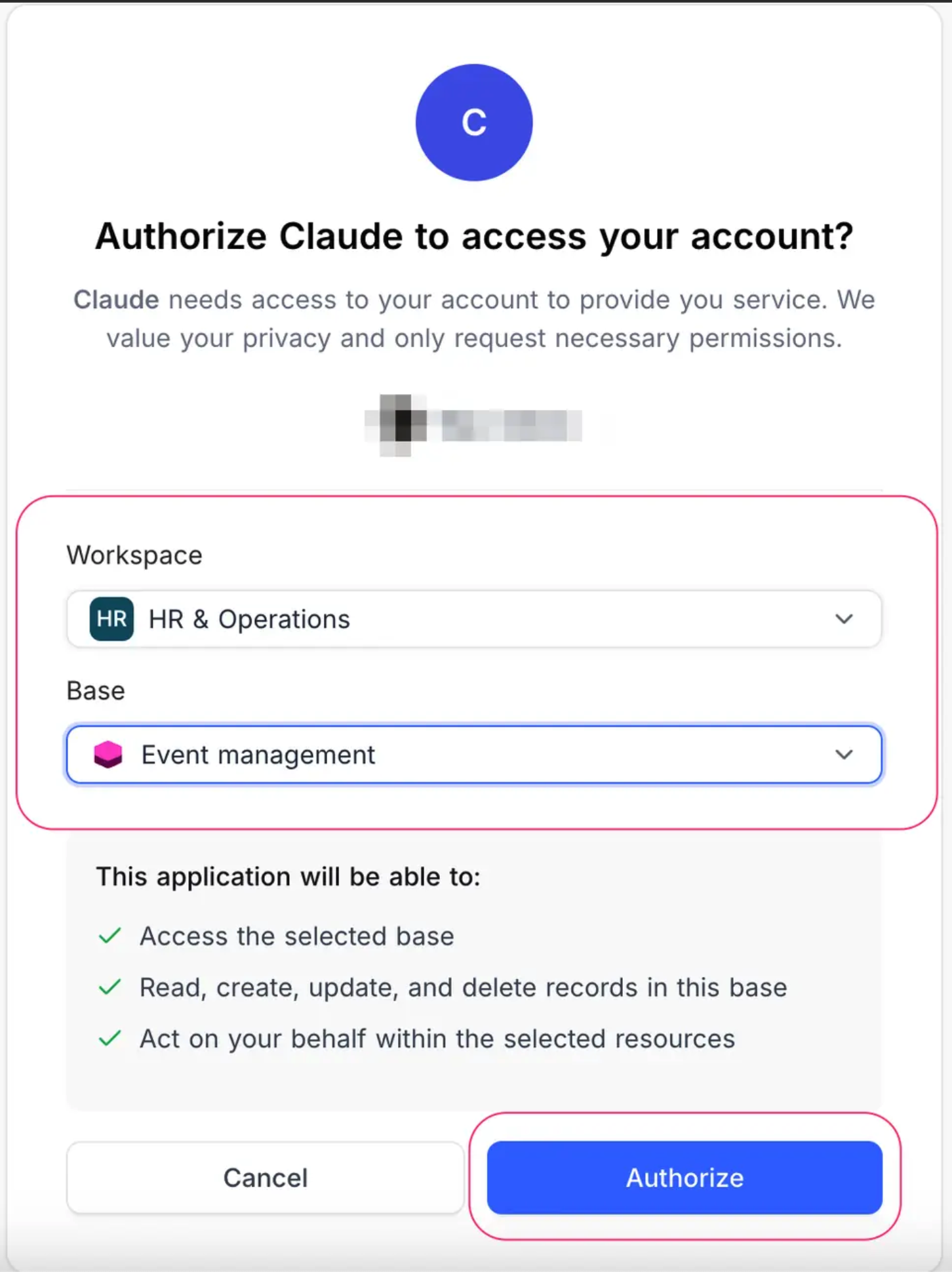
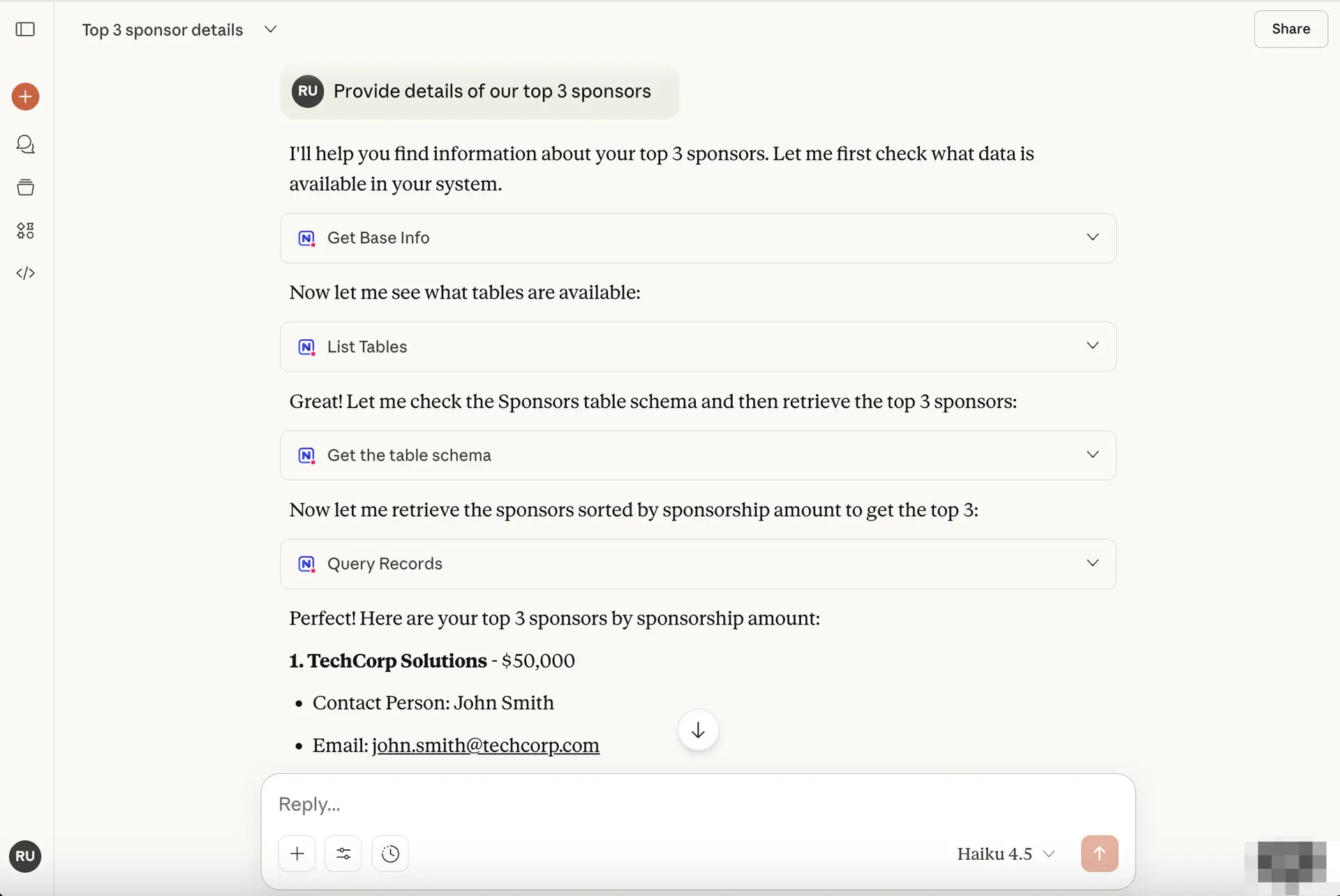
All of your favorite AI assistants just got a massive upgrade. **ChatGPT and Claude can now DIRECTLY connect to your NocoDB databases** directly through our new MCP OAuth integration - no technical setup required. But that's just the beginning: **any AI application that supports MCP OAuth connectors** can instantly access your NocoDB data with a simple authentication flow.
#### What This Means for You
**Before:** Limited to desktop apps & technical barrier
* **Fiddling with MCP Server endpoint JSON configurations** - completely unfriendly for business users
* **Limited to desktop AI applications only** - Even ChatGPT and Claude web/mobile apps couldn't connect
* Required developer expertise to set up and IT team was a bottleneck.
**After:** One-Click Universal Access
* **Simple OAuth flow** - just like connecting via Slack/Google/Facebook
* **Works everywhere** - web, mobile, desktop across all ChatGPT and Claude interfaces
* **Business-user friendly** - no JSON, no servers, no technical knowledge required
* **10-second setup** from any device, anywhere
* **Any MCP OAuth-enabled AI app** can connect instantly
How NocoDB MCP Oauth works ?
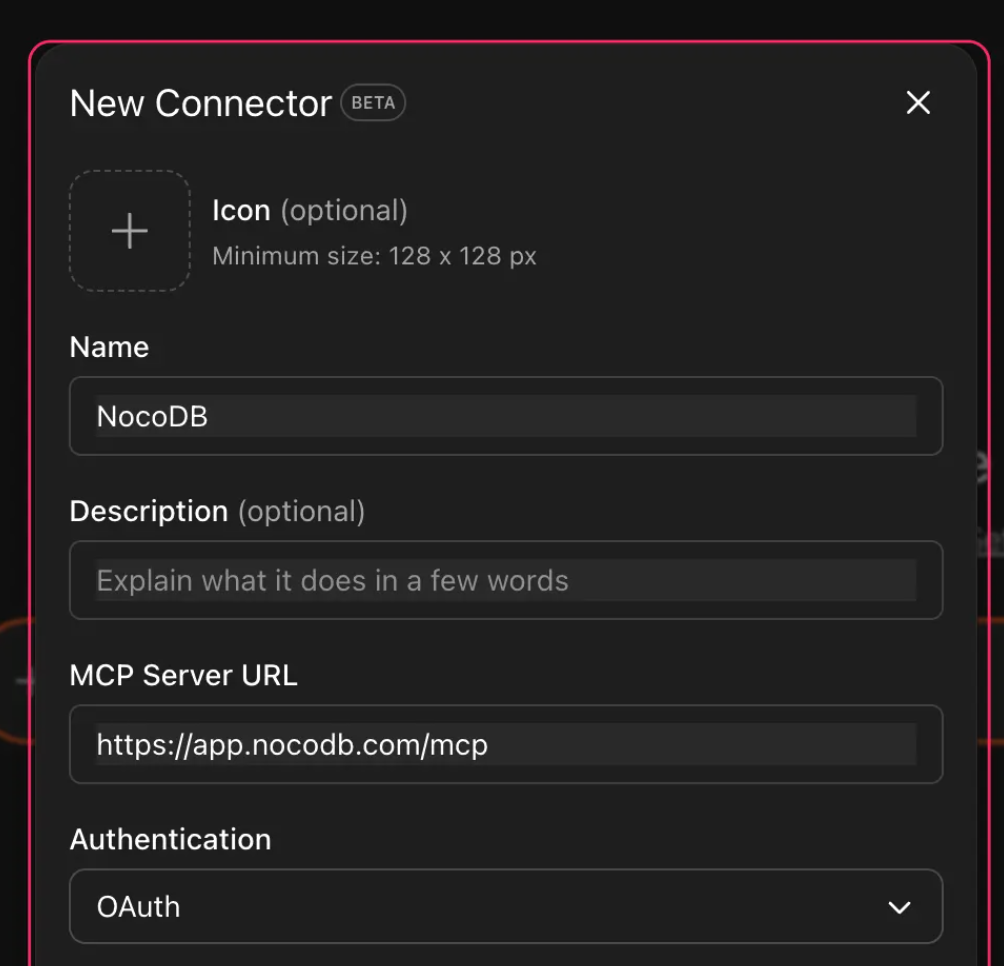
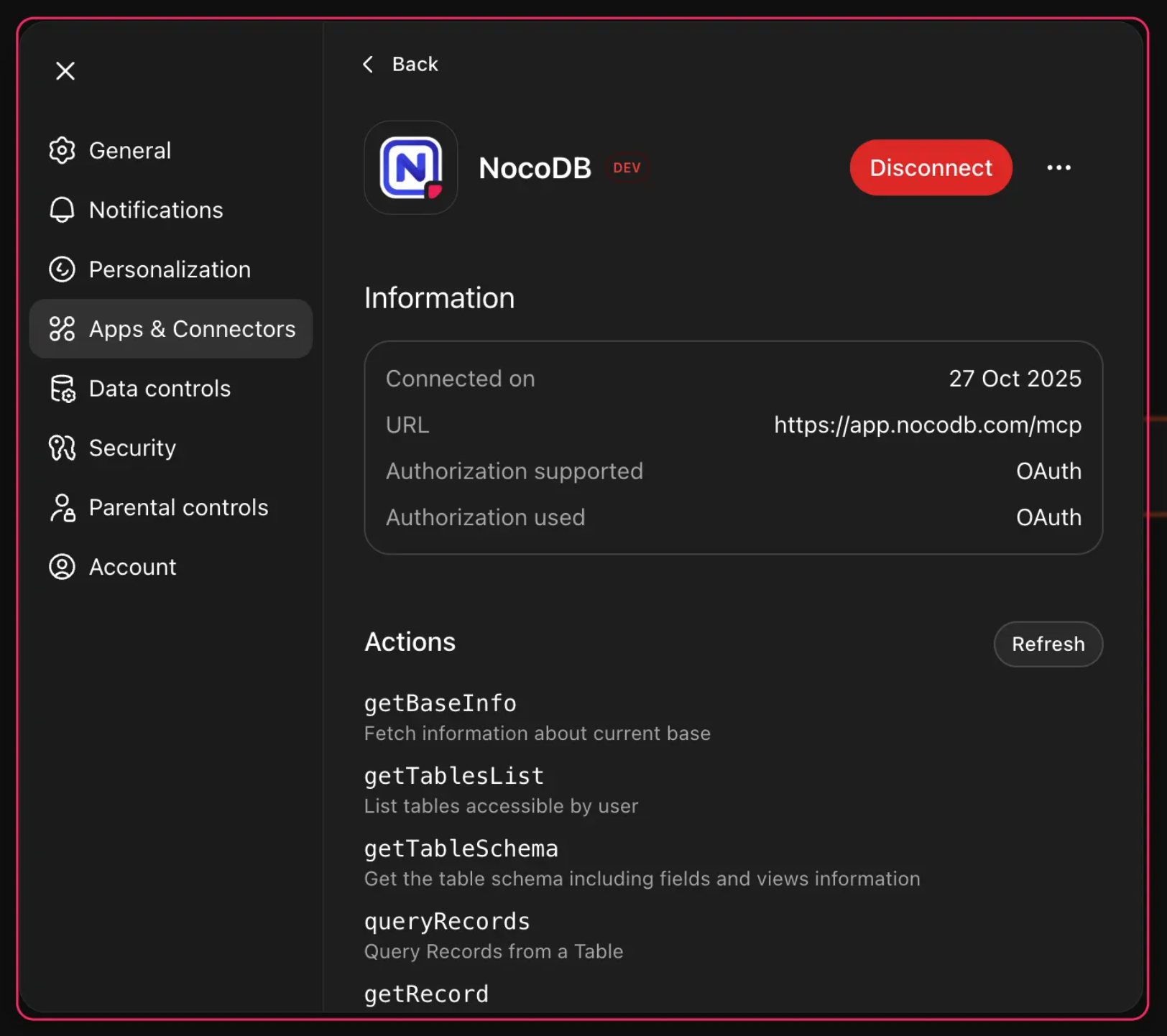
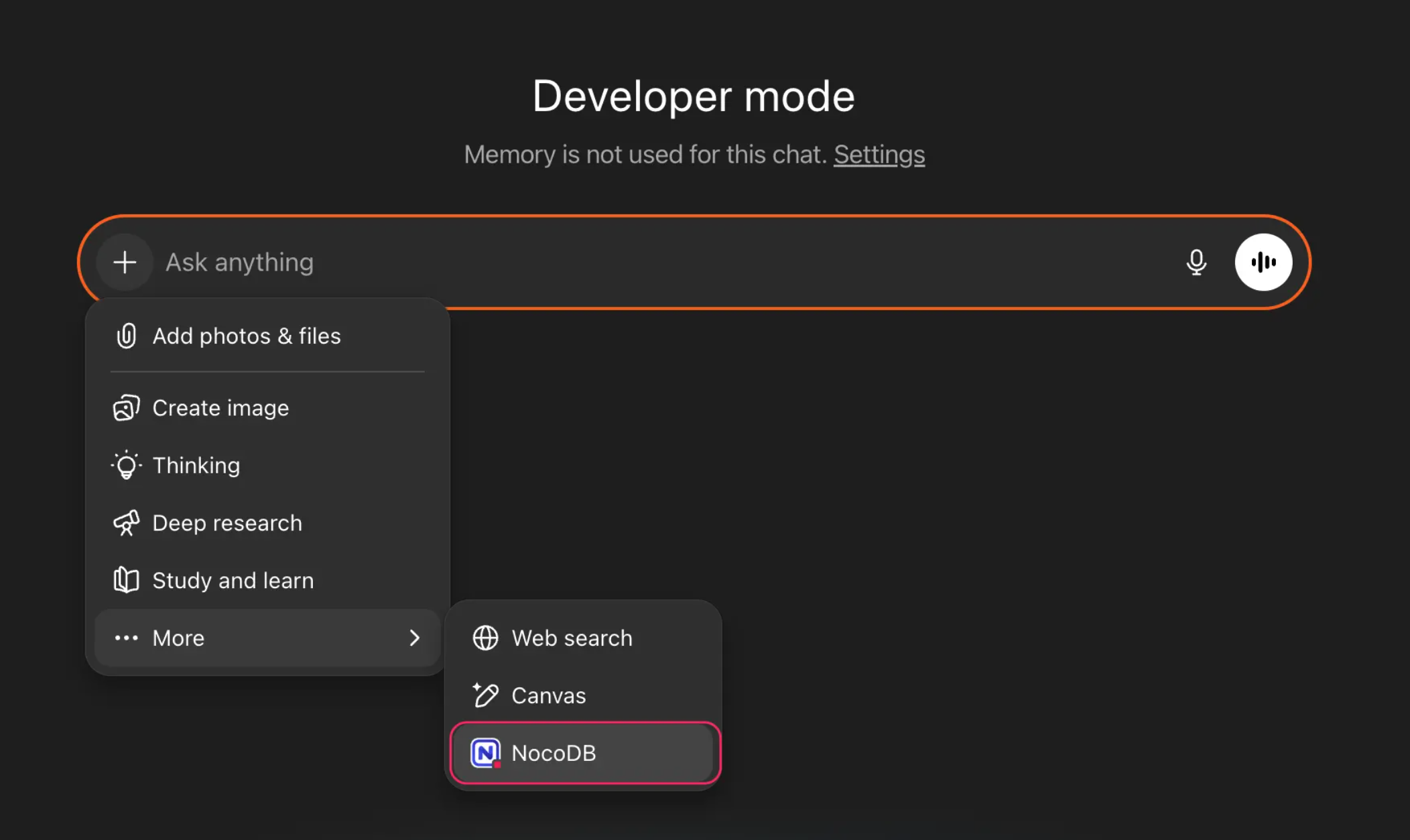
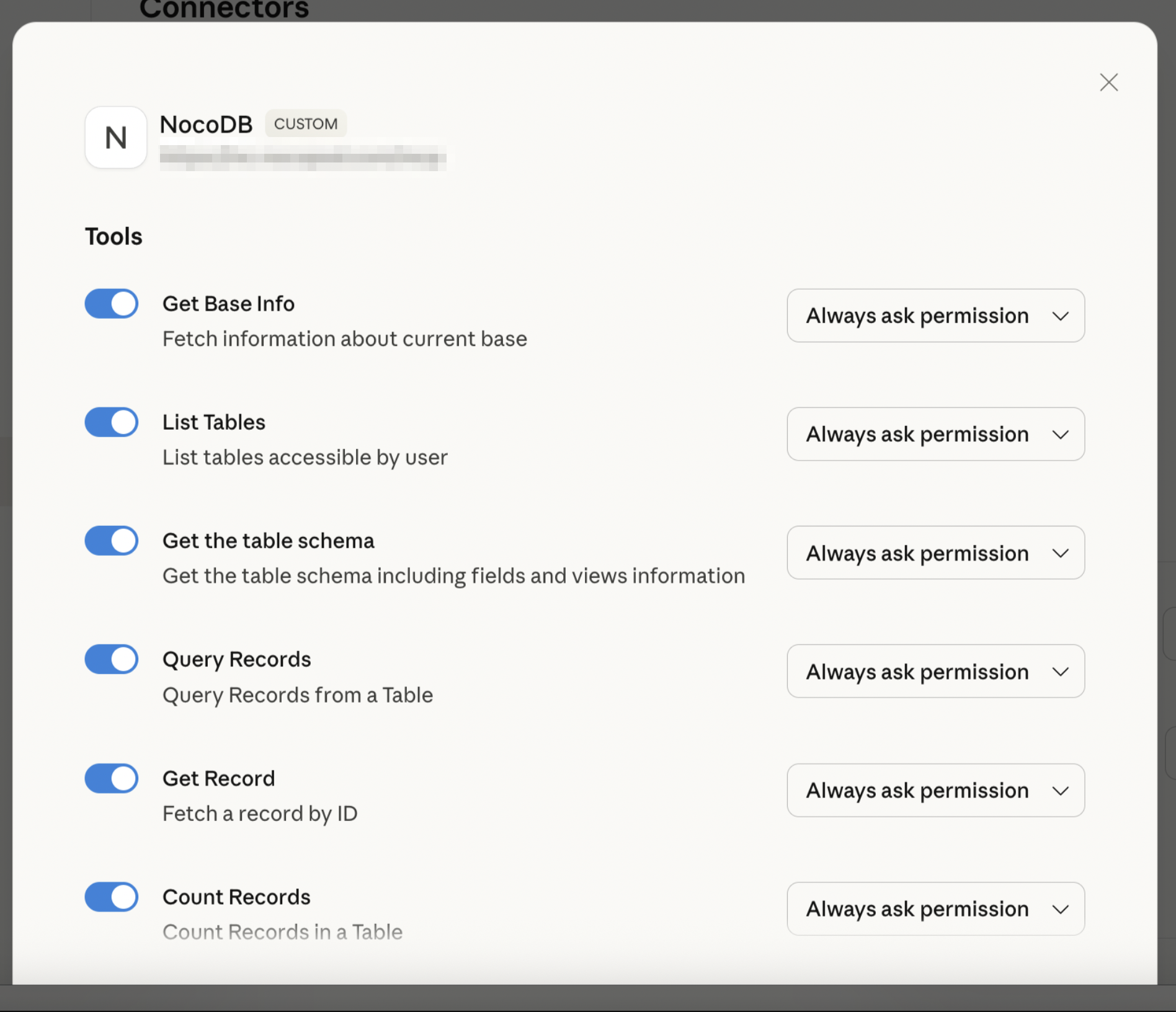
The OAuth integration allows web-based AI clients to request fine-grained access to your NocoDB workspace. Once authorised, these clients can securely query, summarise, and update your database contextually — just like their desktop counterparts.
#### ChatGPT
[Learn more](https://nocodb.com/docs/mcp/chatgpt)
## MCP OAuth Integration
All of your favorite AI assistants just got a massive upgrade. **ChatGPT and Claude can now DIRECTLY connect to your NocoDB databases** directly through our new MCP OAuth integration - no technical setup required. But that's just the beginning: **any AI application that supports MCP OAuth connectors** can instantly access your NocoDB data with a simple authentication flow.
#### What This Means for You
**Before:** Limited to desktop apps & technical barrier
* **Fiddling with MCP Server endpoint JSON configurations** - completely unfriendly for business users
* **Limited to desktop AI applications only** - Even ChatGPT and Claude web/mobile apps couldn't connect
* Required developer expertise to set up and IT team was a bottleneck.
**After:** One-Click Universal Access
* **Simple OAuth flow** - just like connecting via Slack/Google/Facebook
* **Works everywhere** - web, mobile, desktop across all ChatGPT and Claude interfaces
* **Business-user friendly** - no JSON, no servers, no technical knowledge required
* **10-second setup** from any device, anywhere
* **Any MCP OAuth-enabled AI app** can connect instantly
How NocoDB MCP Oauth works ?
The OAuth integration allows web-based AI clients to request fine-grained access to your NocoDB workspace. Once authorised, these clients can securely query, summarise, and update your database contextually — just like their desktop counterparts.
#### ChatGPT
[Learn more](https://nocodb.com/docs/mcp/chatgpt)
 #### Claude
[Learn more](https://nocodb.com/docs/mcp/claude)
#### Claude
[Learn more](https://nocodb.com/docs/mcp/claude)
 ## Copy Another View’s Configuration
[Read detailed setup steps →](https://nocodb.com/docs/product/tables/views/actions-on-view#copy-another-views-configuration-)
> I just adjusted field widths in one view, and now I have to manually resize them all over again in every other view.
You've perfected a view with specific filters, sorts, groups, and field layouts. Now you need a similar view for a different purpose. You either duplicate the entire view and strip away what you don't need, or manually recreate every configuration from scratch. Either way, you're repeating work you've already done.
Introducing **“Copy another view’s configuration”**. Now you can cherry-pick exactly what you need. Need those filters? Copy them. Love the sorting and grouping? Take just those. Your field widths are perfect? Import only that—no more manual resizing.
Reuse exactly what you need and move forward instantly. Your views now build on each other instead of starting from scratch every time.
## Copy Another View’s Configuration
[Read detailed setup steps →](https://nocodb.com/docs/product/tables/views/actions-on-view#copy-another-views-configuration-)
> I just adjusted field widths in one view, and now I have to manually resize them all over again in every other view.
You've perfected a view with specific filters, sorts, groups, and field layouts. Now you need a similar view for a different purpose. You either duplicate the entire view and strip away what you don't need, or manually recreate every configuration from scratch. Either way, you're repeating work you've already done.
Introducing **“Copy another view’s configuration”**. Now you can cherry-pick exactly what you need. Need those filters? Copy them. Love the sorting and grouping? Take just those. Your field widths are perfect? Import only that—no more manual resizing.
Reuse exactly what you need and move forward instantly. Your views now build on each other instead of starting from scratch every time.
 [Read detailed setup steps →](https://nocodb.com/docs/product/tables/views/actions-on-view#copy-another-views-configuration-)
***
## Other Updates
#### User Experience
* **Personal View Identification** – Personal views in the sidebar now display a user icon suffix, making them & their current owner easier to recognise.
[Read detailed setup steps →](https://nocodb.com/docs/product/tables/views/actions-on-view#copy-another-views-configuration-)
***
## Other Updates
#### User Experience
* **Personal View Identification** – Personal views in the sidebar now display a user icon suffix, making them & their current owner easier to recognise.
 * **Filter Reordering** – Toolbar filters can now be rearranged via drag-and-drop.
 * **Role-Based Toolbar Restrictions** – Toolbar operations are now restricted for Commenter and Viewer roles.
#### Account & Security
* **API Token Access** – API tokens are now available directly from the user menu.
* **Role-Based Toolbar Restrictions** – Toolbar operations are now restricted for Commenter and Viewer roles.
#### Account & Security
* **API Token Access** – API tokens are now available directly from the user menu.
 * **MCP Token Management** – Users can now manage all MCP tokens centrally from their account settings.
 #### Scripts
* **Scripts PDF Export** – Added option to export script outputs directly to PDF. Learn more [here](https://nocodb.com/docs/workflows/scripts).
***
---
## Related pages
- [2026.10.0](https://nocodb.com/docs/changelog/2026.10.0.md): See who is overbooked with resource allocation in Timeline View. Plus workflow run playback, buttons that run automations, images and attachments in workflow emails, and sign-in connections for AI tools.
- [2026.09.1](https://nocodb.com/docs/changelog/2026.09.1.md): One MCP connection for your whole account, with 199 tools. Plus a single Tools button for every table tool, Timeline summaries, Last modified fields that track chosen fields, and YouTrack sync.
- [2026.09.0](https://nocodb.com/docs/changelog/2026.09.0.md): NocoDB is now in Claude Connectors with 1200% more MCP tools. Build entire databases, workflows, and interfaces and manage permissions from any MCP client. Plus rich text emails in workflows, buttons available on interfaces, and drag and drop in List View.
- [2026.08.2](https://nocodb.com/docs/changelog/2026.08.2.md): Plot two Y-axes on interface dashboards, embed linked records as editable views, organize workflows into folders, subscribe to comment notifications, and describe interface filters in plain language to NocoAI, alongside a large batch of fixes.
- [2026.08.1](https://nocodb.com/docs/changelog/2026.08.1.md): Realtime presence brings live collaboration to the grid and folders organize your sidebar, alongside multi-field freeze, nested records in List View, and a large batch of improvements.
- [2026.08.0](https://nocodb.com/docs/changelog/2026.08.0.md): Build custom, easy-to-use apps on top of your data with Interfaces, alongside a wide set of improvements and fixes across the platform.
- [2026.07.0](https://nocodb.com/docs/changelog/2026.07.0.md): Bring Google Calendar, Outlook, and CalDAV events into NocoDB with Calendar Sync, pin comments to any spot on an image, and work with richer formulas, lookups, and calendars.
- [2026.06.2](https://nocodb.com/docs/changelog/2026.06.2.md): Connect Oracle databases as an external data source, and work with a richer calendar, lookup formatting, smarter sorting, Gantt enhancements, and a production-grade Helm chart.
#### Scripts
* **Scripts PDF Export** – Added option to export script outputs directly to PDF. Learn more [here](https://nocodb.com/docs/workflows/scripts).
***
---
## Related pages
- [2026.10.0](https://nocodb.com/docs/changelog/2026.10.0.md): See who is overbooked with resource allocation in Timeline View. Plus workflow run playback, buttons that run automations, images and attachments in workflow emails, and sign-in connections for AI tools.
- [2026.09.1](https://nocodb.com/docs/changelog/2026.09.1.md): One MCP connection for your whole account, with 199 tools. Plus a single Tools button for every table tool, Timeline summaries, Last modified fields that track chosen fields, and YouTrack sync.
- [2026.09.0](https://nocodb.com/docs/changelog/2026.09.0.md): NocoDB is now in Claude Connectors with 1200% more MCP tools. Build entire databases, workflows, and interfaces and manage permissions from any MCP client. Plus rich text emails in workflows, buttons available on interfaces, and drag and drop in List View.
- [2026.08.2](https://nocodb.com/docs/changelog/2026.08.2.md): Plot two Y-axes on interface dashboards, embed linked records as editable views, organize workflows into folders, subscribe to comment notifications, and describe interface filters in plain language to NocoAI, alongside a large batch of fixes.
- [2026.08.1](https://nocodb.com/docs/changelog/2026.08.1.md): Realtime presence brings live collaboration to the grid and folders organize your sidebar, alongside multi-field freeze, nested records in List View, and a large batch of improvements.
- [2026.08.0](https://nocodb.com/docs/changelog/2026.08.0.md): Build custom, easy-to-use apps on top of your data with Interfaces, alongside a wide set of improvements and fixes across the platform.
- [2026.07.0](https://nocodb.com/docs/changelog/2026.07.0.md): Bring Google Calendar, Outlook, and CalDAV events into NocoDB with Calendar Sync, pin comments to any spot on an image, and work with richer formulas, lookups, and calendars.
- [2026.06.2](https://nocodb.com/docs/changelog/2026.06.2.md): Connect Oracle databases as an external data source, and work with a richer calendar, lookup formatting, smarter sorting, Gantt enhancements, and a production-grade Helm chart.