# 2025.07.0 : Dashboards, Private Bases & New Extensions
> Part of the NocoDB documentation (Changelog). Index of all pages: https://nocodb.com/llms.txt. Any docs page is available as Markdown by adding `.md` to its URL.
URL: https://nocodb.com/docs/changelog/2025.07.0
Last updated: 2026-10-09
Build dashboards from your data, keep bases private, and extend NocoDB with new extensions and script steps.
 ## Dashboards
> Turn your table data into rich, visual insights. With Dashboards, you can track metrics, share performance updates, and help your team make data-driven decisions—all without leaving NocoDB.
Whether you're reporting on project progress, tracking business KPIs, or sharing insights with stakeholders, Dashboards bring visual clarity to your data. Add **Number Widgets** for key metrics or **Pie & Donut Charts** to break down category data—each widget is fully customisable and easy to configure.
Use filters, sort settings, and number formatting to control how your data appears. Resize, reposition, and personalise your layout with drag-and-drop ease. When you're ready to share, create public links or password-protected dashboards that anyone can view—no login needed.
Dashboards empower your team to stay aligned, spot trends, and act quickly. Whether you're building reports for executives, summaries for clients, or real-time views for your team, Dashboards turn raw data into clear, actionable insights.
## Dashboards
> Turn your table data into rich, visual insights. With Dashboards, you can track metrics, share performance updates, and help your team make data-driven decisions—all without leaving NocoDB.
Whether you're reporting on project progress, tracking business KPIs, or sharing insights with stakeholders, Dashboards bring visual clarity to your data. Add **Number Widgets** for key metrics or **Pie & Donut Charts** to break down category data—each widget is fully customisable and easy to configure.
Use filters, sort settings, and number formatting to control how your data appears. Resize, reposition, and personalise your layout with drag-and-drop ease. When you're ready to share, create public links or password-protected dashboards that anyone can view—no login needed.
Dashboards empower your team to stay aligned, spot trends, and act quickly. Whether you're building reports for executives, summaries for clients, or real-time views for your team, Dashboards turn raw data into clear, actionable insights.
 **Example use cases**
* **Executive Reporting**: Show high-level KPIs in a single view with Number Widgets
* **Sales & Marketing**: Share campaign performance with external partners via public links
* **Operations**: Track real-time workflows or status metrics across departments
* **Finance**: Visualise budget distribution using Pie Charts
* **Product Teams**: Monitor feature adoption metrics or bug status summaries
*Dashboards (currently in **Beta**) are now available on NocoDB Cloud **Plus** plan onwards.*
Dashboards are easy to set up, flexible to use, and built to scale with your needs. Learn how to create your first dashboard in our [documentation here](https://nocodb.com/docs/product/dashboards).
***
## Private Base
> Keep sensitive data private and in the right hands. With Private Base, you decide exactly who can access each base—no more automatic access through workspace roles.
By default, all bases in a workspace inherit access from workspace roles. That means Editors and Viewers could access every new base—even when it wasn’t meant for them. **Private Base** changes that.
A **Private Base** breaks free from workspace-wide role inheritance. Only the base creator has access by default. Everyone else must be explicitly invited with a base-specific role—giving you full control.
**Example use cases**
* **Executive Reporting**: Show high-level KPIs in a single view with Number Widgets
* **Sales & Marketing**: Share campaign performance with external partners via public links
* **Operations**: Track real-time workflows or status metrics across departments
* **Finance**: Visualise budget distribution using Pie Charts
* **Product Teams**: Monitor feature adoption metrics or bug status summaries
*Dashboards (currently in **Beta**) are now available on NocoDB Cloud **Plus** plan onwards.*
Dashboards are easy to set up, flexible to use, and built to scale with your needs. Learn how to create your first dashboard in our [documentation here](https://nocodb.com/docs/product/dashboards).
***
## Private Base
> Keep sensitive data private and in the right hands. With Private Base, you decide exactly who can access each base—no more automatic access through workspace roles.
By default, all bases in a workspace inherit access from workspace roles. That means Editors and Viewers could access every new base—even when it wasn’t meant for them. **Private Base** changes that.
A **Private Base** breaks free from workspace-wide role inheritance. Only the base creator has access by default. Everyone else must be explicitly invited with a base-specific role—giving you full control.
 **Example use cases**
* **HR or Finance**: Keep salary data or budget sheets visible only to the right people
* **Leadership**: Share strategy documents or planning dashboards with execs only
* **Draft Workspaces**: Prepare content or data without exposing it to the wider team
* **External Workspaces**: Hide select client bases from other clients or external partners
***Private Base*** *is available starting with the NocoDB **Business** plan and in self-hosted **Enterprise** plans. Please note that this feature is **not** included in the self-hosted **Enterprise Starter** plan.*
Learn more in the [documentation here](https://nocodb.com/docs/product/projects/private-project).
***
## New Extensions
> Two powerful new extensions are here—**Bulk Update** for fast multi-record edits, and **Page Designer** to turn your data into shareable, printable documents.
Whether you're managing large datasets or building client-facing reports, these two extensions help streamline your workflow inside NocoDB. **Bulk Update** saves time by letting you update many records at once. **Page Designer** helps you create branded PDFs—like invoices, reports, and certificates—directly from your data.
***
### Bulk Update — Update multiple records instantly
Manually editing rows one at a time? Bulk Update lets you apply field-level changes to **all records in a table view** with just a few clicks. You can configure multiple update actions, review changes before applying, and reuse saved actions whenever needed.
**Example use cases**
* **HR or Finance**: Keep salary data or budget sheets visible only to the right people
* **Leadership**: Share strategy documents or planning dashboards with execs only
* **Draft Workspaces**: Prepare content or data without exposing it to the wider team
* **External Workspaces**: Hide select client bases from other clients or external partners
***Private Base*** *is available starting with the NocoDB **Business** plan and in self-hosted **Enterprise** plans. Please note that this feature is **not** included in the self-hosted **Enterprise Starter** plan.*
Learn more in the [documentation here](https://nocodb.com/docs/product/projects/private-project).
***
## New Extensions
> Two powerful new extensions are here—**Bulk Update** for fast multi-record edits, and **Page Designer** to turn your data into shareable, printable documents.
Whether you're managing large datasets or building client-facing reports, these two extensions help streamline your workflow inside NocoDB. **Bulk Update** saves time by letting you update many records at once. **Page Designer** helps you create branded PDFs—like invoices, reports, and certificates—directly from your data.
***
### Bulk Update — Update multiple records instantly
Manually editing rows one at a time? Bulk Update lets you apply field-level changes to **all records in a table view** with just a few clicks. You can configure multiple update actions, review changes before applying, and reuse saved actions whenever needed.
 **Perfect for:**
* Cleaning up outdated fields
* Applying status or tag changes to filtered sets
* Correcting data entry issues across large record sets
***
### Page Designer — Design printable documents from your data
Create beautifully formatted PDFs using Page Designer. Combine text, images, and dynamic field data into custom layouts that are perfect for external or internal sharing.
**What you can do:**
* Drag & drop fields, text, images, and dividers
* Dynamically bind data from a selected record
* Include linked records in list, inline, or table format
* Customise fonts, colours, borders, alignment, and more
* Export designs to PDF or print them directly
Whether you're building a branded invoice or a certificate for a training program, Page Designer helps you turn structured data into professional documents.
**Perfect for:**
* Cleaning up outdated fields
* Applying status or tag changes to filtered sets
* Correcting data entry issues across large record sets
***
### Page Designer — Design printable documents from your data
Create beautifully formatted PDFs using Page Designer. Combine text, images, and dynamic field data into custom layouts that are perfect for external or internal sharing.
**What you can do:**
* Drag & drop fields, text, images, and dividers
* Dynamically bind data from a selected record
* Include linked records in list, inline, or table format
* Customise fonts, colours, borders, alignment, and more
* Export designs to PDF or print them directly
Whether you're building a branded invoice or a certificate for a training program, Page Designer helps you turn structured data into professional documents.
 **Perfect for:**
* 🧾 Invoices & client quotes
* 📄 Reports & summaries
* 🎓 Certificates & badges
* 📊 Dashboards for leadership reviews
***
These extensions are available now from the **Extensions** menu in your NocoDB instance.
🔗 Learn more about each extension in the [documentation](https://nocodb.com/docs/product/extensions).
***
## Script Steps
> Make complex scripts easier to follow by grouping related actions into meaningful steps.
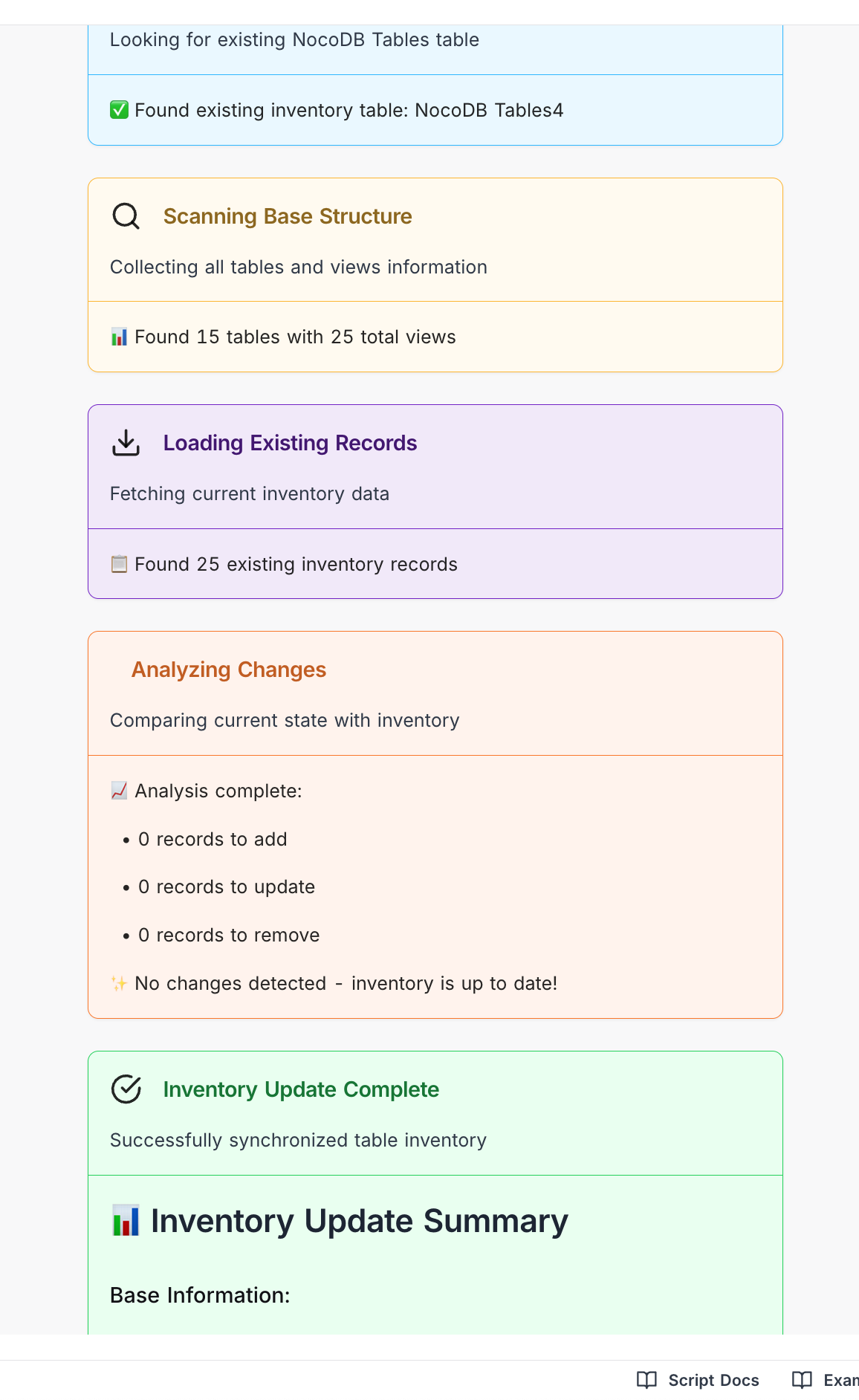
With Script Steps, you can organise your script into well-defined blocks—each with a title, icon, colour, and optional message. This helps users (and developers) better understand what's happening during execution without getting lost in the details.
**Perfect for:**
* 🧾 Invoices & client quotes
* 📄 Reports & summaries
* 🎓 Certificates & badges
* 📊 Dashboards for leadership reviews
***
These extensions are available now from the **Extensions** menu in your NocoDB instance.
🔗 Learn more about each extension in the [documentation](https://nocodb.com/docs/product/extensions).
***
## Script Steps
> Make complex scripts easier to follow by grouping related actions into meaningful steps.
With Script Steps, you can organise your script into well-defined blocks—each with a title, icon, colour, and optional message. This helps users (and developers) better understand what's happening during execution without getting lost in the details.
 **Benefits**
* Break down large scripts into understandable sections
* Add optional context messages (e.g. count, status, totals)
* Use icons and colours for visual clarity
* Improve maintainability and user confidence
***
Want to give your scripts a cleaner, clearer flow? Add Script Steps today. Read the [docs](https://nocodb.com/docs/workflows/scripts/api-reference/script-steps) →
## Other changes
***
### Conditional Lookup & Rollup — Filter linked records with precision
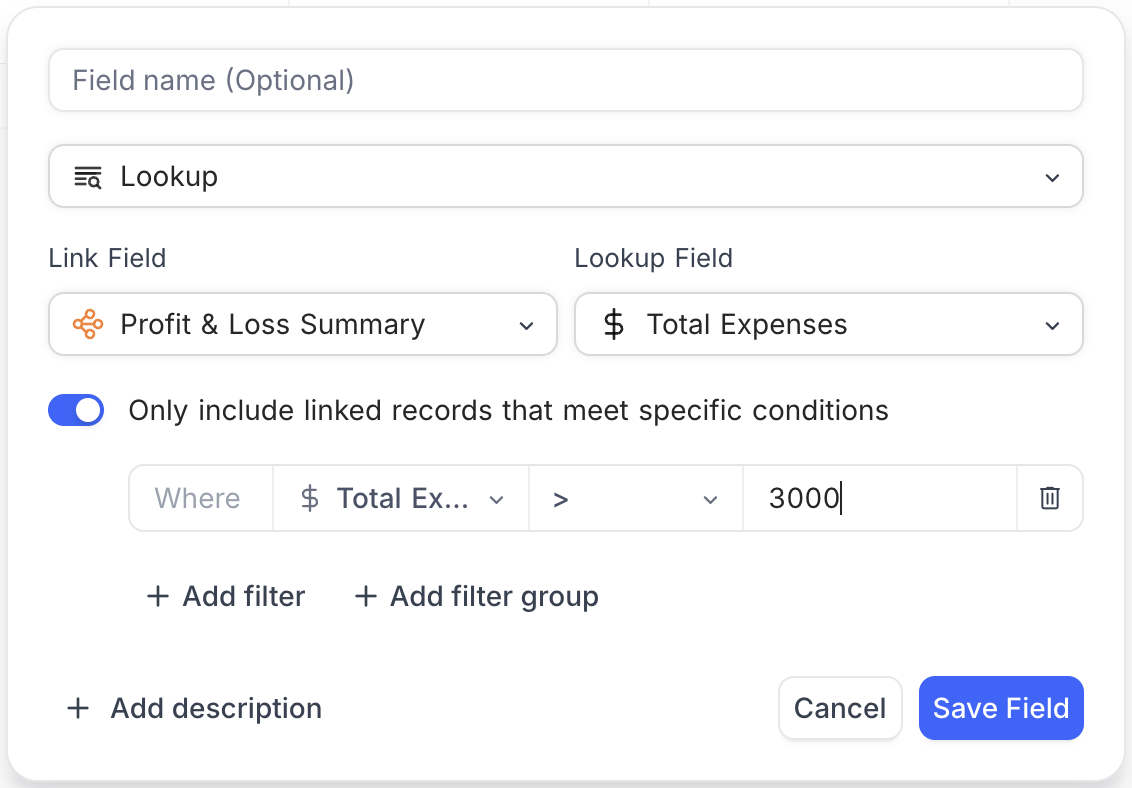
Both **Lookup** and **Rollup** fields now support filters to include **only linked records that meet specific conditions**. Instead of pulling in all related data, you can define criteria to show or calculate values based on what's most relevant.
This helps tailor your data views and summaries—whether you want to display only active records or aggregate values for a specific subset.
**Benefits**
* Break down large scripts into understandable sections
* Add optional context messages (e.g. count, status, totals)
* Use icons and colours for visual clarity
* Improve maintainability and user confidence
***
Want to give your scripts a cleaner, clearer flow? Add Script Steps today. Read the [docs](https://nocodb.com/docs/workflows/scripts/api-reference/script-steps) →
## Other changes
***
### Conditional Lookup & Rollup — Filter linked records with precision
Both **Lookup** and **Rollup** fields now support filters to include **only linked records that meet specific conditions**. Instead of pulling in all related data, you can define criteria to show or calculate values based on what's most relevant.
This helps tailor your data views and summaries—whether you want to display only active records or aggregate values for a specific subset.
 **Use cases:**
* Show only completed tasks in a Lookup
* Sum revenue from the current month in a Rollup
* Count records that meet a numeric or status threshold
This gives you fine-grained control over the data that's displayed or aggregated—making your tables smarter and more focused. Learn more about how to use this feature in our [Conditional Lookup](https://nocodb.com/docs/product/tables/fields/field-types/links-based/lookup#conditional-lookup-) and [Conditional Rollup](https://nocodb.com/docs/product/tables/fields/field-types/links-based/rollup#conditional-rollup-) documentation.
### Group By Views — Expand or Collapse All
You can now **Expand All** or **Collapse All** groups in Group By views with a single click—making it easier to explore or condense grouped records.
This is especially helpful when dealing with large datasets or when presenting grouped summaries to your team.
***
---
## Related pages
- [2026.10.0](https://nocodb.com/docs/changelog/2026.10.0.md): See who is overbooked with resource allocation in Timeline View. Plus workflow run playback, buttons that run automations, images and attachments in workflow emails, and sign-in connections for AI tools.
- [2026.09.1](https://nocodb.com/docs/changelog/2026.09.1.md): One MCP connection for your whole account, with 199 tools. Plus a single Tools button for every table tool, Timeline summaries, Last modified fields that track chosen fields, and YouTrack sync.
- [2026.09.0](https://nocodb.com/docs/changelog/2026.09.0.md): NocoDB is now in Claude Connectors with 1200% more MCP tools. Build entire databases, workflows, and interfaces and manage permissions from any MCP client. Plus rich text emails in workflows, buttons available on interfaces, and drag and drop in List View.
- [2026.08.2](https://nocodb.com/docs/changelog/2026.08.2.md): Plot two Y-axes on interface dashboards, embed linked records as editable views, organize workflows into folders, subscribe to comment notifications, and describe interface filters in plain language to NocoAI, alongside a large batch of fixes.
- [2026.08.1](https://nocodb.com/docs/changelog/2026.08.1.md): Realtime presence brings live collaboration to the grid and folders organize your sidebar, alongside multi-field freeze, nested records in List View, and a large batch of improvements.
- [2026.08.0](https://nocodb.com/docs/changelog/2026.08.0.md): Build custom, easy-to-use apps on top of your data with Interfaces, alongside a wide set of improvements and fixes across the platform.
- [2026.07.0](https://nocodb.com/docs/changelog/2026.07.0.md): Bring Google Calendar, Outlook, and CalDAV events into NocoDB with Calendar Sync, pin comments to any spot on an image, and work with richer formulas, lookups, and calendars.
- [2026.06.2](https://nocodb.com/docs/changelog/2026.06.2.md): Connect Oracle databases as an external data source, and work with a richer calendar, lookup formatting, smarter sorting, Gantt enhancements, and a production-grade Helm chart.
**Use cases:**
* Show only completed tasks in a Lookup
* Sum revenue from the current month in a Rollup
* Count records that meet a numeric or status threshold
This gives you fine-grained control over the data that's displayed or aggregated—making your tables smarter and more focused. Learn more about how to use this feature in our [Conditional Lookup](https://nocodb.com/docs/product/tables/fields/field-types/links-based/lookup#conditional-lookup-) and [Conditional Rollup](https://nocodb.com/docs/product/tables/fields/field-types/links-based/rollup#conditional-rollup-) documentation.
### Group By Views — Expand or Collapse All
You can now **Expand All** or **Collapse All** groups in Group By views with a single click—making it easier to explore or condense grouped records.
This is especially helpful when dealing with large datasets or when presenting grouped summaries to your team.
***
---
## Related pages
- [2026.10.0](https://nocodb.com/docs/changelog/2026.10.0.md): See who is overbooked with resource allocation in Timeline View. Plus workflow run playback, buttons that run automations, images and attachments in workflow emails, and sign-in connections for AI tools.
- [2026.09.1](https://nocodb.com/docs/changelog/2026.09.1.md): One MCP connection for your whole account, with 199 tools. Plus a single Tools button for every table tool, Timeline summaries, Last modified fields that track chosen fields, and YouTrack sync.
- [2026.09.0](https://nocodb.com/docs/changelog/2026.09.0.md): NocoDB is now in Claude Connectors with 1200% more MCP tools. Build entire databases, workflows, and interfaces and manage permissions from any MCP client. Plus rich text emails in workflows, buttons available on interfaces, and drag and drop in List View.
- [2026.08.2](https://nocodb.com/docs/changelog/2026.08.2.md): Plot two Y-axes on interface dashboards, embed linked records as editable views, organize workflows into folders, subscribe to comment notifications, and describe interface filters in plain language to NocoAI, alongside a large batch of fixes.
- [2026.08.1](https://nocodb.com/docs/changelog/2026.08.1.md): Realtime presence brings live collaboration to the grid and folders organize your sidebar, alongside multi-field freeze, nested records in List View, and a large batch of improvements.
- [2026.08.0](https://nocodb.com/docs/changelog/2026.08.0.md): Build custom, easy-to-use apps on top of your data with Interfaces, alongside a wide set of improvements and fixes across the platform.
- [2026.07.0](https://nocodb.com/docs/changelog/2026.07.0.md): Bring Google Calendar, Outlook, and CalDAV events into NocoDB with Calendar Sync, pin comments to any spot on an image, and work with richer formulas, lookups, and calendars.
- [2026.06.2](https://nocodb.com/docs/changelog/2026.06.2.md): Connect Oracle databases as an external data source, and work with a richer calendar, lookup formatting, smarter sorting, Gantt enhancements, and a production-grade Helm chart.